Setting Up OpenClaw: Skills, Tailscale, GitHub Config Sync, and Copilot
A few months ago we onboarded a new environment “the fast way.” It worked… until it didn’t. No clear roll back, no consistent skills, and no shared way to answer the basic question: what’s running, where, and why?
This guide fixes that. It’s a clean Day‑1 setup that gets OpenClaw running securely, reproducibly, and in a way you can scale.
Principles (the why)
- Secure access by default (no exposed ports)
- Reproducible configuration (GitHub‑backed)
- Productive workflows (skills + Copilot)
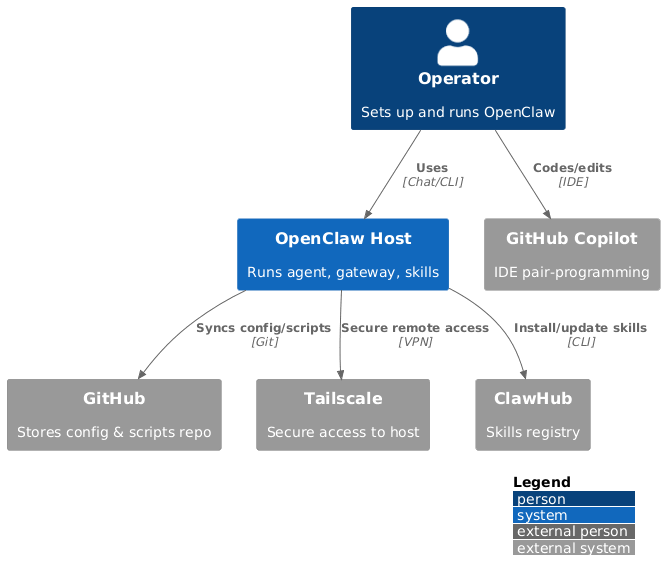
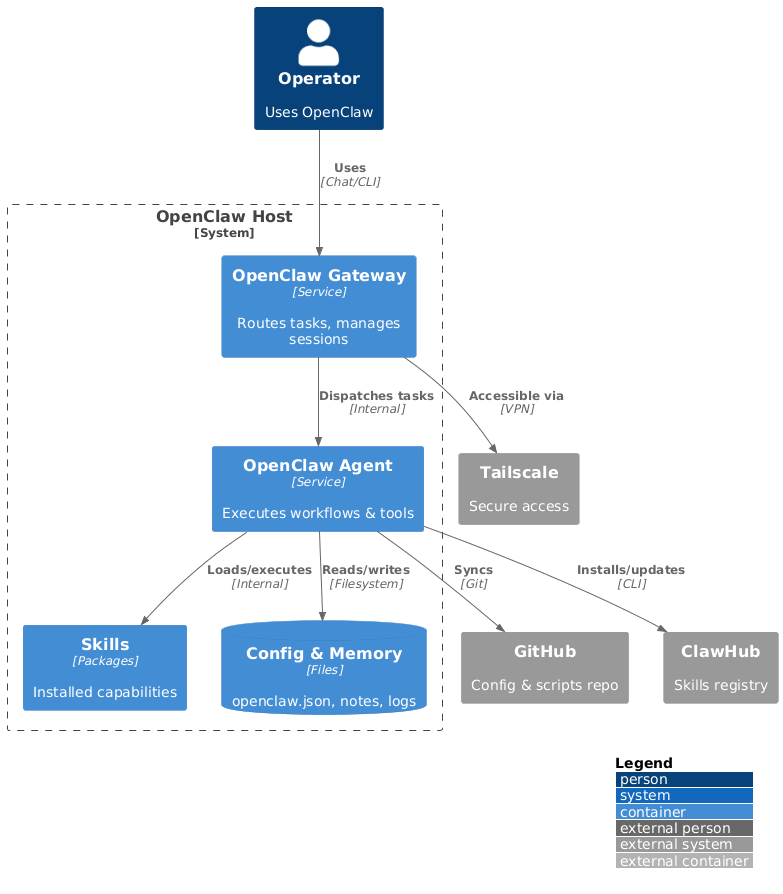
Architecture at a glance
1) Install OpenClaw (quick path)
Use the official docs for your platform. If you want a guided setup with scripts, use the companion repo:
https://github.com/polarpoint-io/ai-capabilities
Ubuntu (reference setup)
Install OpenClaw via the official docs, then verify:
Tailscale is the right default for remote access
Exposing OpenClaw's gateway port publicly is the fastest path to a compromised assistant. Tailscale gives you private, encrypted access without opening any firewall rules — the node is only reachable from devices on your tailnet. It takes about 5 minutes to set up and eliminates the most obvious attack surface for a process that has access to your files, SSH hosts, and messaging channels.
2) Bring up Tailscale (secure access)
Tailscale gives you private, encrypted access without opening ports publicly.
Tip: tag the host and lock it down with ACLs.
3) Use the setup scripts (fast, repeatable)
The ai‑capabilities repo includes setup scripts for both Linux and macOS:
These scripts: - ensure Tailscale is installed and online - start the OpenClaw gateway
Snippet (Linux):
4) Enable your first skills
Installed skills right now:
- self-improving-agent - captures learnings from failures and feedback
- ddg-web-search - web search without an API key
- github - GitHub ops via gh
- kubernetes - cluster operations and manifests
List skills:
Install a new skill:
5) Sync config with GitHub
Store non‑secret config in GitHub for reproducibility.
Suggested layout:
Never commit secrets. Use env vars or a secret manager instead.
Apply this: never commit secrets to your openclaw-config repo
The GitHub config sync layout in this post keeps non-secret configuration version-controlled and reproducible. The critical constraint: API tokens, SSH keys, and webhook secrets go in environment variables or a secret manager — never in the repo. The openclaw.json file in the repo should be a sanitised version with all credential fields replaced by $ENV_VAR references. Document this explicitly in the README so the next person doesn't wonder why the config file doesn't work as-is.
6) Pair with GitHub Copilot
Copilot helps with: - docs/blog drafts - refactors and cleanup - repetitive config work
Workflow: 1) OpenClaw automates 2) Copilot speeds edits 3) You review + ship
Skills missing after reinstall is the most common setup pain
When you reinstall OpenClaw or set up on a new machine, clawhub list will show zero skills even though you have them configured in your GitHub repo. Skills are installed to the local instance, not synced automatically from your config repo. Add a clawhub install step to your setup scripts and document which skills you depend on in openclaw-config/README.md. Otherwise you'll discover missing skills mid-task.
7) Validate the setup
Run these checks:
Quick checklist
- ✅ OpenClaw running
- ✅ Tailscale connected
- ✅ Skills installed
- ✅ Config synced (sanitized)
- ✅ Copilot ready
Common pitfalls (and fixes)
- Gateway not running →
openclaw gateway start - Tailscale offline →
tailscale up - Skills missing →
clawhub list, reinstall - Secrets in Git → move to env vars/secret manager
- No roll back → add a roll back note to
openclaw-config/README.md
Next steps
Explore runnable examples and scripts in the companion repo: https://github.com/polarpoint-io/ai-capabilities
Frequently asked questions
What platforms does OpenClaw support?
OpenClaw runs on Linux (Ubuntu, Debian, and derivatives) and macOS. Windows is not officially supported — the setup scripts in the companion repo target Unix environments. If you need to run on Windows, a WSL2 environment works with the Linux scripts. The gateway process itself is a Node.js daemon that is theoretically cross-platform, but the skill ecosystem assumes Unix tooling.
How do I back up my OpenClaw configuration and memory?
Keep your workspace directory (~/.openclaw/workspace/ by default) in a private Git repo. Commit AGENTS.md, SOUL.md, USER.md, TOOLS.md, HEARTBEAT.md, and the memory/ directory. Exclude any files containing secrets. A daily cron job that commits and pushes gives you automatic version history of your agent's memory and personality evolution.
What's the difference between a skill and a built-in OpenClaw capability?
Built-in capabilities (messaging, file access, basic shell commands) are part of the OpenClaw gateway itself — they're always available. Skills are add-on packages from ClaWHub that provide higher-level domain capabilities: web search, GitHub operations, Kubernetes management. Skills follow the SKILL.md standard and can be installed, uninstalled, and updated independently via clawhub install and clawhub update.
Can OpenClaw access my local files and run shell commands?
Yes — with appropriate permissions. The gateway process runs with your user account's permissions and can read files, run commands, and access your SSH hosts (via the Kubernetes and GitHub skills). This is the power that makes it genuinely useful and also the reason Tailscale access control and careful skill selection matter. Grant skills only the access they need for the tasks you actually want to delegate.
How does OpenClaw authenticate to external services like GitHub?
Skill-level authentication varies by skill. The GitHub skill uses the gh CLI, which authenticates via gh auth login. The Kubernetes skill uses your local kubeconfig. OpenClaw itself doesn't store credentials — it delegates to the tools your account already has configured. This means setup is usually "do you have the CLI authenticated?" rather than "configure a new credential".