

Secrets & GitOps: ArgoCD + External Secrets Done Right
What was getting in the way
GitOps worked — until secrets showed up. Teams either committed secrets or blocked releases waiting for manual secret creation. Neither option is sustainable once you have more than two clusters or three services rotating credentials.
What we actually wanted
A GitOps flow that keeps secrets outside of Git and still automates deployments end to end.
The GitOps secret pattern in one sentence
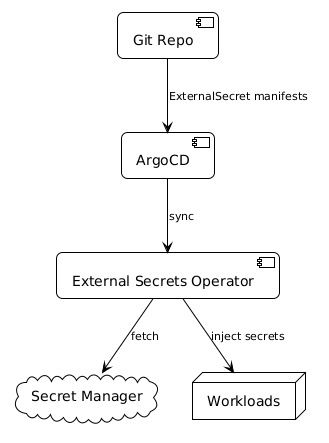
Git holds ExternalSecret manifests (just references, no values). ESO fetches values from your secret manager. ArgoCD syncs the manifests. Nothing sensitive ever touches your Git history.
How we approached it


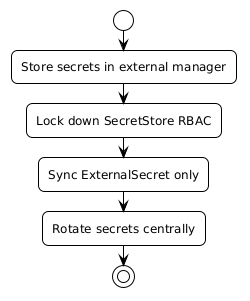
Apply this: migrate the most sensitive secrets first
Don't try to migrate everything at once. Start with database credentials, API keys, and service account tokens — the things where a leak would be most damaging. Once those are working with ESO, the rest follows the same pattern. You'll also learn the rough edges of your specific secret manager integration on lower-stakes items first.
The secure pattern
- Git holds ExternalSecret manifests only
- ESO pulls from Vault/SSM/Secrets Manager
- ArgoCD syncs manifests, ESO resolves secrets
The ExternalSecret is what lives in Git. It has no sensitive values — just a reference to the secret path in your secret manager and a description of which keys to extract. Anyone with repo access can see which secrets are in use without being able to read the values. That is your audit story.
Files worth opening
repo/gitops/secrets/secretstore.yamlrepo/gitops/secrets/externalsecret.yaml
The refresh interval gotcha
ESO's default refreshInterval is 1h. If you rotate a secret in your secret manager expecting it to propagate immediately, it won't — the running pod keeps the old value until the next refresh cycle. For secrets that rotate frequently or in response to incidents, set refreshInterval: 15m or shorter. For long-lived credentials, 1h is fine.
What changed in practice
Teams can ship GitOps changes without ever touching sensitive data. Security teams gain control without blocking delivery. ArgoCD diffs stay clean because the ExternalSecret manifest — not the generated Kubernetes Secret — is what ArgoCD compares. Secret rotation is completely invisible to ArgoCD; it happens in the secret manager and ESO picks it up on the next refresh.
Frequently asked questions
What secret managers does ESO support?
ESO supports AWS Secrets Manager, AWS SSM Parameter Store, Google Secret Manager, Azure Key Vault, HashiCorp Vault, 1Password, Kubernetes secrets, and a growing list of others. The SecretStore provider field controls which backend you use — switching backends requires only a SecretStore change, not a rewrite of your ExternalSecret manifests.
Does ArgoCD treat ExternalSecret manifests as out-of-sync when secrets rotate?
No — this is one of the key benefits. ArgoCD compares the ExternalSecret manifest in Git against the ExternalSecret resource in the cluster. If neither has changed, ArgoCD reports the app as synced even when ESO quietly updates the underlying Kubernetes Secret with a rotated value. No spurious diff noise.
Can I use ESO in a multi-cluster setup?
Yes. Use ClusterSecretStore (cluster-scoped) for stores accessed by multiple namespaces, or SecretStore (namespace-scoped) for tighter isolation. In a multi-cluster ArgoCD setup, deploy ESO to each cluster and point each cluster's ClusterSecretStore at the appropriate path in your secret manager for that environment.
How do I handle secrets that need to exist before ESO is installed?
Bootstrap secrets — the credentials ESO itself uses to authenticate to your secret manager — have a chicken-and-egg problem. Most teams handle this with a SealedSecret or direct kubectl create secret for the bootstrap credential only, then manage everything else via ESO. Document this exception explicitly so the next person understands why one secret bypasses the ESO pattern.
What happens if the secret manager is unreachable?
ESO will surface an error condition on the ExternalSecret resource and the Kubernetes Secret won't be updated. Pods already running continue using their existing secret values (mounted at pod start). New pods that haven't yet received the secret will fail to start. Monitor ExternalSecret status conditions and alert on SecretSyncError to catch connectivity issues before they become incidents.