Building self-service platforms with Crossplane v2.0
I liked this session because it skipped the fluff and went straight to the awkward bit most platform teams know too well: developers waiting days, sometimes weeks, for fairly standard infrastructure requests.
Quick takeaways
- Expose a smaller platform API to developers, keep complexity behind compositions.
- Use Crossplane Projects to keep API, function code, and tests versioned together.
- Treat metrics as an operations product, not just raw counters.
- Start with one self-service path, then expand once usage is stable.
What was getting in the way
At KubeCon EU 2026, Jared Watts and Adam Wolfe Gordon (Upbound) presented a universal challenge in platform engineering: developers often wait weeks to deploy services due to infrastructure complexity, compliance requirements, and DevOps bottlenecks. Creating a database, configuring networking, setting up monitoring - each step requires coordination across multiple teams and tools.
What we actually wanted
A control plane framework that extends Kubernetes to orchestrate everything beyond containers - enabling platform teams to expose curated, self-service APIs to developers while maintaining guardrails and organisational best practices.
Crossplane v2 shifts the mental model from 'provisioning tool' to 'platform API'
CNCF graduation plus 3,000+ contributors signals this is infrastructure — not a bet. The Projects workflow is the feature that matters most for platform teams day-to-day: one repo for API definitions, composition logic, and tests means you stop fighting multi-repo synchronisation and start shipping platform capabilities at software velocity.
CNCF graduation milestone
Crossplane achieved CNCF graduation status with over 3,000 community contributors, cementing its position as the foundational framework for platform engineering. This maturity brings:
- Production-proven stability across enterprises
- Broad ecosystem support (900+ AWS services as Kubernetes APIs)
- Active governance and security practices
- Multi-cloud abstraction layer built on Kubernetes patterns
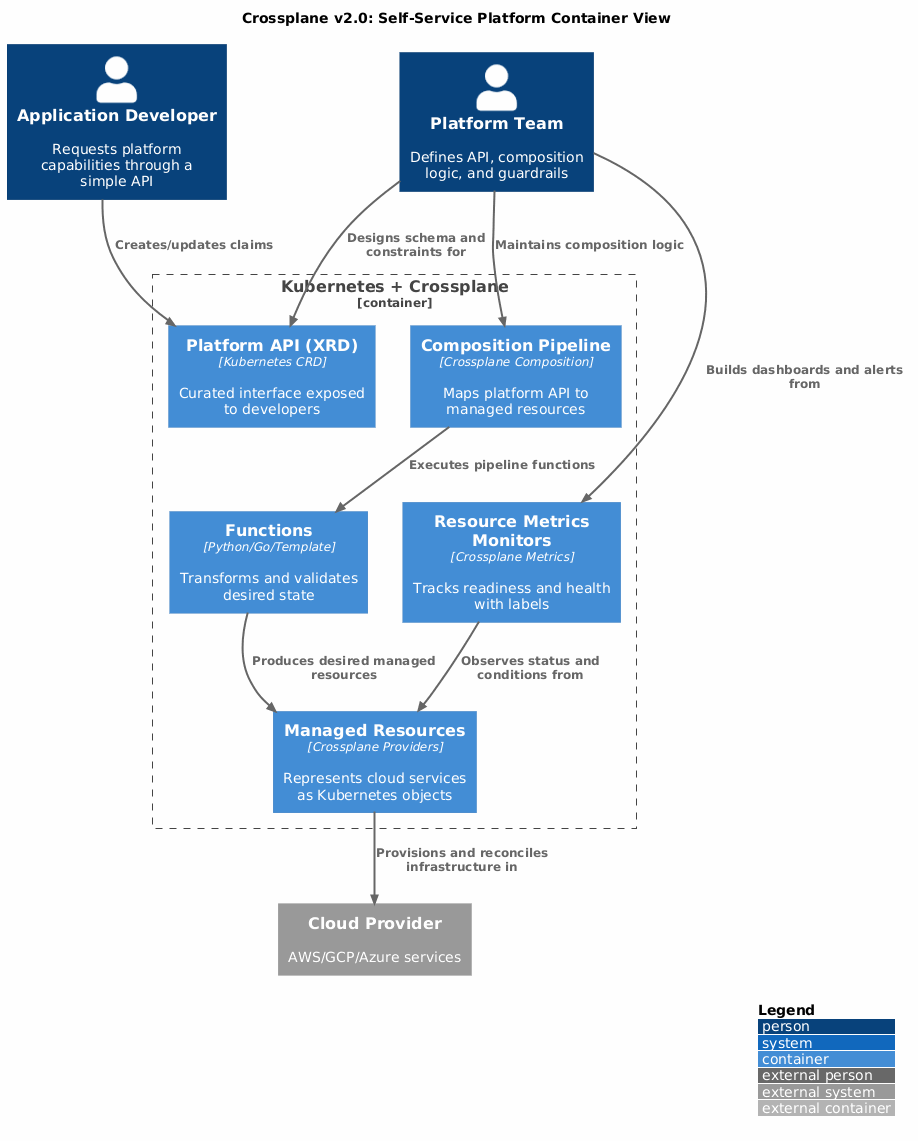
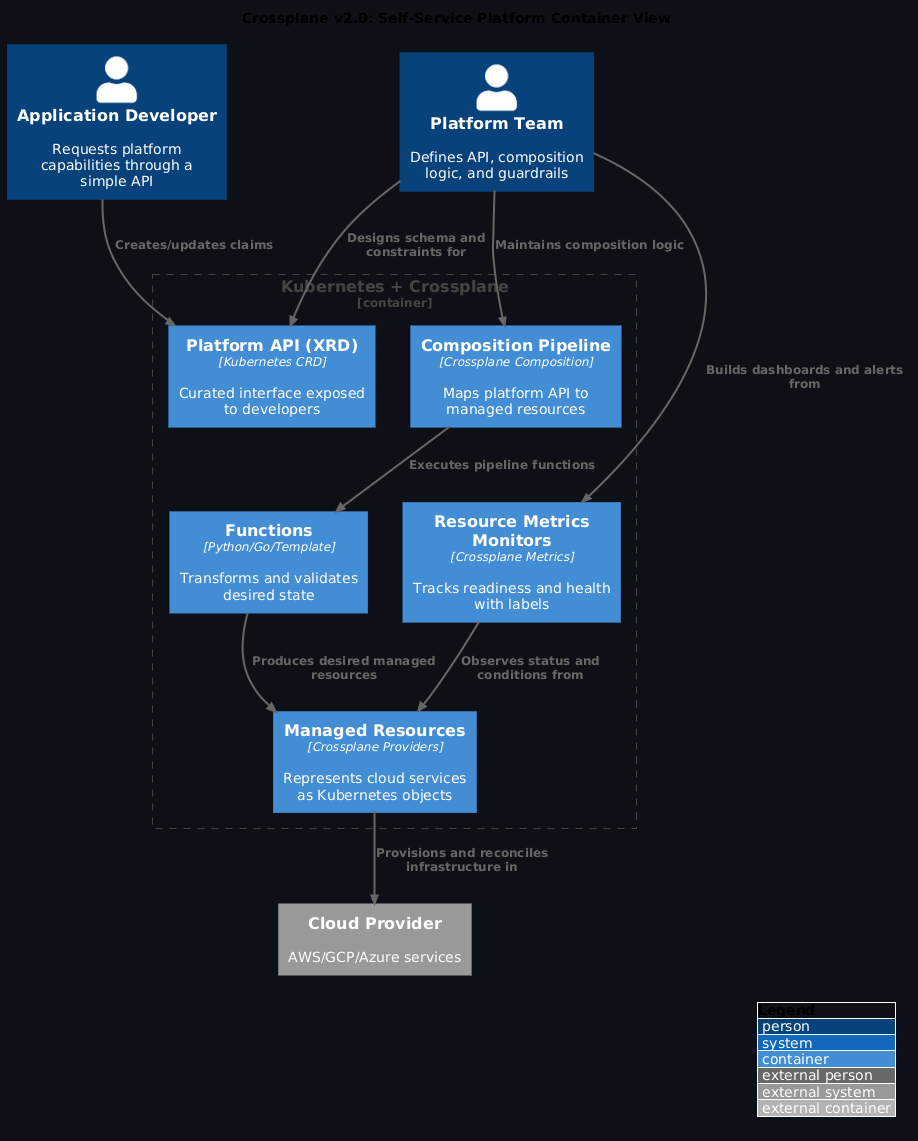
Architecture: control plane for everything
Core concepts
1. Composite Resource Definitions (XRDs)
Define the shape of your platform API - what developers see and interact with:
apiVersion: example.com/v1
kind: App
spec:
  image: my-container:v2.0
  database: postgres
  storage: 100Gi
Platform teams curate this experience, constraining options while maintaining flexibility.
2. Compositions
Implement the logic and transformation - how developer requests fan out into actual infrastructure:
- Functions pipeline (gRPC-based, language-agnostic)
- Python, Go, TypeScript, or simple Go templates
- Transform XR → Deployment, Service, RDS instance, networking, scaling policies
3. Managed Resources
Represent cloud provider services as reconciled Kubernetes API objects:
- S3 buckets, EKS clusters, RDS databases become kind: Bucket, kind: EKSCluster
- Continuous reconciliation fixes drift automatically
- Status conditions reflect real-world state
The Promise: From Weeks to Seconds
Before Crossplane:
Developer → DevOps ticket → Infrastructure team → Compliance review → Manual provisioning → Weeks elapsed
After Crossplane:
Developer applies simple App CR → Platform automatically provisions deployment + database + networking + monitoring → Minutes elapsed
Crossplane v2.0: developer experience improvements
The multi-repo problem
Traditional Crossplane development required juggling: - Repository for functions (Python/Go code) - Repository for configurations (XRDs, Compositions) - Dependencies spanning multiple repos - Manual synchronization on every update
Result: High cognitive load, brittle workflows, coordination overhead.
Crossplane Projects: unified development artifact
The v2.0 release introduces Projects - a single source repository containing: - API definitions (JSON Schema → XRDs) - Composition logic (functions) - Dependencies (providers, CRDs) - Tests (X-prin framework) - Versioning (unified releases)
Think of it like a modern application repository but for your platform APIs.
Live demo walkthrough
Adam demonstrated the new workflow at KubeCon:
1. Initialize Project
Creates structure:
crossplane.yaml  # Project metadata, OCI registry
apis/            # API definitions
functions/       # Function code
compositions/    # Composition templates
2. Define API with JSON Schema
{
  "type": "object",
  "properties": {
    "image": { "type": "string" },
    "port": { "type": "integer" },
    "database": { "type": "string", "enum": ["postgres", "mysql"] }
  }
}
Generate XRD:
3. Generate Composition and Function
Creates Python function template with auto-ready baseline.
4. Write Function Logic
# functions/my-app-function/main.py
def compose(xr, observed, desired):
    # Extract values from XR
    image = xr.spec.image
    port = xr.spec.port
    db = xr.spec.database

    # Compose Kubernetes resources
    deployment = {
        "apiVersion": "apps/v1",
        "kind": "Deployment",
        "spec": {
            "template": {
                "spec": {
                    "containers": [{
                        "image": image,
                        "ports": [{"containerPort": port}]
                    }]
                }
            }
        }
    }

    service = {/* ... */}
    database_instance = {/* ... */}

    return [deployment, service, database_instance]
5. Test Locally
crossplane beta project render # Dry-run function pipeline
crossplane beta project run    # Spin up local kind cluster
Creates complete local environment with Crossplane + your project installed.
6. Validate with X-prin
# tests/app-test.yaml
xr:
  spec:
    image: nginx:1.21
    port: 80
    database: postgres

assertions:
  - deployment.spec.template.spec.containers[0].image == "nginx:1.21"
  - service.spec.ports[0].port == 80
  - database.spec.engine == "postgres"
Run tests:
7. Deploy to Production
Packages everything into OCI artifact, pushes to registry.
Resource State Metrics: granular observability
The second major v2.0 feature addresses operational visibility at scale.
The old problem
Traditional Crossplane metrics: - "15 EKS clusters are unhealthy" - But which clusters? Which teams affected? What's the scope?
The new solution: Resource State Metrics
Built on upstream Resource State Metrics project with Cel expressions:
apiVersion: metrics.crossplane.io/v1alpha1
kind: ResourceMetricsMonitor
metadata:
  name: eks-cluster-health
spec:
  resources:
    - apiVersion: ec2.aws.crossplane.io/v1beta1
      kind: Cluster

  metrics:
    - name: cluster_health
      help: "EKS cluster health by team and environment"
      labels:
        team: 'object.metadata.labels["team"]'
        environment: 'object.metadata.labels["environment"]'
        xr_name: 'object.metadata.labels["crossplane.io/claim-name"]'

      cel: |
        object.status.conditions.exists(c, c.type == "Ready" && c.status == "True") ? 1 : 0
Result: Prometheus metrics with team/environment/XR labels for precise troubleshooting.
Cardinality Management
Status shows current usage:
Grafana Dashboards
Query by team or environment:
Answers: "Show me unhealthy clusters for the platform team in production."
The cardinality explosion tell
Resource State Metrics with unconstrained label cardinality will crash your Prometheus. Every unique combination of team, environment, and xr_name labels creates a new time series. Set cardinalityLimit on every ResourceMetricsMonitor and monitor status.observedCardinality before you hit the ceiling. The default demo config in the KubeCon talk had no limit — don't copy it into production.
Implementation blueprint
Apply this: start with one self-service path, validate usage, then expand
The most common mistake with Crossplane is building ten Compositions before anyone has used one. Define the API for your highest-frequency infrastructure request — usually a database or a deployment target — ship it to one team, measure time-to-first-deployment, and gather friction feedback. Expand only after the first path is trusted and well-understood.
For platform teams
- Adopt Crossplane Projects
- Migrate from multi-repo to unified project structure
- Version APIs + functions together
-
Simplify developer onboarding
-
Define Curated APIs
- Start with JSON Schema (familiar tooling)
- Constrain options (database sizes, instance types)
-
Use familiar abstractions (App, Database, Queue)
-
Write Functions in Preferred Language
- Python for data transformation
- Go for performance-critical logic
-
TypeScript for web team expertise
-
Deploy Metrics Monitoring
- Create ResourceMetricsMonitor for critical resources
- Extract team/environment labels
- Set cardinality limits per monitor
For developers
-
Use Platform APIs
-
Self-Service Without Tickets
- No DevOps coordination
- No weeks-long waits
- Guardrails prevent misconfigurations
For organisations
- Measure Platform Success
- Track time-to-first-deployment
- Monitor ticket reduction
-
Survey developer satisfaction
-
Scale Incrementally
- Start with one team/use case
- Validate platform-market fit
- Iterate based on feedback
What changed in practice
Before: Infrastructure as code spread across Terraform, CloudFormation, Helm charts - manual coordination, weeks-long cycles
After: Unified Kubernetes API for everything - self-service with guardrails, minutes-to-deployment
Crossplane v2.0 shows platform engineering maturity: standardised patterns, better developer experience, and practical operational observability. With CNCF graduation and over 3,000 contributors, momentum in the ecosystem is strong.
The shift from "Platform as Code" to "Platform as API" fundamentally changes how organisations scale infrastructure operations.
References
- Crossplane Documentation - Official docs
- Crossplane v2.0 Migration Guide - Upgrade path
- Crossplane Projects Beta - Demo branch
- X-prin Testing Framework - Composition tests
- KubeCon EU 2026 Presentation - Full slides
- KubeCon EU 2026 Conference Notes - Detailed session coverage
Presented at KubeCon + CloudNativeCon Europe 2026 by Jared Watts & Adam Wolfe Gordon (Upbound)
Frequently asked questions
Is Crossplane v2.0 ready for production use?
Crossplane as a project is CNCF-graduated and production-proven at enterprise scale. The specific v2.0 features shown at KubeCon — the Projects CLI workflow and Resource State Metrics — were in beta at conference time. Check the Crossplane v2 release notes for GA status before adopting specific features in production workloads.
Where can I watch the KubeCon session?
The full session by Jared Watts and Adam Wolfe Gordon is on the CNCF YouTube channel. Search "Building self-service platforms Crossplane v2 KubeCon EU 2026".
How long does it take to go from zero to a working self-service API?
The KubeCon demo showed a working local environment in under 10 minutes using crossplane beta project init and crossplane beta project run. A production-grade Composition with tests, RBAC, and monitoring is a different scope — budget 1-2 sprints for a first domain. The local development loop being fast enough to use daily is what makes iteration tractable.
Do I need to rewrite existing Crossplane v1 Compositions for v2?
Not necessarily. v2 is backwards-compatible with v1 Compositions. The Projects workflow is additive — you can adopt it for new work without migrating existing Compositions. Namespace-scoped managed resources are the biggest operational change; plan that migration separately using the phased approach RBI described.
What's the X-prin testing framework mentioned in the demo?
X-prin is an open-source composition testing framework that lets you write declarative test cases: given this XR spec, assert these Kubernetes resources are generated. It's the Crossplane equivalent of unit tests for your composition logic. Find it at github.com/crossplane-contrib/xprin.