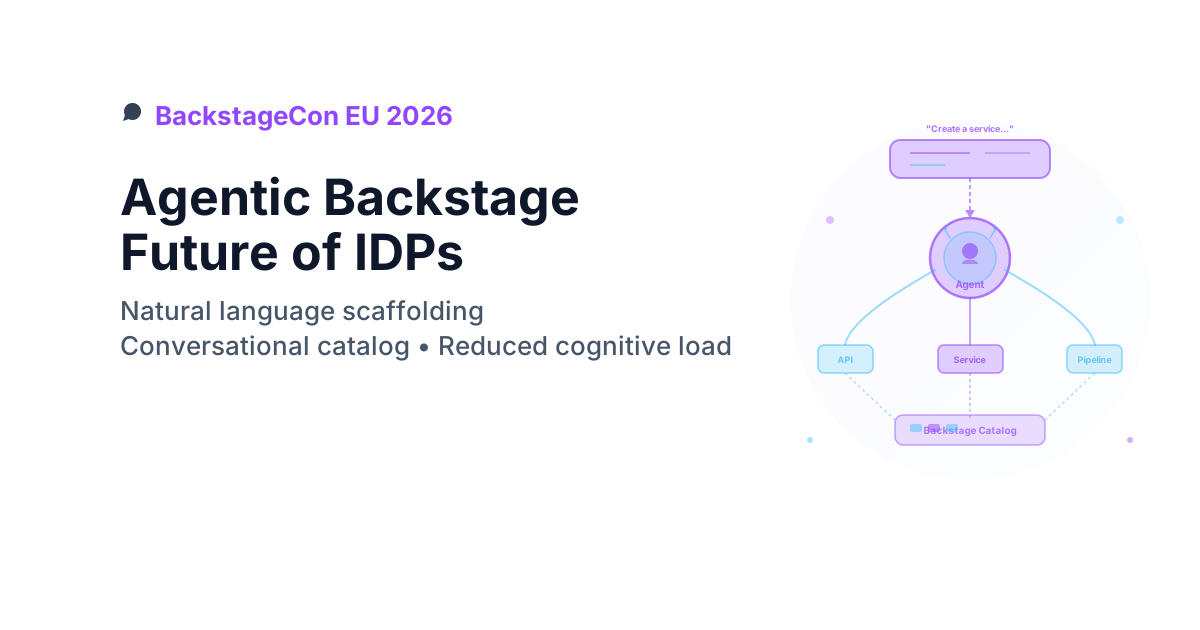
The future of IDPs: Agentic Backstage
This talk hit a nerve. Most of us have seen a developer portal with good intentions and mixed adoption. The interesting bit here was not just "add AI", but where and how the AI showed up in the workflow.
Quick takeaways
- A conversational layer helps only when catalogue metadata is reliable.
- Keep self-service actions close to existing engineering workflows.
- Focus on a few high-frequency tasks first: scaffold, search, deploy, troubleshoot.
- Measure reduced cognitive load with real usage metrics, not feature counts.
Catalogue quality is the prerequisite
A conversational interface that surfaces stale metadata faster than a form wizard is worse than no interface at all. Before investing in the AI layer, audit catalogue completeness: owner annotations, up-to-date TechDocs, explicit deprecation markers, and relationship metadata (provides/consumes). The AI amplifies whatever quality is already there — good or bad.
What was getting in the way
At BackstageCon EU 2026 (co-located with KubeCon), Sam Nixon from Roadie presented a fundamental challenge with Internal Developer Portals: complexity breeds abandonment. Traditional Backstage requires developers to:
- Navigate sprawling service catalogs with thousands of entries
- Fill complex scaffolding forms with dozens of fields
- Click through multi-step workflows
- Search documentation across fragmented sources
- Context-switch between portal and actual coding tools
Result: Cognitive overload, low adoption, platform teams scratching their heads wondering why developers avoid the portal.
What we actually wanted
An IDP that meets developers where they think - natural language interactions that reduce friction, provide contextual help, and feel more like pair programming than form-filling.
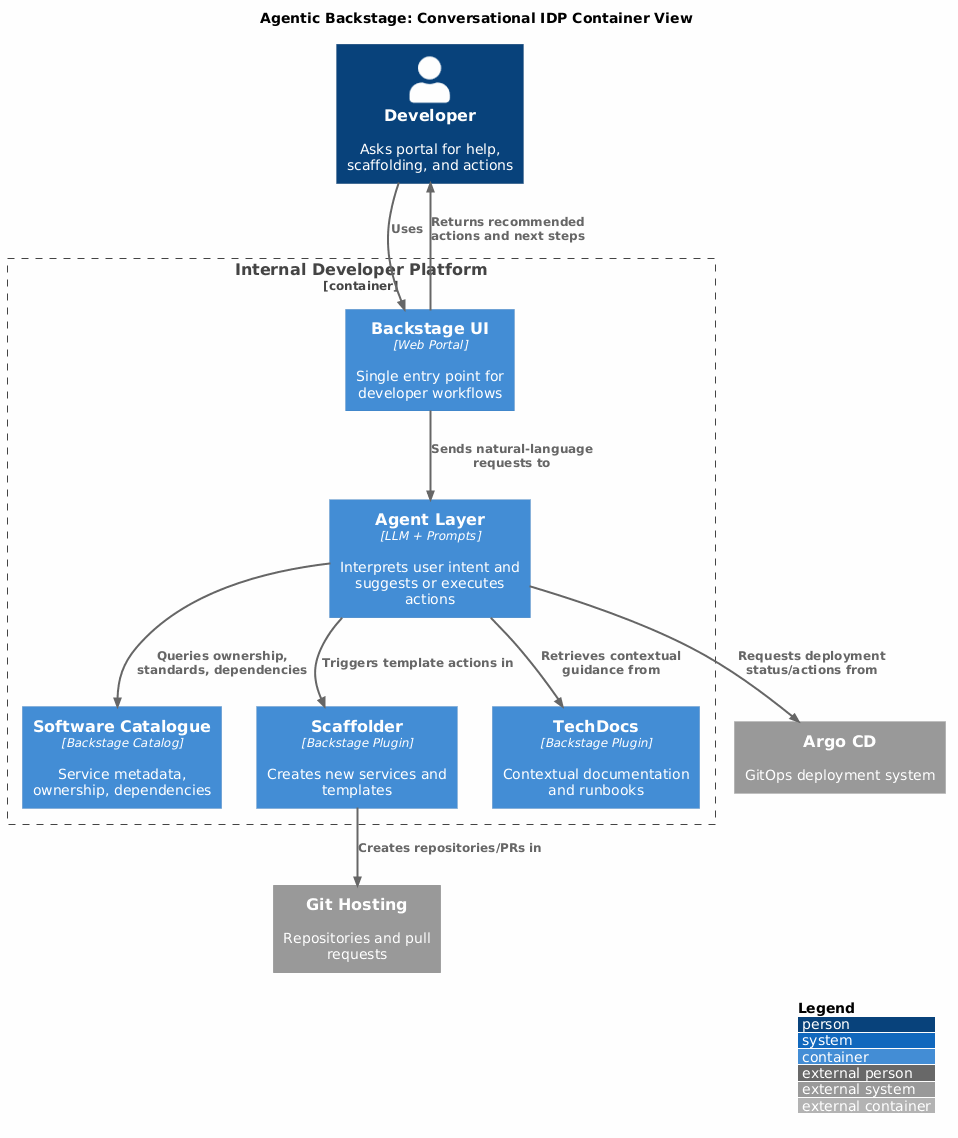
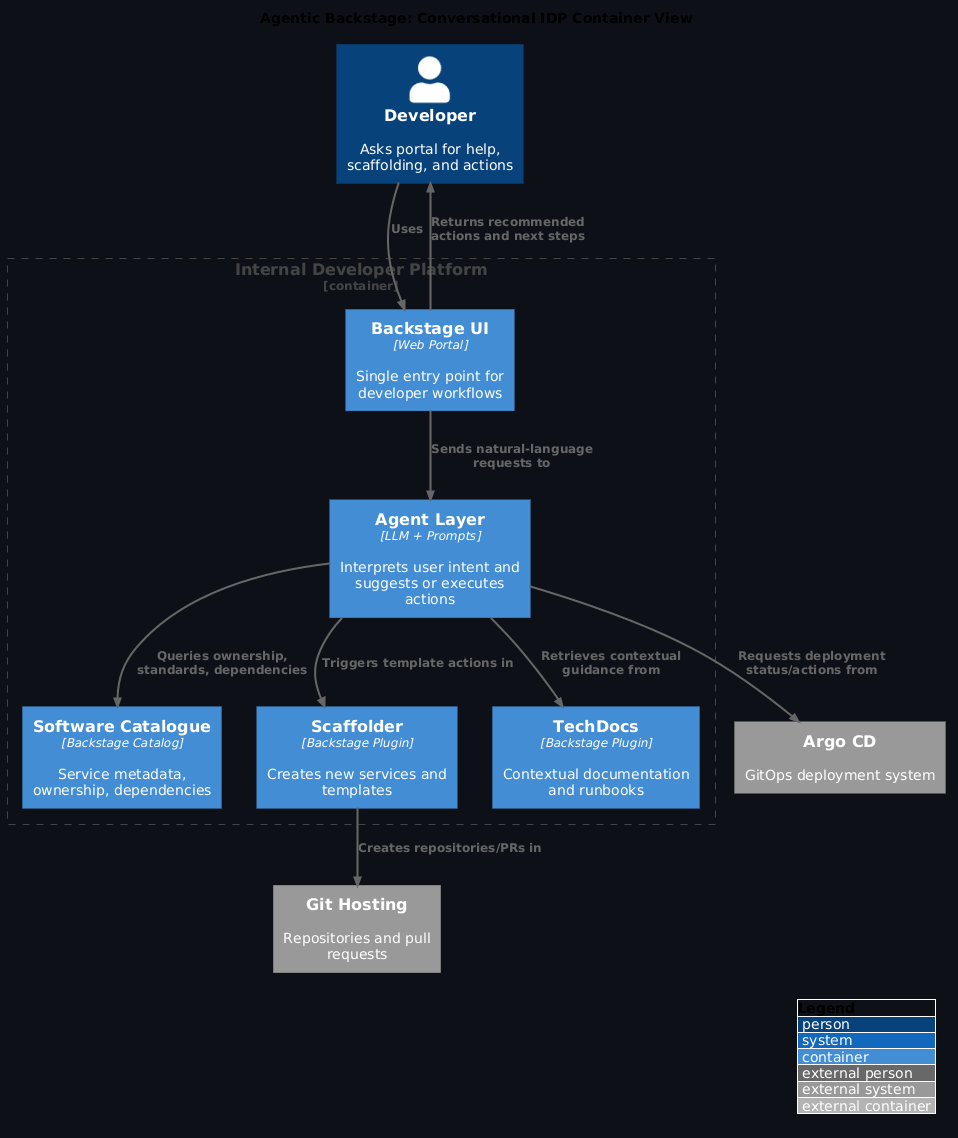
Architecture: conversational IDP
Core concept: agentic software catalogue
Transform Backstage from a static catalogue into an intelligent agent that:
- Understands intent from natural language queries
- Queries the catalogue programmatically via Backstage APIs
- Takes actions (scaffold projects, trigger workflows, update metadata)
- Provides context (documentation, examples, related services)
The technical stack
Backstage Foundation: - Software catalogue (services, APIs, docs, teams) - Plugin ecosystem (scaffolder, search, TechDocs) - Service ownership metadata - Golden paths and templates
AI Layer: - LLM integration (Claude, GPT-4, local models) - Model Context Protocol (MCP) for Backstage APIs - Natural language → structured queries - Contextual prompt engineering with catalogue knowledge
Real-world use cases
1. Natural Language Scaffolding
Traditional Backstage:
1. Navigate to Create Component
2. Select template from dropdown (50+ options)
3. Fill form: Name, Description, Owner, Repo URL, Branch, Pipeline Type, Deployment Target, Resource Limits, Monitoring Config...
4. Click through 3-4 review screens
5. Submit and hope you got everything right
Agentic Backstage:
Developer: "Create a new Node.js microservice called 'payment-processor'
            owned by the payments team, deployed to production with
            standard monitoring"

AI Agent: "Creating payment-processor microservice:
           - Template: nodejs-microservice-standard
           - Owner: team:payments
           - Deployment: production (via ArgoCD)
           - Monitoring: Prometheus + Grafana dashboards enabled
           - Repository: github.com/myorg/payment-processor

           Proceed? (yes/no)"

Developer: "yes"

AI Agent: "✓ Repository created
           ✓ CI/CD pipeline configured
           ✓ Service registered in catalogue
           ✓ Monitoring dashboards provisioned

           Next steps: Clone repo and see CONTRIBUTING.md"
Time saved: 15 minutes → 90 seconds
2. Intelligent catalogue search
Traditional Backstage:
Search: "authentication"
Results: 247 matches
- auth-service-v1 (deprecated)
- auth-service-v2 (deprecated)
- auth-service-v3 (current? unclear)
- authentication-lib-java
- authentication-lib-python
- auth-docs-v1
- ... 241 more
Agentic Backstage:
Developer: "Which authentication service should I use for my Python API?"

AI Agent: "Use auth-service-v3 (authentication.company.com/api)

           Why:
           - Only supported version (v1/v2 deprecated)
           - Python SDK: pip install company-auth-client
           - Owner: platform-security team
           - SLA: 99.9% uptime
           - Docs: [link to integration guide]

           Example integration:
           ```python
           from company_auth import AuthClient
           client = AuthClient(api_key=os.getenv('AUTH_API_KEY'))
           user = client.verify_token(request.headers['Authorization'])
           ```

           Need help with a specific integration? Just ask!"
3. Contextual documentation
Traditional Backstage:
Developer searches "how to deploy" → gets generic TechDocs → still doesn't know team-specific process
Agentic Backstage:
Developer: "How do I deploy my service to production?"

AI Agent: "For YOUR service (payment-processor, owned by payments team):

           1. Merge PR to main branch
           2. CI creates Docker image: ghcr.io/myorg/payment-processor:v{VERSION}
           3. Update image tag in gitops/production/payment-processor/deployment.yaml
           4. Create PR to gitops repo
           5. Payments team lead approves (required per policy)
           6. ArgoCD auto-deploys within 5 minutes

           Monitoring:
           - Grafana: [team-specific dashboard]
           - Alert channel: #payments-alerts

           Rollback:
           - Revert gitops PR
           - Or use: kubectl rollout undo deployment/payment-processor -n payments

           Want me to create the deployment PR for you?"
4. Self-service actions
Beyond Querying: Taking Action
Developer: "Add staging environment to my service"

AI Agent: "I'll scaffold the staging configuration:

           Creating:
           - gitops/staging/payment-processor/namespace.yaml
           - gitops/staging/payment-processor/deployment.yaml (2 replicas, smaller resources)
           - ArgoCD Application for auto-sync
           - Monitoring: staging-payment-processor Grafana dashboard

           Database: Do you need a staging database? (yes/no)"

Developer: "yes, PostgreSQL"

AI Agent: "✓ Terraform PR created for RDS staging instance
           ✓ Connection secret stored in Vault
           ✓ Added secret reference to deployment
           ✓ Updated migration job

           Staging environment ready in ~10 minutes.
           Access: https://payment-processor.staging.company.com"
Plugin ecosystem evolution
Traditional plugin challenges
- Fragmentation: 150+ plugins, unclear which to use
- Configuration: Each plugin requires YAML setup
- Discovery: Hidden features, poor discoverability
- Maintenance: Breaking changes, version conflicts
Agentic plugin management
Query Plugins Conversationally:
Developer: "Show me deployment history for my service"

AI Agent: "I'll use the ArgoCD plugin to fetch deployment history for payment-processor:

           Recent deployments:
           - v2.3.1: Mar 24, 2026 14:30 - Healthy (current)
           - v2.3.0: Mar 24, 2026 09:15 - Rolled back (database migration issue)
           - v2.2.8: Mar 23, 2026 16:45 - Healthy (previous stable)

           Want details on the v2.3.0 roll back? Or see full sync status?"
Recommend Plugins Based on Context:
Developer: "I want to see what's deployed in production"

AI Agent: "You'll need the ArgoCD plugin. I can:
           a) Enable it for your Backstage instance (requires admin approval)
           b) Show you the plugin configuration
           c) Connect you with platform team for access

           Which would you like?"
Implementation patterns
For platform teams
1. Catalogue quality matters more With AI agents querying programmatically, incomplete metadata becomes immediately obvious: - Ensure owner annotations on all components - Maintain up-to-date TechDocs - Tag deprecated services explicitly - Document relationships (provides/consumes APIs)
2. Golden paths as training data Your scaffolder templates become AI agent examples:
# bad: generic template
apiVersion: scaffolder.backstage.io/v1beta3
kind: Template
metadata:
  name: nodejs-service

# good: rich context for AI
apiVersion: scaffolder.backstage.io/v1beta3
kind: Template
metadata:
  name: nodejs-microservice-standard
  title: Node.js Microservice (Production-Ready)
  description: >
    Standard Node.js microservice template with:
    - Express.js REST API framework
    - PostgreSQL database integration
    - Prometheus metrics endpoint
    - Grafana dashboard provisioning
    - ArgoCD GitOps deployment
    - Jest testing scaffold

    Use for: customer-facing services, internal APIs
    Don't use for: batch jobs (use nodejs-job template), frontend (use react-app)

  tags:
    - nodejs
    - microservice
    - production
    - recommended
3. Structured prompts for common tasks Create reusable prompt templates:
# prompts/scaffold-service.md
When a developer asks to create a new service:

1. Determine programming language preference
2. Ask about deployment environment (dev/staging/prod)
3. Identify owning team from their Backstage profile
4. Suggest appropriate template based on:
   - Language → matching template
   - Team → team-specific standards
   - Service type → microservice vs batch job vs frontend
5. Confirm configuration before executing
6. After creation, provide:
   - Link to new repository
   - Link to CI/CD pipeline
   - Link to catalogue entry
   - Next steps for local development
4. Measure cognitive load reduction Track metrics before/after agentic features: - Time to complete scaffolding - Catalogue search → action completion rate - Support channel questions (should decrease) - Developer satisfaction surveys
For developers
5. Treat AI agent like a senior developer Best practices for prompts: - Be specific: "Create production Node.js API" not "make service" - Provide context: "I'm on payments team working on checkout flow" - Ask follow-ups: "Why that template?" - Request explanations: "Explain the monitoring setup"
6. Validate AI-generated actions Always review: - Repository configurations - Resource limits and scaling policies - Network and security settings - Database connection strings
The AI accelerates, but you verify.
The new interface tell
Intuit tried this with an ArgoCD UI extension — built it, shipped it, got poor adoption because experts went straight to logs and novices never opened Argo at all. The lesson: don't build new interfaces. Put AI where engineers already are (Slack, Teams, their IDE). A conversational layer in yet another portal tab will have the same adoption problem as the portal it's trying to fix.
Panel insights: ecosystem perspective
At the Backstage Plugin Ecosystem panel, maintainers from major organisations (Spotify, Red Hat, Roche, SAP, VMware) discussed:
Healthy ecosystem characteristics: - standardisation: Common patterns for plugin structure - Documentation: Clear setup guides and API docs - Versioning: Semantic versioning with migration guides - Community: Active Discord, GitHub discussions - Quality gates: Automated testing, security scanning
Agentic future: - AI agents will prefer well-documented plugins (better API understanding) - Natural language plugin invocation bypasses UI complexity - Contextual plugin recommendations based on catalogue metadata - Automated plugin configuration from conversational setup
What changed in practice
Before: Static catalogue requiring manual navigation, complex forms, hidden documentation
After: Conversational interface that understands intent, takes action, provides context
The shift from "Portal as Documentation Hub" to "Portal as Intelligent Assistant" fundamentally changes developer experience. Agentic Backstage doesn't replace the catalogue - it makes it accessible.
By reducing cognitive load through natural language, platform teams can achieve the original IDP promise: increasing developer velocity while maintaining standards.
Apply this: measure cognitive load reduction with real metrics
Track time-to-complete-scaffolding before and after. Track support channel question volume (it should decrease). Track catalogue search-to-action completion rate. "Developers seem happier" is not a metric. If you can't show a 50%+ reduction in time-to-first-deployment, the conversational layer isn't working yet.
Getting started
Experiment today
- Enable Backstage search API for programmatic queries
- Integrate LLM client (OpenAI, Anthropic, local Ollama)
- Create prompt templates for common tasks (scaffolding, catalogue search)
- Build simple chatbot using Backstage APIs
- Iterate based on developer feedback
Production considerations
- Access control: AI inherits user permissions via tokens
- Audit logging: Track AI-generated actions
- Rollback procedures: Easy undo for AI mistakes
- Prompt injection protections: Validate user inputs
- Cost management: LLM API rate limits and budgets
Frequently asked questions
Does agentic Backstage require a specific LLM?
No — the architecture is model-agnostic. The AI layer sits between the user and the Backstage APIs, translating natural language to structured catalogue queries and scaffolder actions. You can use Claude, GPT-4, or a local model via Ollama. The choice affects response quality and latency, not the fundamental architecture.
How does the AI agent inherit user permissions in Backstage?
Via token passthrough. The AI agent operates with the authenticated user's Backstage token — it can only see and act on resources the user already has access to. There's no privilege escalation. This is the same model MCP uses: the protocol delegates auth to the underlying service.
What's the minimum viable first use case for agentic Backstage?
Natural language catalogue search. It's read-only, has no side effects, and delivers immediate value to developers who struggle with sprawling catalogues. Once that's working and trusted, layer in scaffolding (higher stakes, confirmation gate required) and then self-service actions (highest stakes, full audit logging required).
Can agentic Backstage create PRs or trigger pipelines directly?
Yes, within the scaffolder's existing action framework. Any action available in a Backstage template (create repo, trigger CI, register component) can be invoked by the AI agent. The key control: always present a confirmation step before executing irreversible actions. "Proceed? (yes/no)" is not optional for anything that creates or modifies external resources.
How do you prevent prompt injection in a public-facing IDP?
Validate all user inputs before passing them to the LLM. Treat user-supplied strings as untrusted data — don't interpolate them directly into system prompts. Use structured output formats (JSON schema validation) so the LLM can't be instructed to output arbitrary text that gets executed downstream. Audit log every AI-generated action with the original user input alongside it.
References
- Backstage Documentation - Official docs
- Agentic Backstage Talk - Sam Nixon presentation
- Backstage Plugin Ecosystem Panel - Spotify, Red Hat, Roche, SAP, VMware
- Model Context Protocol - Integration spec
- KubeCon EU 2026 Conference Notes - Full BackstageCon coverage
Presented at BackstageCon EU 2026 (co-located with KubeCon) by Sam Nixon (Roadie) and ecosystem maintainers