Your Second Brain, Now With an AI Inside It
There's a drawer in my office I'm not proud of. Half-filled notebooks, sticky notes with context I've lost, printed articles I never re-read. A physical archive of things I meant to think about. Sound familiar?
Tiago Forte wrote a whole book about this feeling. Building a Second Brain starts from the same place — the exhausting gap between how much we consume and how much we actually retain and use. His answer was PARA: a system for organising everything you capture so it stays findable, actionable, and connected. For a lot of people (myself included) it was the first knowledge management approach that actually stuck.
But Forte's book was published in 2022. Before the current generation of LLMs became genuinely useful tools. And reading it now, knowing what a capable language model can do, you can see exactly where the system was still leaving work on the table.
For years, Obsidian and PARA gave me a digital version of that drawer — but a good one. Organised. Searchable. Linkable. The kind of system where a note from six months ago actually shows up when you need it.
But there was still friction. Processing the inbox. Deciding where something lives. Connecting the note I just wrote to the project it belongs to. The thinking part. The part that takes energy at the end of a long day when you just want to dump and run.
That's the part an LLM can do.
This post is about wiring Obsidian and PARA together with a language model — not to automate everything, but to take on the low-value cognitive overhead so your attention goes to the thinking that actually matters. And it's grounded in Andrej Karpathy's LLM OS mental model, which reframes how to think about this whole thing.
The LLM OS idea
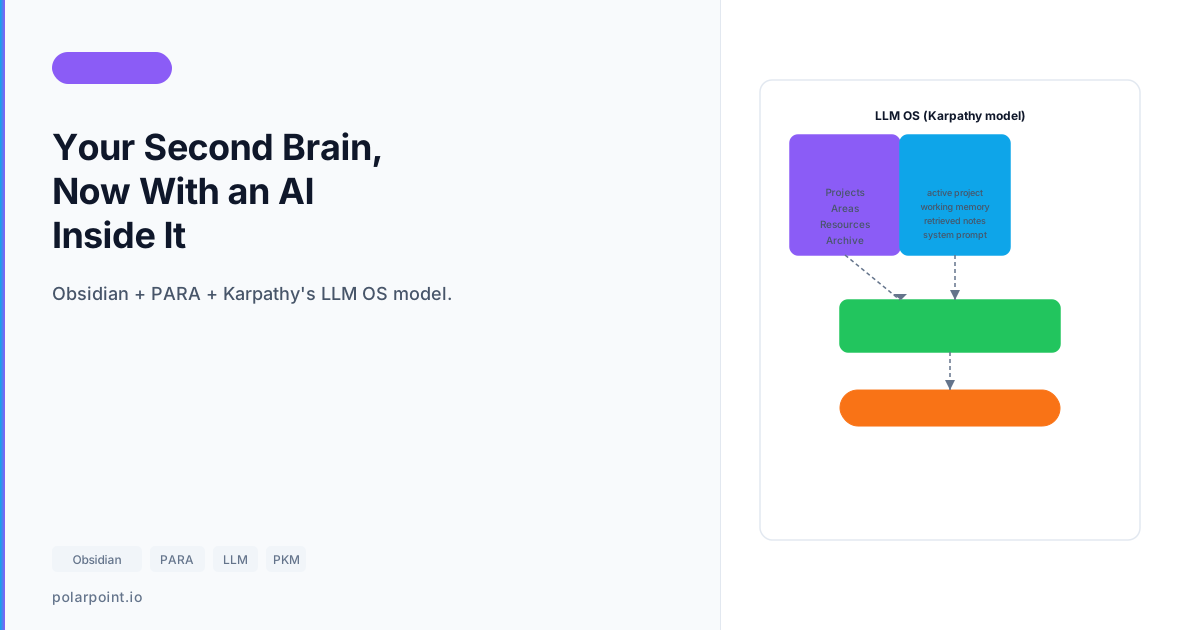
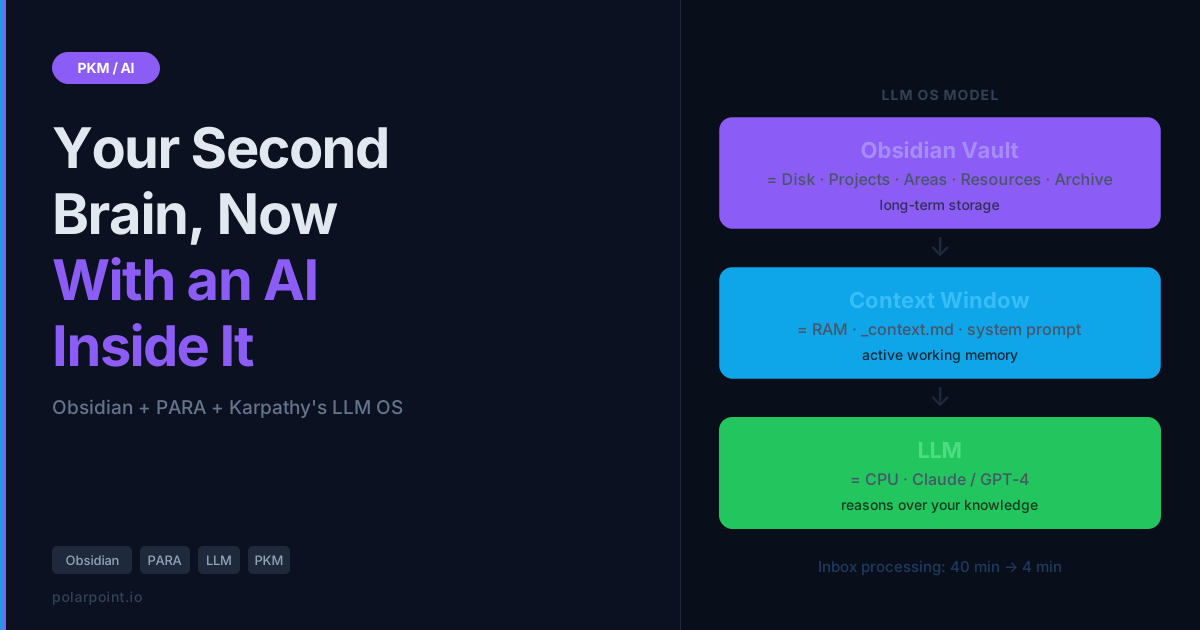
Karpathy laid out a sketch that clicked for a lot of people: think of an LLM not as a chatbot but as a CPU. It's the reasoning engine. Everything else in your system is a peripheral.
- Context window = RAM (fast, limited, volatile)
- Vault / file system = disk storage (slow, persistent, unlimited)
- Tools = peripherals (web search, calendar, APIs)
- System prompt = the OS — your instructions, your persona, your rules
Under this model, your Obsidian vault isn't a note-taking app. It's long-term storage for a reasoning system that can reach in and retrieve what it needs when it needs it. The LLM isn't just helping you write — it's thinking with your accumulated knowledge.
The mental model shift that changes what you build
Once you see the vault as disk storage for a reasoning system rather than a note-taking app, the design decisions become obvious. Projects get _context.md files. Areas get _overview.md logs. The system prompt becomes your OS — something you write deliberately and maintain, not a one-liner you type fresh each session.
PARA as the file system
If the vault is disk storage, PARA is the file system.
Forte's framework from Building a Second Brain gives you four categories for organising everything digital:
- Projects — things with a deadline and a specific outcome. "Launch the rebrand" not "branding stuff."
- Areas — ongoing responsibilities with no end date. Health, finance, client relationships.
- Resources — reference material you might want someday. Articles, research, book notes.
- Archive — inactive projects, completed work, things you're done with but might want to retrieve.
The genius of PARA is that it organises by actionability, not topic. A note about marathon training goes in Projects if you're training for one next month, Areas if running is a standing part of your life, or Resources if it's just interesting to you. Same note, different home depending on where you are.
This maps beautifully onto the LLM OS model. Projects are your active RAM — things the LLM should know about constantly. Areas are the slightly slower disk you pull from regularly. Resources are the archive you search when you need them. And Archive is cold storage.
The CODE method — and where the LLM fits
Building a Second Brain also introduces a workflow called CODE: Capture, Organise, Distil, Express. It's the process that turns information into usable knowledge.
- Capture — collect anything that resonates
- Organise — put it in the right PARA category
- Distil — highlight, summarise, find the essence
- Express — use it to make something
Apply this: LLM removes the CODE bottlenecks
When Forte wrote the book, Organise and Distil were the bottlenecks. Deciding where something goes, then doing the work of summarising it — that's where most second brains silently broke down. An LLM removes both bottlenecks at once: you dump into the inbox (Capture), the LLM categorises and files it (Organise), pulls out key points and links to existing notes (Distil), and your job is to use it (Express). The creative leap at the end stays human. Everything before it doesn't have to.
What the workflow actually looks like
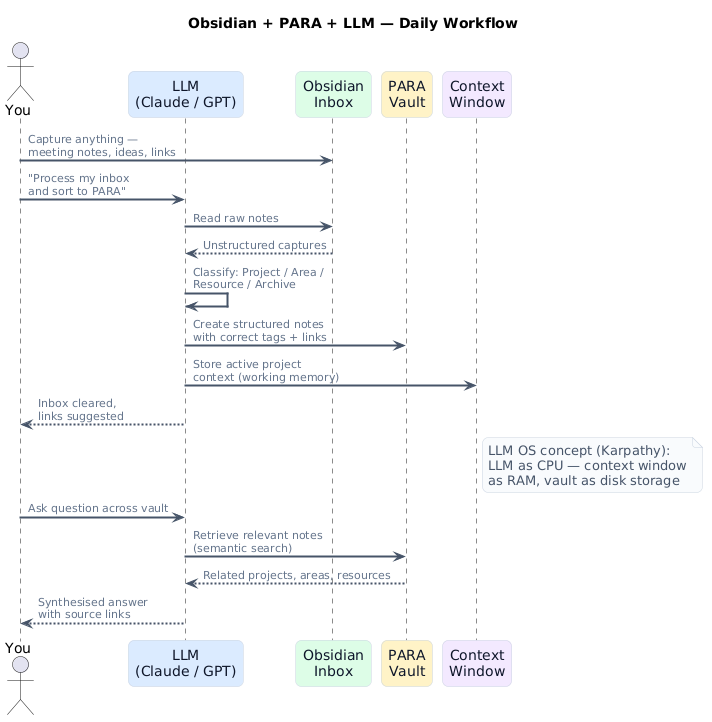
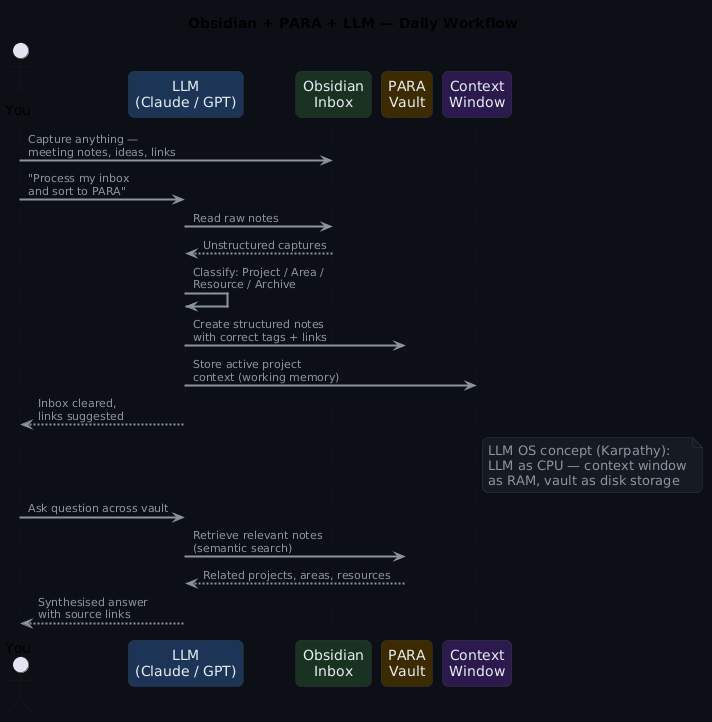
Here's the full picture of how these three things connect:
And the underlying architecture — what each layer is doing:
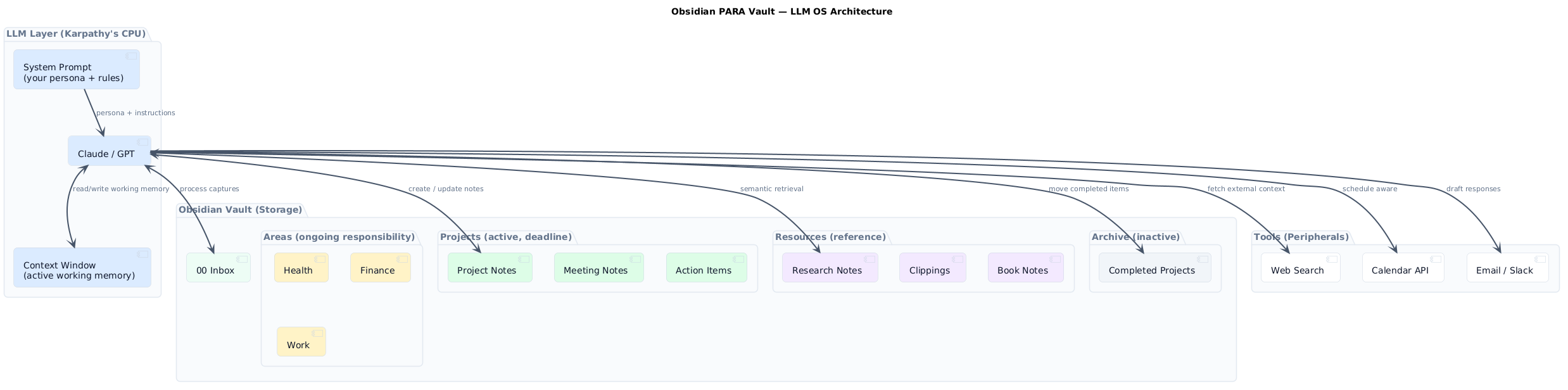
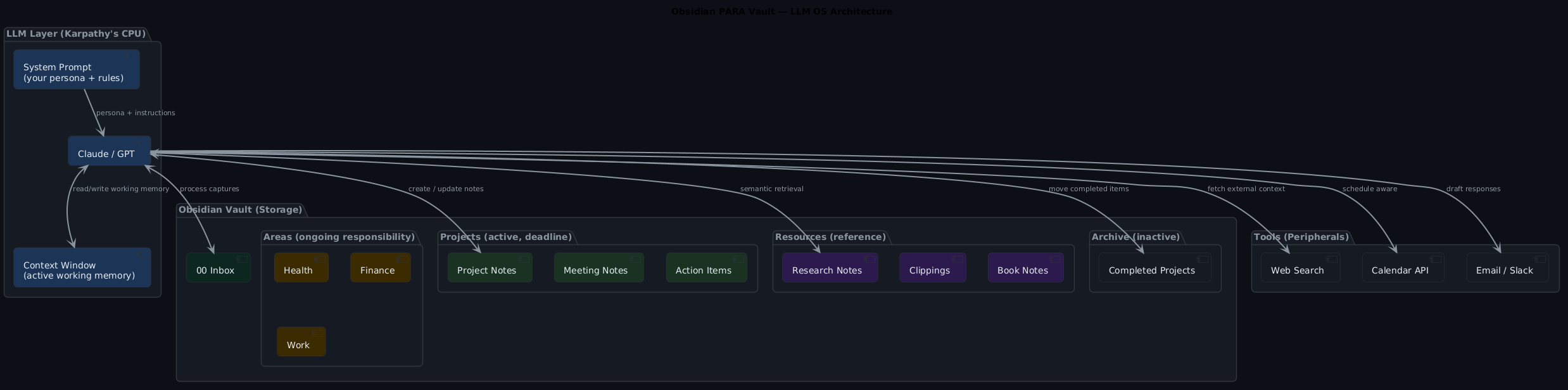
In practice, this is a loop. You capture, the LLM processes, the vault accumulates, and the LLM retrieves from the vault when you need it to think with you.
The inbox: where it starts
Every knowledge system needs a friction-free capture mechanism. In Obsidian mine is a single note: 00 Inbox. Everything goes there. Meeting notes, article links, random observations, voice-to-text transcriptions. No friction, no decisions at capture time.
The problem with most inboxes is that they become graveyards. You dump in, never process. The LLM changes that equation — processing the inbox is now a command, not a chore.
Process my Obsidian inbox. For each item:
- Identify what it is (note, reference, action, idea)
- Suggest which PARA category it belongs in
- Extract any action items
- Identify links to existing notes in my vault

Here's the inbox content:
[paste or read inbox file]
Four minutes vs forty
What comes back is a processing report: categorised items, suggested file paths, extracted actions, suggested links. I run this every morning. Takes about four minutes. Used to take forty. Review the output, approve what makes sense, and the inbox clears. The LLM doesn't make final decisions — it does the thinking work so your review is fast.
Projects: active context for the LLM
Here's where the LLM OS model pays off most concretely. When you're working on a project, you don't want to re-explain context every time you start a new conversation. You want the LLM to just know.
The pattern: each project folder contains a _context.md file — a living document that captures the current state, decisions made, open questions, key people, and constraints. When you start a session on that project, you paste the context file into the system prompt.
# Project: Platform Migration Q3
Status: In progress — 40% complete
Owner: Surj
Deadline: 2026-09-30

## Current state
Moved 3 of 8 services to the new infra. Payments, auth, and notifications done.
Legacy billing still on old stack — blocked on vendor contract renewal.

## Key decisions
- Chose Crossplane over Terraform for infrastructure as code (see ADR-004)
- Blue/green deployments only, no rolling (risk appetite)

## Open questions
- Will the vendor renew before the Q3 deadline?
- Crossplane 2.2 upgrade — should we do it mid-migration or after?

## Key people
- Sarah (infra lead) — owns the Crossplane work
- Tom (vendor) — decision on contract renewal expected June
Now when you ask "what should I focus on this week?", the LLM has the full picture. It's not guessing. It knows the state, the constraints, the open questions. It can give you an actually useful answer.
Keep context files tight — 3-5 paragraphs maximum
If your _context.md files are too long, you'll run out of context window before you've loaded everything useful. The detail lives in the project notes; the context file is the map. Overlong context files are the most common reason this pattern works poorly in practice.
Areas: ambient context
Areas work differently. You're not driving towards a deadline — you're maintaining a standard. Health, finance, career development. The LLM's role here is more like a periodic reviewer.
The pattern I've landed on: each area has an _overview.md and a _log.md. The overview is the current state. The log is a running record of decisions and updates. Once a week I drop both into a session and ask:
Review my [Health] area notes.
What commitments have I made that I haven't followed through on?
What patterns do you notice?
What one thing would have the most impact if I addressed it this week?
This is surprisingly useful. The LLM doesn't have bias about what you should prioritise — it just reads what you wrote and reflects it back. The friction of doing this review yourself (and the self-deception that comes with it) basically disappears.
Resources: retrieval on demand
Resources are the part most people over-engineer. They build elaborate tagging systems, complex folder hierarchies, MOCs (maps of content) for their MOCs. And then never use any of it because retrieval is too slow.
The LLM changes the retrieval model. You don't need perfect organisation — you need good enough organisation and a smart retrieval prompt.
Search my Resources folder for anything relevant to
"Kubernetes multi-cluster cost optimisation".
Summarise what I have and identify gaps I should fill.
Apply this: fuzzy retrieval beats perfect tagging
With Obsidian's local REST API (via the community plugin), or just by pasting relevant folder contents, the LLM can do this in seconds. The key insight: resources don't need to be perfectly tagged because the LLM can fuzzy-match across content, not just titles. Good-enough organisation (sub-folders by broad domain) is enough.
The system prompt: your OS
This is the part most people skip, and it matters a lot. The system prompt is the LLM OS equivalent of your operating system — the persistent layer that shapes how everything behaves.
Mine looks something like this:
You are my personal knowledge assistant working within my Obsidian PARA vault.

You know my current active projects (see Project Context section).
You help me process, organise, retrieve, and synthesise — not just respond.

Rules:
- When I ask a question, cite the specific note you're drawing from
- When I capture something new, suggest where it goes in PARA and what it links to
- When I ask for a summary, give me the 3 most important things, not everything
- Be direct. I don't need preamble.
- Flag when you're uncertain or when my notes contradict each other

Current active project context:
[paste _context.md files for active projects]
The rules section is where you encode your preferences. The project context section is what changes day to day. Everything else is stable.
What Building a Second Brain got right — and what's changed
Forte's other big idea in the book is progressive summarisation: the practice of layering highlights on your notes over time — bold the key passages, then highlight the best of those, then write a two-sentence summary at the top. Each pass distils the note further so retrieval is fast.
It's a genuinely good technique. It's also tedious enough that most people do it inconsistently, which means most notes never get meaningfully distilled at all.
This is where an LLM just does the job better. You don't need multiple passes over weeks — you run one prompt and the distillation happens in seconds:
Read this article/book chapter/meeting note.
Give me: a 2-sentence summary, the 3 most important points,
and any specific claims I should verify or revisit.
The output becomes the top of the note. One pass. Done.
Practical setup
You don't need plugins or APIs to start. The simplest version is:
Step 1 — Set up your PARA structure in Obsidian. Four top-level folders: Projects, Areas, Resources, Archive. Add an 00 Inbox note at the root.
Step 2 — Write a system prompt file (_system-prompt.md) at the vault root. Keep it simple to start.
Step 3 — Write a _context.md in each active project folder. Fill in: current state, key decisions, open questions, key people.
Step 4 — Every morning: copy your system prompt and active project contexts, open a Claude or ChatGPT session, paste, process inbox.
That's the MVP. It works without any automation.
When you want more
The Obsidian community plugin Local REST API exposes your vault over HTTP. Combined with a small script, you can automate the context-loading step entirely — the LLM pulls fresh context from your vault at the start of each session without any manual pasting.
import requests, anthropic

VAULT_URL = "http://localhost:27123"
HEADERS = {"Authorization": "Bearer YOUR_TOKEN"}

def read_note(path: str) -> str:
    r = requests.get(f"{VAULT_URL}/vault/{path}", headers=HEADERS)
    return r.json().get("content", "")

def build_context() -> str:
    system = read_note("_system-prompt.md")
    inbox  = read_note("00 Inbox.md")
    # Load active project contexts
    projects = []
    for project in ["Platform Migration Q3", "Blog Content Plan"]:
        ctx = read_note(f"Projects/{project}/_context.md")
        if ctx:
            projects.append(f"## {project}\n{ctx}")
    return system + "\n\n" + "\n\n".join(projects), inbox

context, inbox = build_context()

client = anthropic.Anthropic()
response = client.messages.create(
    model="claude-opus-4-6",
    max_tokens=2048,
    system=context,
    messages=[{
        "role": "user",
        "content": f"Process my inbox and suggest PARA placements:\n\n{inbox}"
    }]
)

print(response.content[0].text)
What breaks, and how to handle it
Context window limits hit real projects. If your _context.md files are too long, you'll run out of context before you've loaded everything useful. Keep project contexts tight — three to five paragraphs maximum. The detail lives in the project notes; the context file is the map.
Vault organisation still matters. The LLM can fuzzy-match across content but it can't read what isn't there. If your Resources folder is a flat dump of 400 unsorted links, retrieval quality drops. Good-enough organisation (sub-folders by broad domain) makes a real difference.
You need to review LLM-generated notes. The LLM will confidently put things in the wrong PARA category sometimes. Review the inbox processing output before accepting it wholesale. This takes maybe sixty seconds. Don't skip it.
A stale system prompt is worse than no system prompt
Your active projects change. Update the context files when projects complete, start, or shift significantly. A stale context gives the LLM confident but wrong assumptions about what you're working on — you'll get plausible but useless answers and you won't immediately know why.
Quick takeaways
- Think of your Obsidian vault as long-term storage for a reasoning system, not a note app
- PARA maps naturally onto the LLM OS model: Projects = active RAM, Resources = disk, Archive = cold storage
- The highest-leverage use is inbox processing — it's where the friction lives
_context.mdfiles in each project folder are the key to making the LLM useful across sessions- Start manual (paste, don't automate) and add the Local REST API when the habit is solid
- The system prompt is your OS — write it deliberately, keep it updated
What you actually get
An Obsidian vault with an LLM attached isn't magic. You don't suddenly think better. What you get is:
- Inbox that clears itself in four minutes instead of never
- A reasoning partner that knows your current projects without re-explaining every session
- Resource retrieval that works on fuzzy intent, not exact tag matches
- Weekly area reviews that surface things you'd politely avoid noticing
- A growing corpus of your own thinking that actually compounds over time
The second brain Tiago Forte promised in his book. But now it thinks back.
Frequently asked questions
Which Obsidian plugins do I actually need for this?
Genuinely, none to start. The core workflow works with plain markdown files and manual copy-paste into your LLM of choice. If you want to go further, the Local REST API plugin is the one worth adding — it lets you build automations that read and write your vault programmatically. Dataview is useful for querying across notes but not required.
Does this work with Claude in the Projects feature?
Yes, and actually it's a nicer interface for this workflow than starting fresh each time. Store your system prompt and active project contexts as project files. Claude maintains the context across conversations automatically. The Local REST API automation is less necessary if you're working this way.
What's the PARA system's weakness here?
The boundary between Projects and Areas is genuinely ambiguous for a lot of things. "My health" — is that a Project (lose 5kg by summer) or an Area (ongoing)? The answer is both, and PARA handles this by letting you have both a project and an area for the same domain. The LLM can help you figure out which bucket a capture belongs in, but the conceptual question is yours to answer.
Do I need to read Building a Second Brain first?
No, but it's worth it. The book gives you the reasoning behind PARA — why organising by actionability beats organising by topic, and the CODE workflow that the LLM integration slots into. If you want to skip straight to implementation, the PARA categories above are enough to get started. If you find yourself wondering "why does this structure work?", read the book — it answers that question well. The LLM layer is what Forte would add if he were writing it today.
I have 3,000 notes already. How do I migrate?
Don't try to migrate everything at once. Start PARA fresh and move notes in as you need them. Within three months most of your actively-referenced material will have migrated naturally. The old stuff that hasn't been touched in three months? Archive the whole folder. You can always search it later.
The working code
The scripts behind the workflow described here are in the companion GitHub repo. vault-processor.py reads from either the Obsidian filesystem directly or the Local REST API plugin, processes your inbox against Claude, and outputs a structured filing report. There's also an area review mode for weekly PARA area check-ins.