
Spec-Driven Development with Convention Files
A colleague spent forty minutes debugging a Terraform change that had been planned — and partially applied — in a chat thread the previous week. Nobody remembered the exact prompt, the reasoning had evaporated, and the agent's recommendation no longer matched the current state. The fix itself took five minutes. The archaeology took the rest.
That is the problem with AI-assisted work that lives in chat threads. The intent, the plan, the decisions, and the evidence all disappear the moment the conversation scrolls out of view.
Liatrio's Spec-Driven Development (SDD) workflow tackles this by keeping every stage of AI-assisted work in markdown artefacts that live in Git. Four prompts — specify, plan, implement, validate — turn a vague request into a reviewed spec, an audited task list, committed proof artefacts, and a final validation report. Everything is versioned, reviewable, and auditable.
If you already use convention files such as AGENTS.md, .prompt.md, .instructions.md, and .agent.md, the SDD prompts slot in naturally. This post explains how.
The spec step is where most AI-assisted work quietly fails
Vague requirements handed to an AI agent produce confident, well-formatted output that doesn't solve the actual problem. SDD-1's clarification-before-planning step forces the scope to be explicit before any code is written. If the spec takes 20 minutes to get right, the implementation takes hours less. That's the trade-off: front-load clarity, back-load execution.
What SDD does
SDD is four markdown prompts. No dependencies, no tooling, no installation required. You paste a prompt into your AI assistant — or install them as slash commands — and the AI follows a structured workflow.
| Step | Prompt | What it produces |
|---|---|---|
| 1 · Specify | SDD-1-generate-spec.md |
Scope check, clarification questions, specification with demo criteria |
| 2 · Plan | SDD-2-generate-task-list-from-spec.md |
Parent tasks, subtasks, baseline commit, planning audit gate |
| 3 · Implement | SDD-3-manage-tasks.md |
Single-threaded execution, checkpoints, proof artefacts before each commit |
| 4 · Validate | SDD-4-validate-spec-implementation.md |
Coverage matrix, proof verification, PASS/FAIL gates |
Every artefact lands in docs/specs/[NN]-spec-[feature-name]/, giving you a lightweight, file-based backlog that travels with the repo.
The highest-leverage work happens in steps 1 and 2. When the spec is clear and the plan is audited, the implementation and validation steps are far more likely to run without human rescue.
Where SDD fits in the convention file taxonomy
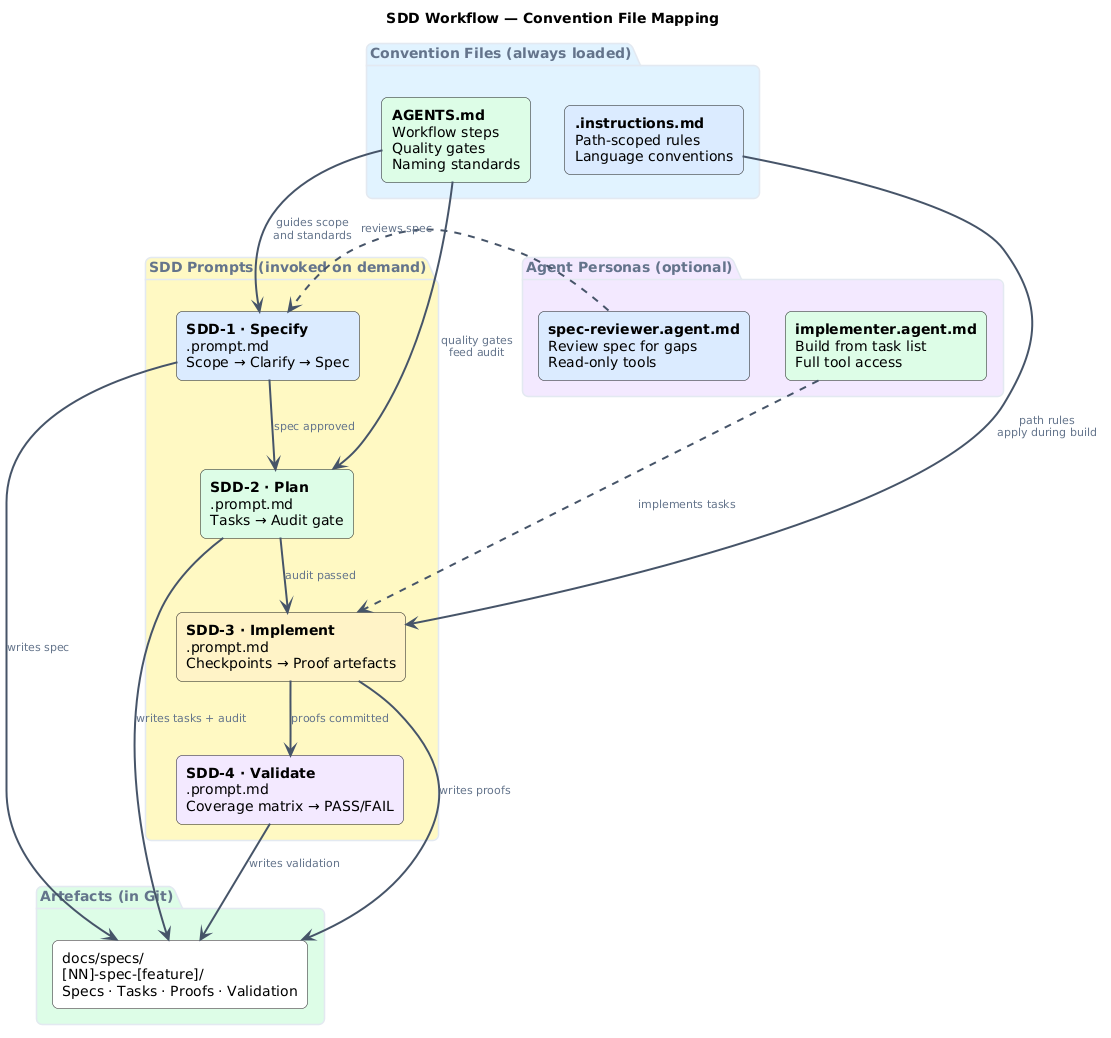
Convention files already solve "how should agents behave in this repo?" SDD addresses a different question: "how should agents approach a specific piece of work from start to finish?"
The mapping is straightforward:
| Convention file | Role in SDD |
|---|---|
| AGENTS.md | Sets the baseline — naming conventions, quality gates, workflow steps. SDD prompts inherit this context. |
| .instructions.md | Path-scoped rules for language, framework, or infrastructure conventions. Applied automatically during the implement step. |
| .prompt.md | The SDD prompts themselves. Install them as slash commands in .github/prompts/. |
| .agent.md | Optional agent personas — a spec reviewer that only reads, an implementer with full tool access. |
| SKILL.md | Reusable capabilities the implementation step can invoke — e.g. a skill for running database migrations or generating Helm charts. |
AGENTS.md and .instructions.md are always loaded. They form the standing instructions. The SDD .prompt.md files are invoked on demand — one per step. Agent personas are optional but useful for teams that want separation between planning and execution.
Adapting SDD prompts for your repos
The raw SDD prompts from Liatrio work out of the box, but they work better when they reference your repo's conventions. Here is how to wire them together.
1. Install the prompts as slash commands
The simplest approach uses Liatrio's slash-command-manager:
uvx --from git+https://github.com/liatrio-labs/slash-command-manager \
  slash-man generate \
  --github-repo liatrio-labs/spec-driven-workflow \
  --github-branch main \
  --github-path prompts/
This installs /SDD-1-generate-spec, /SDD-2-generate-task-list-from-spec, /SDD-3-manage-tasks, and /SDD-4-validate-spec-implementation as native slash commands in your editor.
Alternatively, copy each prompt into .github/prompts/ and they become VS Code .prompt.md slash commands automatically:
.github/prompts/
├── SDD-1-generate-spec.prompt.md
├── SDD-2-generate-task-list-from-spec.prompt.md
├── SDD-3-manage-tasks.prompt.md
└── SDD-4-validate-spec-implementation.prompt.md
2. Wire AGENTS.md into the spec step
Your AGENTS.md already defines workflow steps, quality gates, and naming standards. Reference it from the spec prompt so that SDD-1 inherits your conventions:
# AGENTS.md


---

## Workflow
1. Plan → scope, success criteria, risks
2. Build → implement with tests
3. Document → update runbooks
4. Release → owner sign-off + monitoring


---

## Quality gates
- Every change has an owner
- Risks documented before build
- Docs updated before release


---

## Standards
- Naming: <team>-<service>-<env>
- Environments: dev → staging → prod


---

## Spec-driven development
- Use `/SDD-1-generate-spec` for any change that spans more than one file
- Specs live in `docs/specs/`
- No implementation starts without an audited task list (SDD-2 gate)
That last section is the key addition. It tells agents (and humans) when to use the SDD workflow and where artefacts go.
3. Add path-scoped rules for the implement step
.instructions.md files apply automatically when the agent touches files matching a glob. During SDD-3 (implement), these keep the agent aligned with your language and framework conventions without repeating them in the SDD prompts:
---
applyTo: "infra/**/*.tf"
---
# Terraform conventions
- Use modules from the internal registry
- Tag all resources with team and environment
- No inline IAM policies
---
applyTo: "k8s/**/*.yaml"
---
# Kubernetes conventions
- All manifests use kustomize overlays
- No hardcoded image tags — use digest references
- Resource limits required on all containers
4. Add agent personas (optional)
For teams that want to separate planning from execution, add agent personas:
---
# .github/agents/spec-reviewer.agent.md
description: Reviews specs for completeness, ambiguity, and missing demo criteria
tools: ['search']
---
Review the spec at the path provided. Check for:
- Clear scope boundaries (what is in scope, what is not)
- Testable demo criteria
- Identified risks and mitigations
- Consistency with the AGENTS.md workflow

Do not propose implementation. Flag gaps only.
---
# .github/agents/implementer.agent.md
description: Implements tasks from an SDD task list
tools: ['search', 'editFiles', 'terminalLastCommand']
---
Implement the next incomplete task from the task list.
Follow the AGENTS.md conventions and any .instructions.md
rules that apply to the files being changed.

Before committing, create proof artefacts in the proofs directory.
SDD and operational workflows
If you have used our AGENTS.md approach for operational automation — querying work trackers, populating sprint review decks, updating dashboards — you might wonder how SDD fits alongside it.
The short answer: they are complementary and cover different shapes of work.
| SDD prompts | AGENTS.md operational agents | |
|---|---|---|
| Work shape | Project-shaped: a feature, a migration, a new API endpoint | Ticket-shaped: recurring BAU tasks, data population, report generation |
| Trigger | Engineer invokes /SDD-1-generate-spec when starting a piece of work |
Agent definition runs when the Copilot agent is asked to execute it |
| Artefacts | Specs, task lists, proof documents, validation reports | Updated PlantUML diagrams, Marp slides, dashboard metrics |
| Data source | The codebase itself + human intent | External systems (Jira, GitHub Issues, Azure DevOps) |
| Quality gate | Planning audit + validation coverage matrix | Human confirmation before each query |
For platform engineering teams, SDD covers the development side — golden paths, self-service tooling, migration scripts, new capabilities. Operational agents cover the BAU side — sprint review decks, request metrics, team dashboards.
Both patterns live in the same repo, coexisting without conflict:
.github/
├── prompts/
│   ├── SDD-1-generate-spec.prompt.md
│   ├── SDD-2-generate-task-list-from-spec.prompt.md
│   ├── SDD-3-manage-tasks.prompt.md
│   └── SDD-4-validate-spec-implementation.prompt.md
├── agents/
│   ├── spec-reviewer.agent.md
│   └── implementer.agent.md
├── instructions/
│   ├── terraform.instructions.md
│   └── kubernetes.instructions.md
└── copilot-instructions.md

AGENTS.md              ← workflow + naming + gates
agents.md              ← operational agent definitions (tracker queries, deck population)
docs/specs/            ← SDD artefacts
Apply this: add an SDD section to your AGENTS.md today
The smallest useful change is a single paragraph in your existing AGENTS.md: when to invoke SDD-1, where specs go, and the gate rule (no implementation without an audited task list). That alone changes agent behaviour for any change that spans more than one file — without requiring anyone to learn a new tool. The prompts do the rest.
What makes this approach work
Three things separate repos that use SDD effectively from repos where the prompts gather dust:
The spec step catches scope creep early. SDD-1 validates whether the work is too large, too small, or appropriately sized. Too large and it suggests splitting. Too small and it suggests implementing directly. This single check prevents the most common failure mode: a vague requirement that balloons during implementation.
The planning audit creates accountability. SDD-2 generates a task list and then audits it against the spec. If the tasks do not cover the demo criteria, or if they introduce scope the spec did not describe, the audit flags it. Implementation does not start until the audit passes and the engineer approves remediations.
Proof artefacts prevent "it works on my machine." SDD-3 requires proof artefacts — markdown files documenting what was done, what was tested, and what the results were — before each commit. These are not trophies. They are evidence that feeds the validation step and gives reviewers something concrete to check.
Context rot is real — the emoji markers exist for a reason
SDD's emoji markers (SDD1️⃣, SDD2️⃣, etc.) detect when the AI has lost the plot in a long conversation. When the marker disappears from responses, the agent has likely drifted from the prompt. This isn't a theoretical problem — long SDD-3 sessions (implement) are particularly vulnerable because they accumulate context fast. If the marker vanishes, start a fresh session with the current task list rather than trying to recover the thread.
Context rot and verification markers
SDD includes an unusual feature: emoji markers (SDD1️⃣, SDD2️⃣, SDD3️⃣, SDD4️⃣) at the start of AI responses. These detect context rot — the silent degradation of AI performance as input context grows longer.
Context rot does not announce itself with errors. The agent simply stops following instructions. When the marker appears, it suggests the agent is still tracking the prompt. When the marker disappears, you know to check whether the agent has lost the thread.
This is a lightweight, no-tooling approach to a real problem. If you have run long conversations with AI agents, you have experienced context rot — you just may not have had a name for it.
Practical patterns worth borrowing
Even if you do not adopt SDD wholesale, several patterns are worth extracting for your own convention files:
Clarification-before-planning. SDD-1 can generate a questions file with recommended answers and justification notes before writing the spec. Your AGENTS.md can adopt this: "For changes spanning more than three files, the agent must list open questions and recommended answers before proposing a plan."
Audit gates. SDD-2's planning audit is a quality gate that runs before implementation. Any AGENTS.md can include a similar rule: "No implementation starts until the plan has been reviewed against the acceptance criteria."
Proof-before-commit. SDD-3 requires proof artefacts before each commit. Even without the full SDD workflow, you can add to AGENTS.md: "For significant changes, create a proof file in docs/decisions/ before committing."
Single-threaded execution. SDD-3 enforces working on one task at a time. This reduces work-in-progress and avoids the tangled state that comes from partially completed parallel tasks.
Getting started
The quickest path:
- Read the SDD prompts — they are plain markdown, and the workflow logic is transparent
- Install them as slash commands or copy into
.github/prompts/ - Add a "Spec-driven development" section to your
AGENTS.md - Try it on one feature and see whether the spec-then-plan-then-build cadence reduces rework
The prompts are Apache 2.0 licensed and work with any AI assistant. They are not a product — they are a workflow encoded in markdown. Adapt them, extend them, or simply borrow the patterns that fit.
Further reading
- Spec-Driven Development Workflow — the source repo with prompts and documentation
- SDD Playbook — comprehensive guide with comparison, FAQ, and worked examples
- AI Convention Files: The Complete Taxonomy — every convention file type explained
- Using AGENTS.md for Platform Engineering — workflow, quality gates, and agent collaboration
- Repo-Native AI Workflows — keeping AI work in Git with issues, branches, and PRs
Frequently asked questions
Does SDD work with any AI assistant or only specific tools?
SDD prompts are plain markdown files — they work with any AI assistant that can read a prompt file: VS Code Copilot, Claude Code, Cursor, or even a browser-based chat session where you paste the prompt. The slash-command installer targets VS Code specifically. If you use a different editor, copy the four .prompt.md files into your .github/prompts/ directory — most editors with Copilot support pick them up automatically.
How does SDD handle a feature that turns out to be much larger than the spec suggested?
SDD-1 has an explicit scope check: if the work is too large, it suggests splitting into multiple specs. If you discover scope creep during SDD-3 (implement), the right move is to stop, create a new spec for the expanded scope, and add it to the backlog. Continuing to implement beyond the original spec boundary corrupts the task list audit trail and makes the validation step (SDD-4) meaningless.
Do I need to use all four SDD steps, or can I pick just the parts that help?
You can use individual steps. The spec step (SDD-1) alone — getting a written, reviewed scope before writing any code — is valuable even without the rest. The planning audit (SDD-2) is the second most valuable in isolation. Steps 3 and 4 build on the artefacts from 1 and 2, so they work best when the earlier steps have been completed. Most teams find they naturally adopt all four once they experience the reduction in rework.
How does SDD interact with an existing sprint planning process?
SDD operates at the implementation level, not the planning level. Sprint planning decides what to work on; SDD governs how that work proceeds once a developer picks it up. The spec artefact in docs/specs/ can serve as the implementation spec that links to the original ticket or story. Some teams create the SDD-1 spec during sprint planning as the definition of ready for a story — that's a natural integration point.
What's the right scope threshold for using SDD vs just writing code directly?
Liatrio's guidance: SDD-1 for anything that spans more than one file. That's a reasonable default. The clarification-before-planning step costs 10-20 minutes; if the change is genuinely one-file simple, you've lost nothing by doing it quickly. If the change turns out to be more complex than it looked, you've caught that before implementation started. Err toward using SDD-1 — the spec step is low-cost even when the work is simple.