

Cursor MDC Rules: The More Powerful AI Context File You're Probably Not Using
If you use Cursor, there's a good chance your repo has a .cursorrules file — a flat block of instructions that loads into every session. It works. But there's a newer format, .cursor/rules/*.mdc, that the flat file can't match: scoped rules that only activate when you're editing specific file types, multiple rule sets that coexist in the same repo, and front matter that controls exactly when and how each rule loads.
For platform repos with multiple languages, multiple concerns, and strict boundaries between what should and shouldn't change, the MDC format is meaningfully better. This post explains what's different and what a well-structured .cursor/rules/ directory looks like for a Kubernetes platform repo.
Quick takeaways
.cursor/rules/*.mdcreplaces.cursorrules— the old file still works but the new format is strictly more capable- MDC front matter controls three things: which files trigger the rule (
globs), whether it loads always or on-demand (alwaysApply), and a description Cursor uses to decide whether to attach it automatically - Multiple
.mdcfiles in.cursor/rules/are independent — you can have a YAML-specific rule, a Helm-specific rule, and a Python-specific rule that never interfere with each other - The
descriptionfield is how Cursor decides which rules to auto-attach whenalwaysApplyis false — write it like a one-line brief, not a title
What MDC adds that .cursorrules doesn't
The flat .cursorrules file has one mode: always-on, whole-repo. Every session, every file, the same block of instructions. That's fine for small repos with one language and one concern. For a platform repo touching YAML manifests, Python controllers, Helm charts, and shell scripts, you often end up with rules that contradict each other or are irrelevant to the current task.
MDC solves this with three front matter fields:
---
description: Apply when editing ArgoCD Application manifests
globs: ["apps/**/*.yaml", "argocd/**/*.yaml"]
alwaysApply: false
---
globs — a list of file patterns. When you open or edit a file that matches, Cursor loads this rule automatically. When you're editing a Python file, the ArgoCD YAML rule doesn't load. No noise.
alwaysApply — when true, the rule loads in every session regardless of what files are open. Use this for org-wide conventions that apply to everything. When false, Cursor decides whether to load the rule based on the description and the current context.
description — used by Cursor's rule-selection logic to decide whether to auto-attach the rule when alwaysApply is false. Write it as a brief that tells Cursor when this rule is relevant: "Apply when editing Helm values files" rather than "Helm conventions".
The description field does real work
When alwaysApply: false and no globs match, Cursor reads the description and decides whether the current task warrants loading the rule. A description like "Apply when working with ArgoCD sync configuration" will cause Cursor to load the rule during conversations about ArgoCD even if you haven't opened a matching file yet. Write descriptions that describe the scenario, not the rule itself.
The rule types in practice
Always-on rules — org-wide conventions that apply regardless of context. Sync model, forbidden paths, naming conventions. These are essentially your AGENTS.md content, reformatted for Cursor.
---
description: Platform engineering baseline — always load
alwaysApply: true
---

## This is a platform repo

Changes to `main` auto-deploy to production via ArgoCD (~90 seconds).
There is no staging buffer between a merged PR and a running cluster.

## Forbidden paths

Never modify these — they're managed by automated pipelines:
- `crds/` — upgrade-crds pipeline only
- `infra/providers/` — bootstrap workflow only
- `.github/workflows/` — reviewed separately, never auto-generated
File-scoped rules — loaded only when editing specific file types. This is where MDC earns its value over .cursorrules.
---
description: ArgoCD Application manifest conventions
globs: ["apps/**/*.yaml", "applications/**/*.yaml"]
alwaysApply: false
---

## ArgoCD Application naming

Pattern: `<team>-<service>-<env>` — no underscores, no abbreviated envs.

Correct: `payments-api-prod`
Wrong: `payments_api_prd`, `payments-api-production`

## Sync settings

Auto-sync Applications use `prune: true, selfHeal: true`.
Never set `automated: {}` without both fields.

## Health checks

Every Application should have a health check that maps to the
Deployment or StatefulSet being managed. Don't leave it defaulting
to `Healthy` if the underlying resource has custom health logic.
On-demand rules — set alwaysApply: false with no globs. Cursor loads them when the description matches the task, or you can reference them manually.
---
description: Use when writing Kyverno policies — validation rules, CEL expressions, test cases
alwaysApply: false
---

## Kyverno policy conventions

Always start with `validationFailureAction: Audit`.
Switch to `Enforce` only after a week of clean audit logs.

## CEL expressions

Prefer CEL over JMESPath for new policies (v1.17+).
Use `request.object` not `object` in admission rules.

## Test structure

Every policy needs a test file in `policies/tests/` with at least:
- One passing resource
- One failing resource
- One edge case
Apply this: one rule file per concern
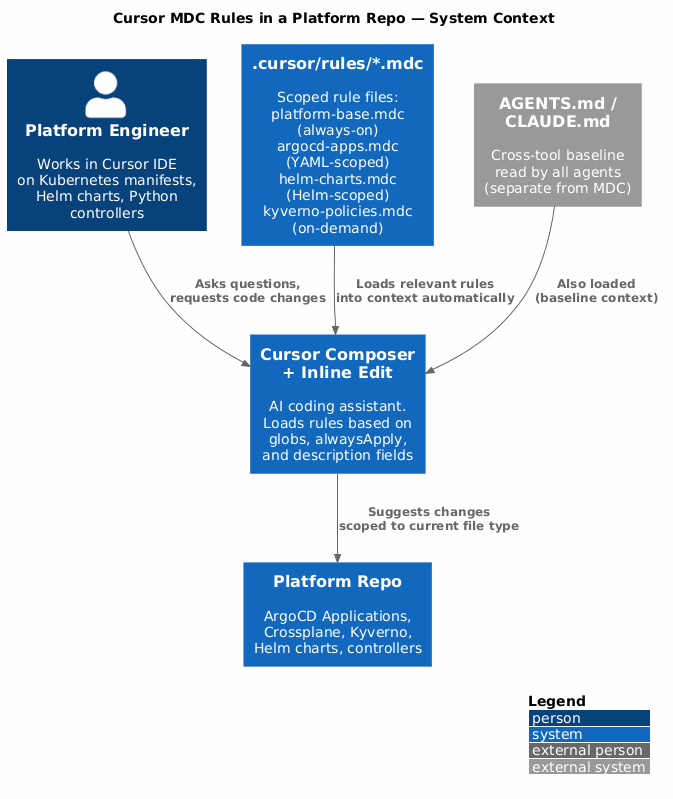
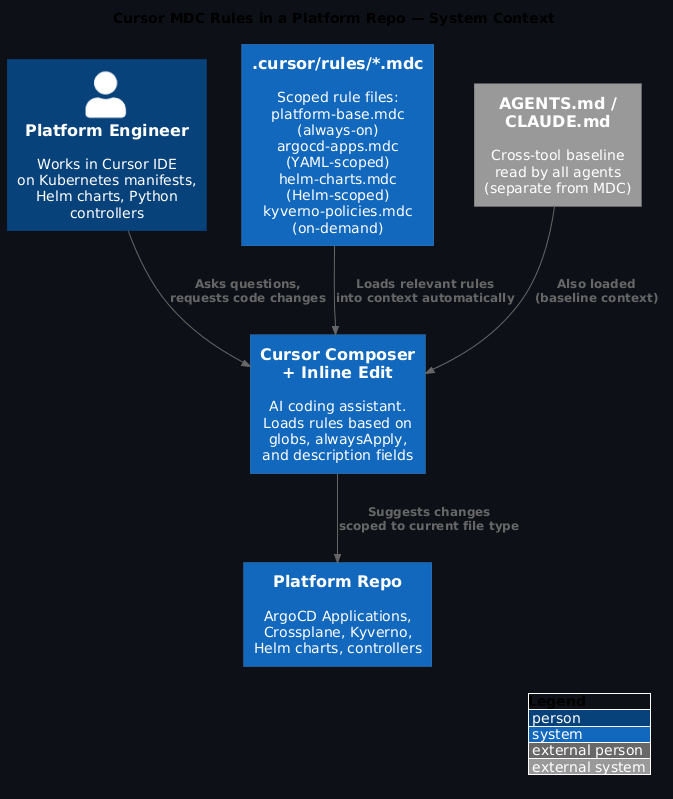
Resist the temptation to put everything in one big MDC file. The point of the format is that rules load when relevant and stay quiet when they're not. A rule file called platform-base.mdc (always-on, 10 lines), argocd-apps.mdc (YAML-scoped), helm-charts.mdc (Helm-scoped), and kyverno-policies.mdc (on-demand) will serve you better than one 100-line file that loads everything every time.
A complete .cursor/rules/ directory for a platform repo
.cursor/
└── rules/
    ├── platform-base.mdc        # always-on: sync model, forbidden paths
    ├── argocd-applications.mdc  # globs: apps/**/*.yaml
    ├── crossplane-compositions.mdc  # globs: crossplane/**/*.yaml
    ├── helm-charts.mdc          # globs: charts/**
    ├── kyverno-policies.mdc     # on-demand: kyverno policy writing
    ├── python-controllers.mdc   # globs: controllers/**/*.py
    └── shell-scripts.mdc        # globs: scripts/**/*.sh
Each file is small — 10 to 30 lines of focused, context-specific guidance. The always-on file covers the org-wide non-negotiables. The scoped files cover the domain-specific conventions that only apply when you're actually in that domain.
Don't duplicate your AGENTS.md in platform-base.mdc
If your repo already has AGENTS.md, you don't need to copy its content into the Cursor rule files. AGENTS.md is read by Claude Code, Cursor (via Composer), GitHub Copilot, and Codex CLI. The Cursor MDC rules are in addition to AGENTS.md, not instead of it. Use platform-base.mdc for Cursor-specific behaviour — how it responds to inline edit requests, how it structures diffs, what it should ask before making changes — not to repeat the org conventions already in AGENTS.md.
How this fits with AGENTS.md and CLAUDE.md
Think of the three files as covering different surfaces:
AGENTS.md — cross-tool baseline. Every agent that touches your repo reads this. It's the org-wide contract: sync model, forbidden paths, naming conventions, secrets handling. Don't duplicate it in your MDC files.
CLAUDE.md — Claude Code-specific. Memory configuration, MCP tool access, custom slash commands, task templates. Invisible to Cursor and Copilot.
.cursor/rules/*.mdc — Cursor-specific. Scoped rules, domain-specific guidance, how Cursor behaves in inline edits vs Composer sessions vs auto-complete.
The three coexist without conflict. A platform repo should have all three.
Migrating from .cursorrules
If you have an existing .cursorrules file, migration is straightforward:
- Create
.cursor/rules/platform-base.mdcwithalwaysApply: true - Copy your existing
.cursorrulescontent into it - Delete
.cursorrules - Over time, extract domain-specific sections into their own scoped rule files
Cursor will continue reading .cursorrules for legacy compatibility, but the MDC files take precedence when both exist.
FAQ
Does MDC work in Cursor's Composer and inline edit modes?
Yes, with slightly different behaviour. In Composer (the chat panel), all relevant rules load based on the files in context and the description fields. In inline edit mode (Cmd+K), Cursor loads rules matching the file you're editing. Always-on rules load in both modes.
Can I have rules that apply to specific directories, not just file types?
Yes — globs supports path patterns, not just extensions. ["infra/crossplane/**"] scopes the rule to everything under infra/crossplane/, regardless of file type. Combine path and extension patterns: ["charts/**/*.yaml", "charts/**/*.tpl"] covers both YAML and template files in your charts directory.
What's the maximum number of rule files before Cursor gets overloaded?
There's no documented hard limit, but in practice the total character count of loaded rules matters more than the number of files. Cursor's context window fills up like anything else. Keep individual rule files under 500 tokens and the total loaded at any one time under 2,000 tokens. If you find Cursor ignoring rules, the context window is usually the culprit.
Should the .cursor/rules/ directory be committed to git?
Yes. Treat it like AGENTS.md — it's infrastructure, it belongs in the repo, and it should go through code review when it changes. If you maintain a platform-standards repo for your org, include .cursor/rules/ templates there and sync them with the same mechanism you use for AGENTS.md.
Do MDC rules work with Claude in Cursor's Composer?
Yes — when you use Claude as the model in Cursor's Composer, it reads the MDC rules like any other Cursor model. The rules load into Claude's context the same way. This is one reason not to duplicate AGENTS.md content in your MDC files: if you're using Claude via Cursor, it's already reading AGENTS.md directly.
The example .cursor/rules/ files from this post are available as templates in the ai-capabilities repo.