HolmesGPT Knows What Your Runbooks Are Missing. Here's How to Fix It.
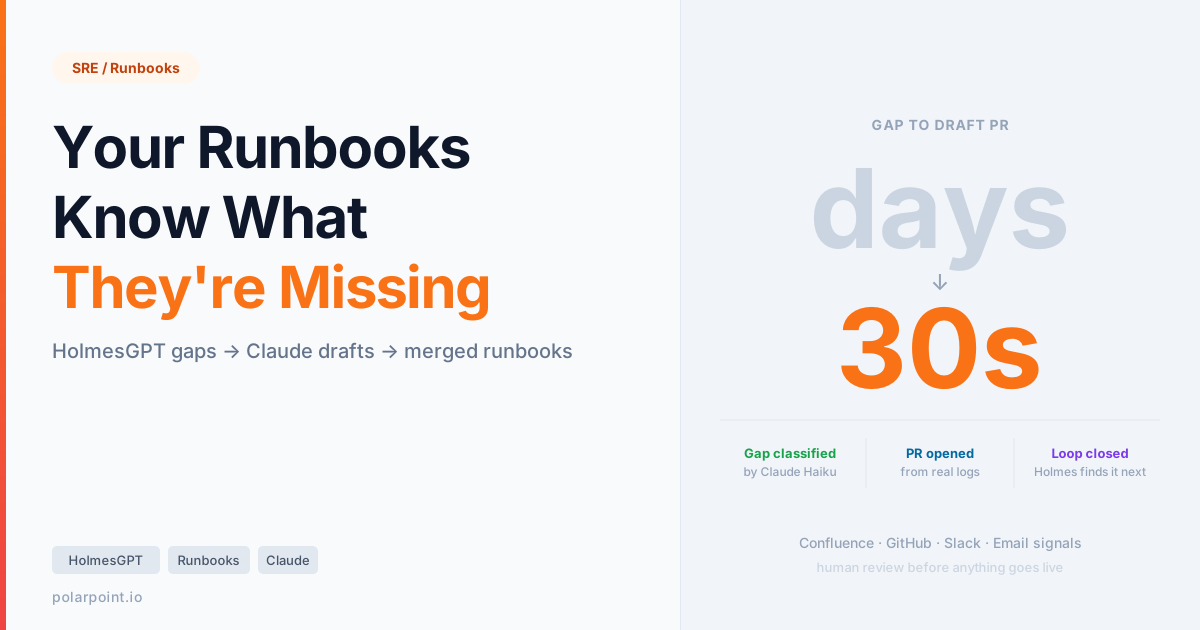
Your runbooks are wrong. Not all of them — but the ones that matter most are the ones that don't exist yet. Every incident HolmesGPT handles without finding a matching runbook is a signal. Every Slack access request it can't resolve from policy. Every team repeating the same escalation pattern. That's your knowledge base telling you exactly where it's incomplete.
This post builds a closed-loop system that listens to those signals and drafts the missing runbooks — automatically, with human review before anything goes live.
If you haven't read From Alert to Root Cause: HolmesGPT in Production, start there. This post assumes Holmes is running with Confluence and Slack configured, and you're ready to close the feedback loop.
Quick takeaways
- Every failed Confluence lookup, every improvised investigation, every repeated Slack query is a runbook gap. Holmes logs them all.
- The holmesgpt-runbook-mcp server gives Holmes five structured tools: search runbooks by CQL property query, classify a gap, draft a runbook, open a PR, and analyse root cause from the KB.
- You review and merge. Next time Holmes hits the same incident, it finds the runbook on the first CQL query — not a fuzzy text match.
- The same loop works for team emails and support tickets — anything Holmes processes that it couldn't resolve from existing knowledge.
- This is the difference between a static knowledge base and one that learns from operations.
The problem: runbooks decay faster than incidents
You write a runbook when something breaks badly enough that you never want to diagnose it from scratch again. Then:
- The service changes. The runbook doesn't.
- A new failure mode appears that didn't exist when the runbook was written.
- A new team joins. They have different escalation paths and tooling.
- Holmes handles an incident, can't find the relevant page, improvises a fix — and nobody writes it down.
The runbook gap compounds silently. Holmes handles it this time. Handles it next time. The third time, it's 2am and a different engineer is on-call and the context that Holmes had to reconstruct from scratch last time isn't available because nobody turned it into documentation.
The fix isn't telling engineers to write more runbooks. It's making the gap visible and turning the signal into a draft.
Where the signals come from
Holmes generates four types of runbook signal you can capture:
1. Failed Confluence lookups When Holmes searches your knowledge base and finds nothing relevant, it logs it. The search query itself tells you what's missing — "payments OOMKill connection pool", "RDS failover EKS node group", "ingress rate limiting prod". These are the queries your on-call engineers will type into Confluence next time too.
2. Improvised investigations Holmes completes an investigation but notes "no matching runbook found — resolved via live investigation." The investigation output is the runbook. It just hasn't been written to Confluence yet.
3. Repeated Slack patterns Access requests or incident queries that Holmes sees multiple times with no policy match. "I need prod-payments access" with no Confluence policy page is a gap. "How do I restart the ingestion pipeline" asked four times in a month means the restart procedure isn't documented.
4. Email and ticket patterns If you forward ops email or support tickets to Holmes, it processes them the same way. Clusters of similar requests without a resolved-from-runbook outcome are gaps.
The architecture
Holmes investigation → MCP tool call → classify gap → draft runbook → GitHub PR → human review → Confluence
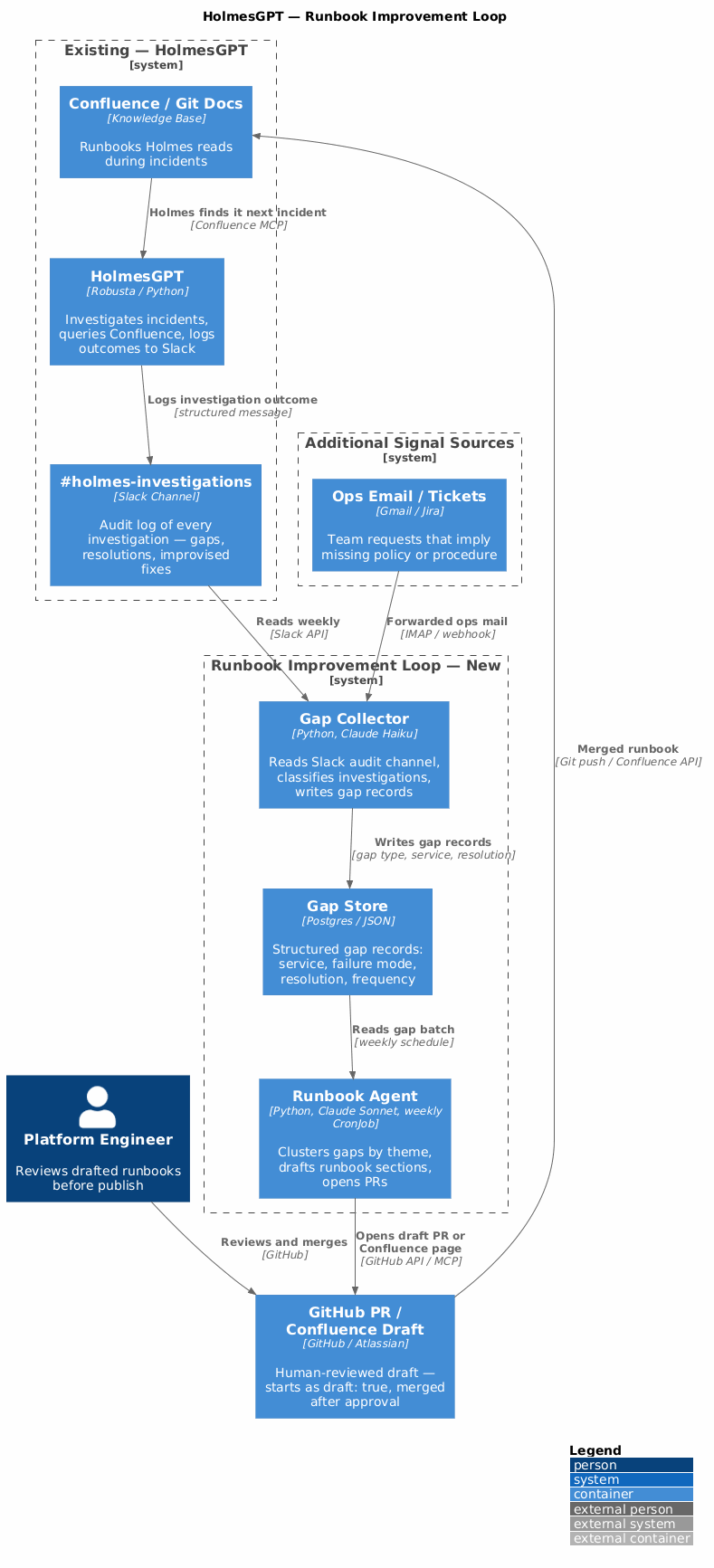
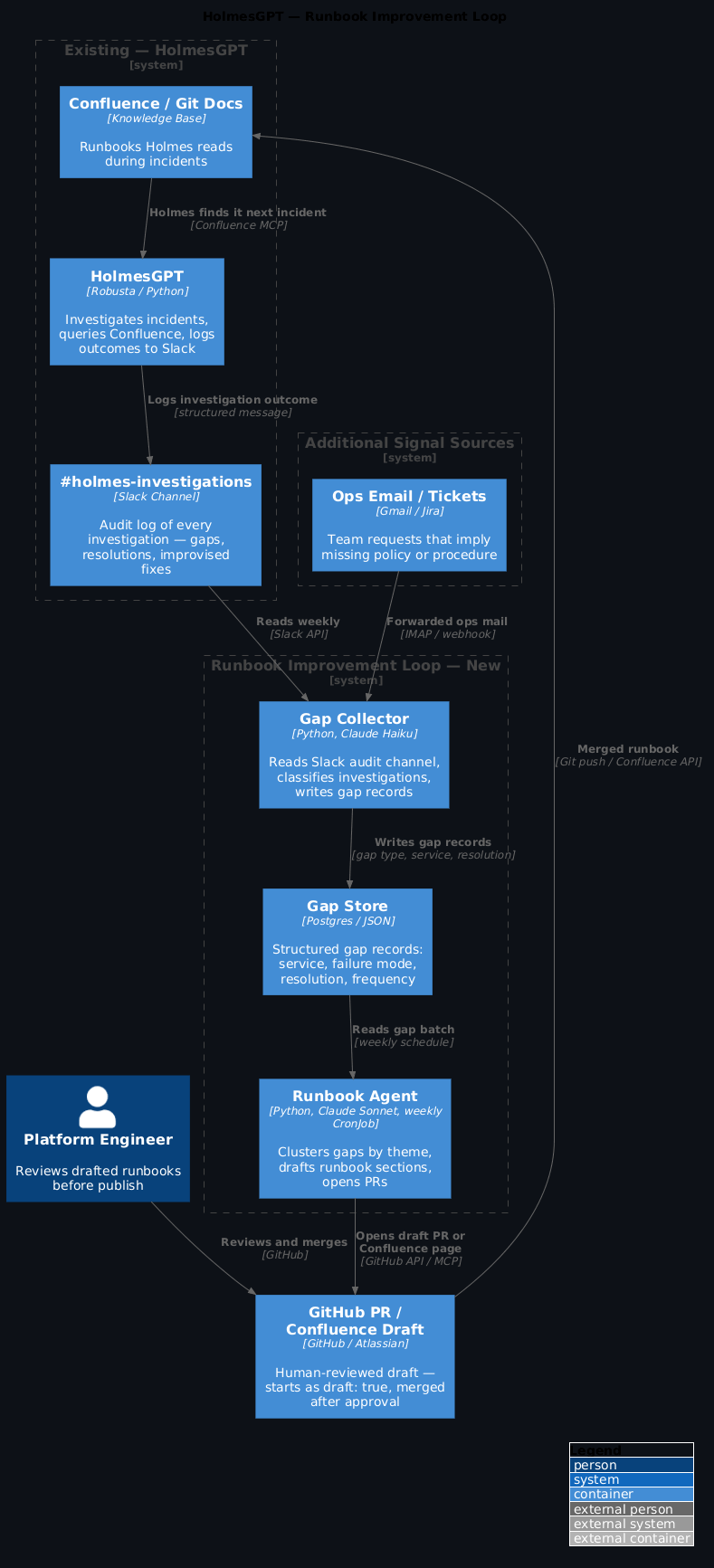
The loop is powered by holmesgpt-runbook-mcp — a FastMCP server that runs alongside Holmes in your cluster and exposes five tools:
| Tool | When Holmes calls it |
|---|---|
runbook_search |
First — finds existing runbooks by CQL property query |
runbook_get |
After search — retrieves full page content |
investigation_classify |
After every investigation — detects gaps via Claude Haiku |
runbook_draft |
When gap count hits threshold — Sonnet drafts + opens PR |
root_cause_analyse |
During active incident — KB-augmented root cause with live data |
Why MCP over a batch pipeline: A CronJob reading Slack logs introduces a week's lag and cold context. The MCP server lets Holmes classify and draft within the same investigation session — the draft PR has the full investigation context, not a reconstructed summary.
Review gate — every draft goes through human review before merge. The PR starts as Status: Draft. A platform engineer changes it to Approved before the MkDocs CI build publishes it to Confluence. This is not optional — the server drafts, you decide.
Wiring up the MCP server
Deploy holmesgpt-runbook-mcp alongside Holmes in your cluster:
# Create secrets (or use ExternalSecrets — see deploy/externalsecret.yaml in the repo)
kubectl create secret generic holmesgpt-runbook-mcp-secrets \
  --namespace platform-tools \
  --from-literal=anthropic-api-key=$ANTHROPIC_API_KEY \
  --from-literal=confluence-url=$CONFLUENCE_URL \
  --from-literal=confluence-username=$CONFLUENCE_USERNAME \
  --from-literal=confluence-api-token=$CONFLUENCE_API_TOKEN \
  --from-literal=github-token=$GITHUB_TOKEN

kubectl apply -f https://github.com/polarpoint-io/holmesgpt-runbook-mcp/blob/main/deploy/
Then wire it into Holmes's config:
# holmes-config.yaml
mcpServers:
  - name: holmesgpt-runbook-mcp
    url: http://holmesgpt-runbook-mcp.platform-tools.svc.cluster.local:8080/mcp
Holmes now has five new tools available during every investigation. It will prefer runbook_search over the raw Confluence MCP when looking for runbooks — the property-based CQL is more precise than full-text search.
The investigation_classify tool is the gap detector
Holmes calls investigation_classify at the end of every investigation. Claude Haiku classifies the log in under a second: has_gap=true, service=payments-api, failure_mode=OOMKill, confidence=high. The server accumulates these. When a (service, failure_mode) pair hits 2+ gaps, Holmes calls runbook_draft automatically.
What the MCP server does during a live investigation
Here's the tool call sequence Holmes follows with the MCP server wired in:
1. Alert fires → Holmes starts investigation
Holmes calls: runbook_search(service="payments-api", alert_name="KubePodOOMKilled")
→ Returns: [{title: "RB - payments-api OOMKill", url: "...", mttr: "15m", ...}]

Holmes calls: runbook_get(page_id="12345")
→ Returns: full runbook content including diagnosis steps and resolution paths
If a runbook is found, Holmes uses it directly. No improvisation, no gap.
2. No runbook found → Holmes improvises → classifies the gap
Holmes calls: investigation_classify(
  investigation_log="<full investigation text>",
  alert_name="KubePodOOMKilled",
  namespace="payments"
)
→ Returns: {has_gap: true, confidence: "high", service: "payments-api",
             failure_mode: "OOMKill", resolution: "helm rollback payments 3"}
3. Gap count hits threshold → Holmes drafts
Holmes calls: runbook_draft(
  service="payments-api",
  failure_mode="OOMKill",
  alert_name="KubePodOOMKilled",
  investigation_logs=["<log1>", "<log2>", "<log3>"],
  namespace="payments",
  priority="high"
)
→ Returns: {pr_url: "https://github.com/.../pull/142", pr_number: 142, ...}
The draft PR is open in under 30 seconds from the end of the investigation. The runbook is in the AI-optimised format, generated from the actual resolution steps in the logs.
4. Root cause analysis during the next incident
Holmes calls: root_cause_analyse(
  alert_name="KubePodOOMKilled",
  namespace="payments",
  service="payments-api",
  pod_logs="<kubectl logs output>",
  metrics_summary="memory_working_set: 254Mi / 256Mi limit"
)
→ Returns: {
    most_likely_cause: "Memory leak in v2.3.1 — linear heap growth post-deploy",
    confidence: "high",
    recommended_action: "helm rollback payments 3",
    escalate_immediately: false,
    matching_runbooks: [{title: "RB - payments-api OOMKill", url: "..."}]
  }
Holmes surfaces this in the incident Slack thread before a human has even looked at the alert.
What a drafted runbook looks like
The agent produces markdown that your MkDocs build publishes to both your documentation site and Confluence (via the python-mkdocs-to-confluence plugin). There's a formatting choice here that matters a lot for HolmesGPT.
Why confluence_properties changes everything
When Holmes queries Confluence looking for a runbook, it's doing a CQL (Confluence Query Language) search via the Confluence MCP. With standard prose runbooks, that query is a fuzzy text search across the entire page body. With confluence_properties frontmatter, you can write a precise CQL query:
type=page AND label=runbook AND property["Service"]="payments-api" AND property["Failure-Mode"]="OOMKill"
The plugin converts the confluence_properties: frontmatter dict into a native Confluence Page Properties macro — the same one used by Page Properties Reports. Holmes finds the exact runbook before reading a word of it.
The runbook agent's draft prompt should produce this format. Here's the payments OOMKill example — drafted from four HolmesGPT investigation logs:
---
title: 'RB - payments-api OOMKill'
tags:
  - runbook
  - payments
  - kubernetes
  - memory
toc: true
confluence_properties:
  Service: payments-api
  Failure-Mode: OOMKill
  Alert-Name: KubePodOOMKilled
  Severity: P1-P2
  MTTR: 15m
  Owner: platform-team
  Status: Draft
  Last-Tested: 2026-06-28
labels: [runbook, payments, critical]
---

# RB — payments-api: OOMKill

## Alert Match

| Field | Value |
|-------|-------|
| Alert name | `KubePodOOMKilled` |
| Prometheus query | `kube_pod_container_status_last_terminated_reason{reason="OOMKilled", namespace="payments"} > 0` |
| Namespace | `payments` |
| Affected resource | `deployment/payments-api` |

**Symptom signals:**
- Pod termination reason: `OOMKilled` in `kubectl describe`
- Alert fires in: `#alerts-platform`
- Grafana panel: **Payments API — Memory Working Set**

---

## Quick Summary

`payments-api` has been killed by the Linux OOM killer because its working set
exceeded the container limit (256Mi). Most common cause is a batch reconciliation
job or checkout burst holding large order objects in memory. Restart restores
service in ~60s; if recurring more than twice daily, escalate for a limit increase
or memory leak investigation.

---

## WHAT

The Kubernetes OOM killer terminated `payments-api`. Kubernetes restarts the pod
automatically, but repeated kills push it into `CrashLoopBackOff`.

**Impact:** Payment processing fails during the restart window (~60s).
Data loss risk: low (transactions are idempotent).

## WHY

- **Reconciliation job** — loads a full order slice; volume growth may now exceed the limit
- **Memory leak** — gradual heap growth visible as a sawtooth in Grafana
- **Traffic spike** — checkout burst driving concurrency above what the limit sustains
- **Limit too low** — original limit not reviewed since a recent payload size increase

## HOW

### 1. Confirm the alert

```bash
kubectl describe pod -n payments -l app=payments-api | grep -A8 "Last State"
Expected: Reason: OOMKilled / Exit Code: 137.
If reason is different — this is a different failure mode, stop here.
2. Diagnose (decision tree)
Is this recurring?
- 2+ kills in 24h → memory leak or wrong limit → jump to Investigate memory growth - First/second kill → likely spike → jump to Rolling restart and monitorIs the reconciliation job running?
- Yes → jump to Reconciliation job OOM3. Rolling restart and monitor
kubectl rollout restart deployment/payments-api -n payments
kubectl rollout status deployment/payments-api -n payments
Watch Grafana memory panel. If working set climbs again without traffic increase, escalate to memory growth path.
4. Escalation
| Severity | Contact | Channel |
|---|---|---|
| P1 — repeated kills | @payments-oncall |
#payments-incidents |
| P2 — single kill, recovered | @platform-team |
#platform-alerts |
Generated by HolmesGPT Runbook Agent from 4 investigation logs. Review and remove
Status: Draftbefore publishing.[Runbook Draft] RB - payments-api OOMKill!!! tip "The Alert Match and Quick Summary sections are what make this agent-readable" Holmes needs to match the runbook *before* reading it in full. `Alert-Name` in `confluence_properties` enables CQL matching. `Alert Match` gives Holmes the exact Prometheus query and symptom signals to confirm a match. `Quick Summary` is what gets surfaced in the incident Slack thread — one paragraph Holmes can paste directly without reading the full HOW section. !!! note "Adapt the structure to match your existing runbooks" The agent prompt includes a `format` block you control — point it at your runbook template. The [WHAT / WHY / HOW structure used by the Polarpoint monitoring runbooks](https://github.com/polarpoint-io/markdown-pol-docs/tree/main/docs/technical-practices/monitoring-observability/runbooks) is the base; the `Alert Match`, `Quick Summary`, and `confluence_properties` frontmatter are the additions that make it agent-readable. --- ## The PR that holmesgpt-runbook-mcp opens The `runbook_draft` tool handles everything: Sonnet drafts the content, the server formats it in the [Polarpoint AI-optimised runbook format](https://github.com/polarpoint-io/markdown-pol-docs/blob/main/docs/technical-practices/monitoring-observability/runbooks/rb_template_ai_optimized.md) with `confluence_properties` frontmatter, and opens a GitHub draft PR with a review checklist:
Generated by: holmesgpt-runbook-mcp Priority: high Incidents that triggered this draft: 3 Service: payments-api | Failure mode: OOMKill
Before merging: - [ ] Verify diagnosis steps are accurate for your environment - [ ] Check escalation contacts and channels are current - [ ] Add cross-links to related runbooks - [ ] Confirm commands are safe to run in production - [ ] Change Status: Draft → Status: Approved in frontmatter
Once merged, the MkDocs CI build publishes it to Confluence with the `confluence_properties` frontmatter rendered as a Page Properties macro. From that point, `runbook_search` finds it by CQL — not by text match.

!!! warning "Don't skip the review gate"
    The server drafts from real investigation logs, which means it's working from what actually happened — not hypothetical procedures. But it doesn't know your current escalation contacts, which commands require prod access approval, or whether a particular resolution was a one-off workaround or the correct fix. Every draft starts as `Status: Draft`. A human reads it before Holmes can cite it.

---

## Wiring in email and tickets

If your team receives ops emails or support tickets, you can feed those into the same gap store:

```python
# email_processor.py — for Gmail via MCP or forwarded ops mailbox

def process_ops_email(email_body: str, subject: str) -> dict:
    """Extract potential knowledge gaps from ops email."""
    response = client.messages.create(
        model="claude-haiku-4-5-20251001",
        max_tokens=400,
        messages=[{
            "role": "user",
            "content": f"""Is this ops email a request that suggests a missing runbook or policy?

Subject: {subject}
Body: {email_body}

Return JSON:
- is_gap: bool (true if this is a how-do-I or help-with-X request)
- gap_description: str (what knowledge is missing)
- category: access_request|incident|how_to|escalation|other
- service: str or null

Return only valid JSON."""
        }]
    )
    return json.loads(response.content[0].text)
Set up a forwarding rule from your ops inbox to the collector. Same logic, same gap store. Now your runbook gaps include everything your team emails about, not just what Holmes handled.
Deploying it like any other platform service
The MCP server ships with K8s manifests — Deployment, Service, and ExternalSecret (Vault-backed). Drop the deploy/ folder into your platform repo and let ArgoCD reconcile it:
# Add to your platform repo
cp -r /path/to/holmesgpt-runbook-mcp/deploy platform-repo/apps/holmesgpt-runbook-mcp/
git add . && git commit -m "feat: holmesgpt-runbook-mcp deployment"
git push
# ArgoCD picks it up
The ExternalSecret pattern matches your existing HolmesGPT secrets — same Vault path structure, same rotation policy. The server runs as a non-root pod with a read-only root filesystem. Logs go to stdout and are picked up by your OTel collector like everything else.
It's a long-running service, not a CronJob
Unlike a batch pipeline, the MCP server runs continuously — Holmes calls into it during live investigations. The gap state (which (service, failure_mode) pairs have been seen N times) is held in memory per-pod. If you need persistence across restarts, the server can be extended to write gap records to a Postgres sidecar. The repo README covers this extension.
What changes in your next incident
Before this loop: Holmes handles the incident, improvises a resolution, logs it to Slack. The knowledge lives in the Slack thread. The next engineer on call reconstructs the same investigation.
After this loop: Holmes handles the incident, improvises a resolution, logs it. The gap collector captures it. Next Monday, the agent drafts the runbook. Your team reviews and merges it Thursday. The following week, when the same failure mode appears, Holmes finds the Confluence page in the first search and surfaces the resolution directly in the incident summary.
The loop takes about two weeks to close. Every week after that, your runbook coverage improves — driven by what Holmes actually tried to find, not what someone remembered to write.
What you get
- Runbooks that reflect your real failure modes, not the ones you anticipated when you set the system up
- A gap backlog you can prioritise — high-frequency failures first
- Drafts that include the actual resolution steps from real incidents, not hypothetical procedures
- Email and ticket signal feeding the same loop — nothing falls through the cracks
- A GitOps-managed, auditable process: every runbook has a PR, every PR has a source
FAQ
What if the draft quality is bad?
It won't be great at first — especially for failure modes with complex resolution paths. That's fine. The review gate exists for this reason. A mediocre draft that captures the right diagnosis steps and escalation path is still better than no runbook. Your team edits it before merge.
How do I prevent the same gap being drafted multiple times?
The gap store tracks which gaps have produced a draft. The collector deduplicates on (service, failure_mode) before writing. You'll occasionally get a near-duplicate — the review step catches these and you merge the better one.
Do I need to run Holmes for a while before this is useful?
Yes. You need a few weeks of investigation logs before the clustering has enough signal to produce quality clusters. Start the gap collector immediately, but run the runbook agent monthly for the first two months, then switch to weekly once you've got volume.
Can I use this without Confluence? Our runbooks are in Git.
Yes — swap the Confluence MCP call for the GitHub PR opener. The agent writes markdown, the destination is up to you. Some teams use both: Confluence for operational runbooks (searchable by Holmes during incidents), Git for the source of truth that syncs to Confluence on merge.
What about runbooks that are outdated rather than missing?
That's the next loop. If Holmes finds a Confluence page but the resolution in that page fails — and Holmes logs an alternative resolution — that's an update signal, not a creation signal. The gap collector can distinguish these (the classifier returns "type": "outdated" vs "type": "missing"). The runbook agent can open an update PR instead of a creation PR. That extension is left as an exercise, but the architecture supports it.
For the baseline HolmesGPT setup that feeds this loop, see From Alert to Root Cause: HolmesGPT in Production. For the MkDocs → Confluence pipeline that makes runbooks CQL-queryable, see Git is the Source. Confluence is the Search Layer.. The MCP server source is at github.com/polarpoint-io/holmesgpt-runbook-mcp. For building this loop spec-first with BMAD — including the verified-flag gate the PRD phase surfaced — see BMAD in Practice.