Multi‑Cluster GitOps with ArgoCD: The Operational Blueprint
One cluster is manageable. Two is fine. Five is where things start getting interesting. Somewhere around ten, you're not managing Kubernetes anymore — you're managing the management of Kubernetes, and that's a different job entirely.
The pattern most teams fall into is depressingly predictable. You start with one ArgoCD instance, one cluster, everything works great. Then a new environment lands — staging needs to be production-like, a regional cluster gets spun up, a client needs isolation. Each new cluster gets a copy of the configuration from the last one, tweaked by hand. Promotions happen by copying YAML between directories and hoping nothing was missed. Six months in, you've got seven clusters and no real confidence they're running the same thing.
Config drift isn't a discipline problem. It's an architectural one. You need a model that makes consistency the default, not something you have to manually enforce.
The architecture that actually scales
The key mental shift with multi-cluster ArgoCD is moving from "ArgoCD manages apps" to "ArgoCD manages apps across a registered fleet". One ArgoCD control plane, a registered cluster list, and ApplicationSets that fan out automatically.

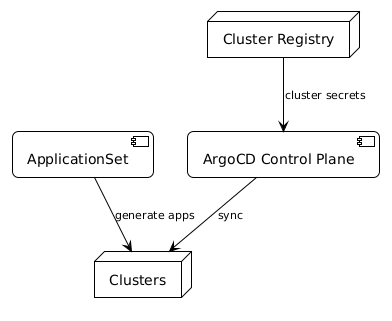
The three components you're building:
Cluster registry — ArgoCD discovers clusters through Kubernetes secrets in the argocd namespace. Each secret has a specific format: the cluster name, server URL, and credentials. When you register a cluster, ArgoCD can target it. Add the cluster to the registry, and it becomes part of the fleet. Remove it, and it drops out cleanly.
ApplicationSets — this is where the fan-out happens. Instead of creating individual Application resources per cluster, you create one ApplicationSet with a generator that matches against your cluster registry. The generator produces one Application per matching cluster automatically. Add a new cluster to the registry and it gets the ApplicationSet deployed without any manual steps.
Promotion via Git — promotion between environments happens in Git, not in ArgoCD. Tag a commit, merge to a branch, update an image tag in a values file. ArgoCD watches for the change and syncs. The promotion is auditable, reversible, and doesn't require touching the control plane directly.

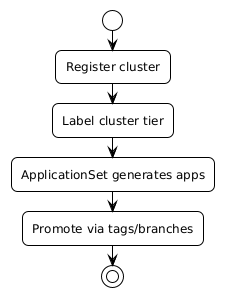
The label taxonomy is your fleet segmentation model
The labels on your cluster registry secrets (environment: production, region: uk, tier: critical) are what ApplicationSet generators match against. Design them deliberately before you start adding clusters — changing label keys after you have 10 clusters registered is painful. Start with environment, region, and tier as your core three.
What the ApplicationSet actually looks like
The cluster generator is the simplest way to start:
apiVersion: argoproj.io/v1alpha1
kind: ApplicationSet
metadata:
  name: platform-baseline
  namespace: argocd
spec:
  generators:
    - clusters:
        selector:
          matchLabels:
            environment: production
  template:
    metadata:
      name: '{{name}}-platform-baseline'
    spec:
      project: platform
      source:
        repoURL: https://github.com/your-org/platform-config
        targetRevision: HEAD
        path: 'clusters/{{name}}/baseline'
      destination:
        server: '{{server}}'
        namespace: platform-system
      syncPolicy:
        automated:
          prune: true
          selfHeal: true
The {{name}} and {{server}} placeholders come from the cluster registry secret labels. Add a new cluster secret with environment: production and this ApplicationSet targets it immediately. No edits required.
Cluster registry: what the secret looks like
apiVersion: v1
kind: Secret
metadata:
  name: prod-uk-cluster
  namespace: argocd
  labels:
    argocd.argoproj.io/secret-type: cluster
    environment: production
    region: uk
type: Opaque
stringData:
  name: prod-uk
  server: https://prod-uk.internal.example.com
  config: |
    {
      "bearerToken": "<token>",
      "tlsClientConfig": {
        "insecure": false,
        "caData": "<base64-ca>"
      }
    }
The labels on the secret are what the ApplicationSet generator matches against. Add region: uk and you can write ApplicationSets that only target UK clusters. Add tier: critical and you can separate high-availability workloads from standard ones. The label structure is your fleet segmentation model — design it deliberately.
The copy-paste fleet tell
If you're cloning one cluster's ArgoCD Application YAML and editing it by hand for each new cluster, you'll accumulate drift faster than you can track it. That's the pre-ApplicationSet pattern — it breaks around cluster five or six when someone edits the wrong copy. ApplicationSets with cluster generators are the fix: one definition, automatic fan-out.
Promotion without chaos
The temptation with multi-cluster setups is to build complex promotion pipelines. Resist it. The simplest approach that works:
One Git repository with per-environment directories. clusters/dev/, clusters/staging/, clusters/prod-uk/, clusters/prod-eu/. Each ApplicationSet targets the right path based on cluster labels. Promotion is a PR that updates values in the target directory. ArgoCD syncs the change. Done.
For image promotion specifically, tools like Argo CD Image Updater or a simple GitHub Action that opens a PR on new image tags keep the process automated without removing the human approval step where you want it.
What you're avoiding: imperative promotion scripts, manual kubectl apply across clusters, and the situation where staging and production have diverged so much that staging isn't actually testing what will go to production.
The operational difference
The before and after is pretty stark.
Before: adding a new cluster means copying configuration from an existing cluster, editing it by hand, applying it manually, and hoping you didn't miss any of the seven customisations that were made to the original over the past year.
After: register the cluster secret with the right labels. ApplicationSets that match those labels deploy automatically. The new cluster is consistent with every other cluster in that fleet segment from the moment it's registered.
Drift stops being something you chase after and starts being something ArgoCD's self-heal catches before you even notice. Promotions are git operations with full audit trails. Rolling back is reverting a commit.
It's not magic. You still need to design your repository structure and your label taxonomy thoughtfully. But the operational ceiling — the point where the approach breaks down — is dramatically higher.
Apply this: register one cluster, validate the fan-out
Before registering your full fleet, register a single non-production cluster and verify that your ApplicationSets target it correctly. Check that {{name}} and {{server}} resolve, that sync policies apply, and that the path is correct. One cluster first, then fleet. You'll catch label and path errors cheaply before they multiply.
The working code
The companion repo has a complete walkthrough with cluster secret format, ApplicationSet YAML with cluster generator, and a register-cluster.sh script that handles credential extraction and secret creation in one step.
→ argocd-multi-cluster example + scripts
bash scripts/gitops/register-cluster.sh \
  --name prod-eu \
  --server https://prod-eu.k8s.example.com \
  --environment production \
  --region eu \
  --tier critical
Frequently asked questions
How do I rotate the credentials in a cluster registry secret?
Update the config field in the cluster secret with the new bearer token or certificate. ArgoCD detects the change and uses the updated credentials for subsequent operations. For short-lived tokens (e.g., service account tokens with expiry), consider running a controller that refreshes the secret automatically before expiry.
What happens if a cluster is unreachable — does it affect other clusters?
ArgoCD processes each cluster independently. A cluster that's offline or unreachable shows as Unknown health and degrades in the UI, but doesn't block sync operations on other registered clusters. You'll want alerting on cluster connectivity (ArgoCD exposes a argocd_cluster_connection_status metric) so outages don't go unnoticed.
Can ApplicationSets target the in-cluster ArgoCD control plane itself?
Yes — the in-cluster destination uses server: https://kubernetes.default.svc. You can include it in generator outputs alongside remote clusters. It's often useful for bootstrapping control-plane applications that should always run in the ArgoCD cluster.
How do you handle per-cluster configuration overrides with ApplicationSets?
Use the matrix generator to combine a cluster generator with a Git generator. The Git generator reads per-cluster value files from paths like clusters/{{name}}/values.yaml. Each cluster gets its own override file; the ApplicationSet template merges base values with cluster-specific ones at sync time.
What's the recommended approach for cluster bootstrap (before ArgoCD itself is running)?
Typically: spin up the cluster, install ArgoCD via Helm or a bootstrap script, register the cluster in your hub ArgoCD, then let the ApplicationSet deploy everything else. The register-cluster.sh script in the companion repo handles the credential extraction and secret creation step. Some teams use Crossplane or Cluster API to provision and bootstrap in one step.