From Alert to Root Cause: HolmesGPT in Production
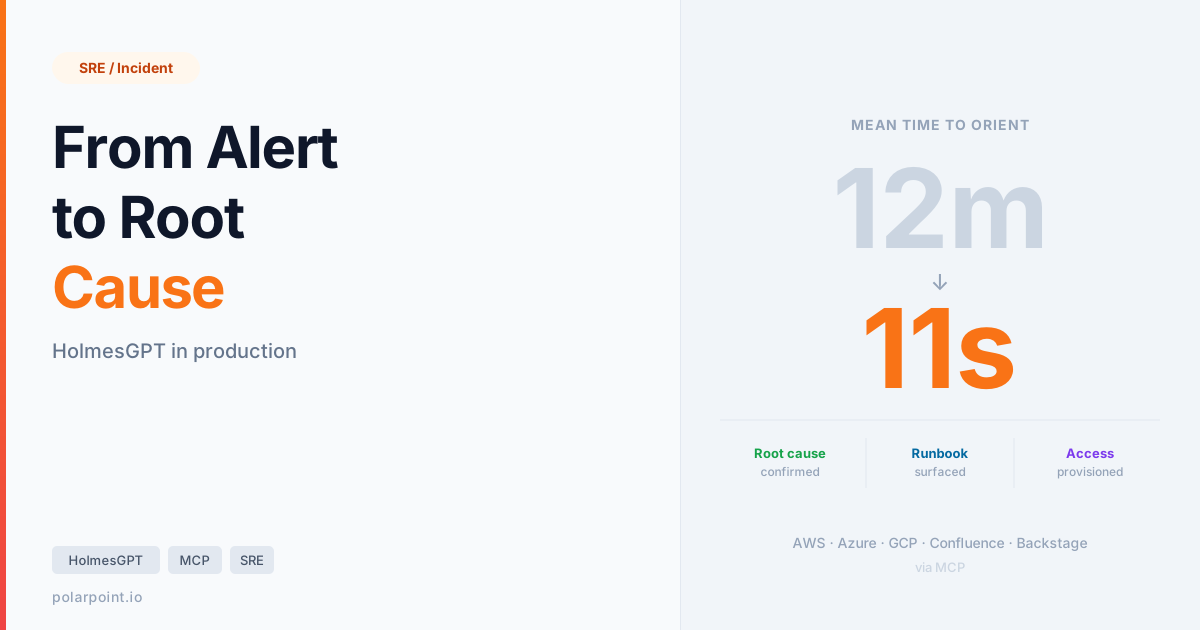
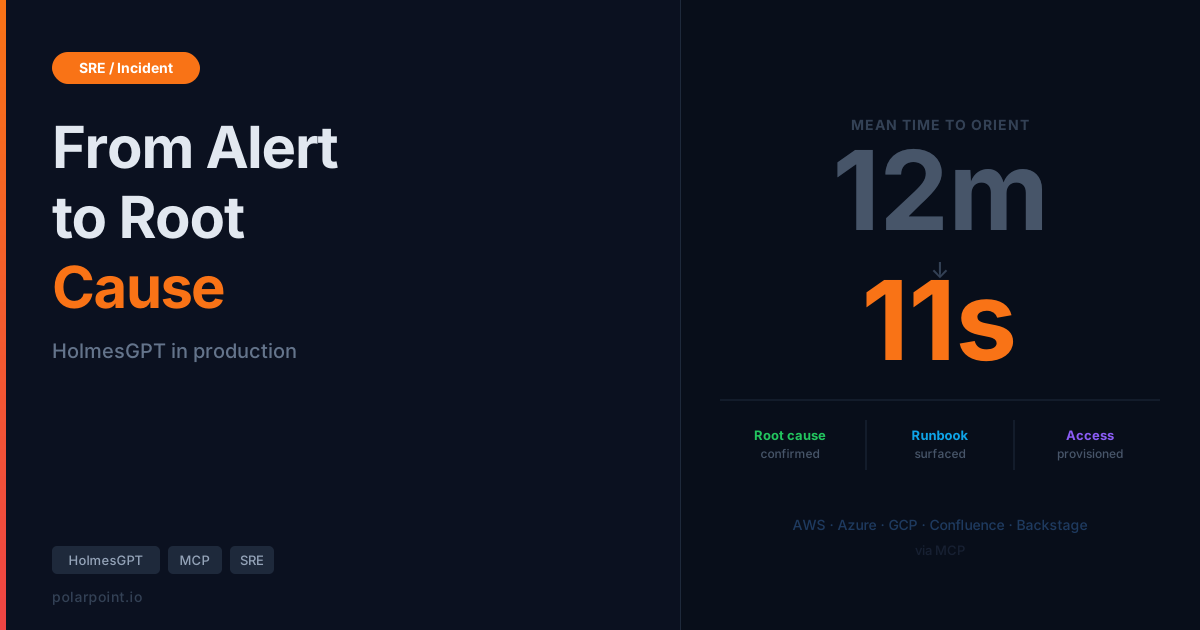
You know the moment. PagerDuty fires at 2am. You're pulling up kubectl, squinting at pod logs, trying to remember which namespace this service actually lives in. Someone's pinging Slack. The on-call channel is filling up. You spend the first twelve minutes just getting oriented — what's broken, where, and why — before you've even formed a hypothesis.
HolmesGPT collapses that twelve minutes into eleven seconds. Not by replacing your judgement. By doing the orientation work for you.
This post covers HolmesGPT as a full AI operations platform — not just Kubernetes triage, but cloud provider context across AWS, Azure, and GCP via MCP servers, Confluence runbook lookup during active incidents, Backstage Scaffolder integration for access provisioning, and Slack/Teams workflows that handle access requests end to end. If you want the broader patterns for AI-assisted incident response, read our AI Incident Triage post first.
What HolmesGPT actually is¶
HolmesGPT is an open-source AI troubleshooting assistant built by Robusta. It's designed specifically for Kubernetes operations — it doesn't just read logs you paste at it, it actively queries your cluster. Think of it as a SRE who already has kubectl, Prometheus, your alert history, your cloud console, your runbooks, and your service catalog open in separate terminals and can correlate them all faster than you can tab-switch.
The key distinction from general-purpose AI chat: HolmesGPT operates with tools. Real ones. It calls kubectl get events, queries Prometheus metrics, reads Confluence pages, pings Backstage for service ownership, and reaches into AWS CloudWatch — all in a single investigation. You give it a question in plain English. It goes and finds the answer.
The MCP ecosystem is what makes this a full ops platform
Since version 0.4, HolmesGPT has embraced the Model Context Protocol (MCP) as its extension framework. That's what makes the cloud provider and enterprise tool integrations possible — Holmes speaks MCP natively, so anything that exposes an MCP server becomes a tool it can use during any investigation, exactly like kubectl is a tool.
Getting started¶
Two ways in. Standalone CLI to try it, Robusta Helm chart for production.
Standalone CLI
pip install holmesgpt
export ANTHROPIC_API_KEY=sk-ant-...
holmes ask "Why is the payments service crashing?"
Holmes picks up your kubeconfig automatically. Three commands and you're investigating.
Production via Robusta
helm repo add robusta https://robusta-charts.storage.googleapis.com && helm repo update

helm install robusta robusta/robusta \
  --set "clusterName=prod-eu" \
  --set "sinksConfig[0].robusta_sink.token=YOUR_TOKEN" \
  --set "holmesConfig.enabled=true" \
  --set "holmesConfig.llmProvider=anthropic" \
  --set "holmesConfig.anthropicApiKey=sk-ant-..." \
  -n robusta --create-namespace
Robusta watches AlertManager and dispatches Holmes automatically. By the time you see the Slack notification, the root cause analysis is already there.
MCP server configuration
Additional integrations — cloud providers, Confluence, Backstage — are wired in via the mcpServers block in holmes-config.yaml:
mcpServers:
  - name: aws
    command: uvx
    args: ["awslabs.aws-mcp-server@latest"]
    env:
      AWS_REGION: eu-west-1
      AWS_PROFILE: prod

  - name: confluence
    command: uvx
    args: ["mcp-confluence@latest"]
    env:
      CONFLUENCE_URL: https://yourco.atlassian.net/wiki
      CONFLUENCE_TOKEN: ${CONFLUENCE_API_TOKEN}

  - name: backstage-catalog
    url: https://backstage.internal/api/catalog-mcp/sse
    headers:
      Authorization: "Bearer ${BACKSTAGE_TOKEN}"

  - name: backstage-scaffolder
    url: https://backstage.internal/api/scaffolder-mcp/sse
    headers:
      Authorization: "Bearer ${BACKSTAGE_TOKEN}"
Backstage MCP setup
Unlike the other integrations, there's no standalone Backstage MCP process to run. The Catalog and Scaffolder MCP capabilities come from TeraSky's Backstage plugins — specifically @terasky/backstage-plugin-catalog-mcp-backend and @terasky/plugin-scaffolder-mcp-backend. You install them into your Backstage instance, and Backstage exposes the MCP endpoints that Holmes connects to via URL. The exact endpoint paths are in the plugin READMEs.
The triage workflow¶
Here's what the full investigation sequence looks like with all integrations active:
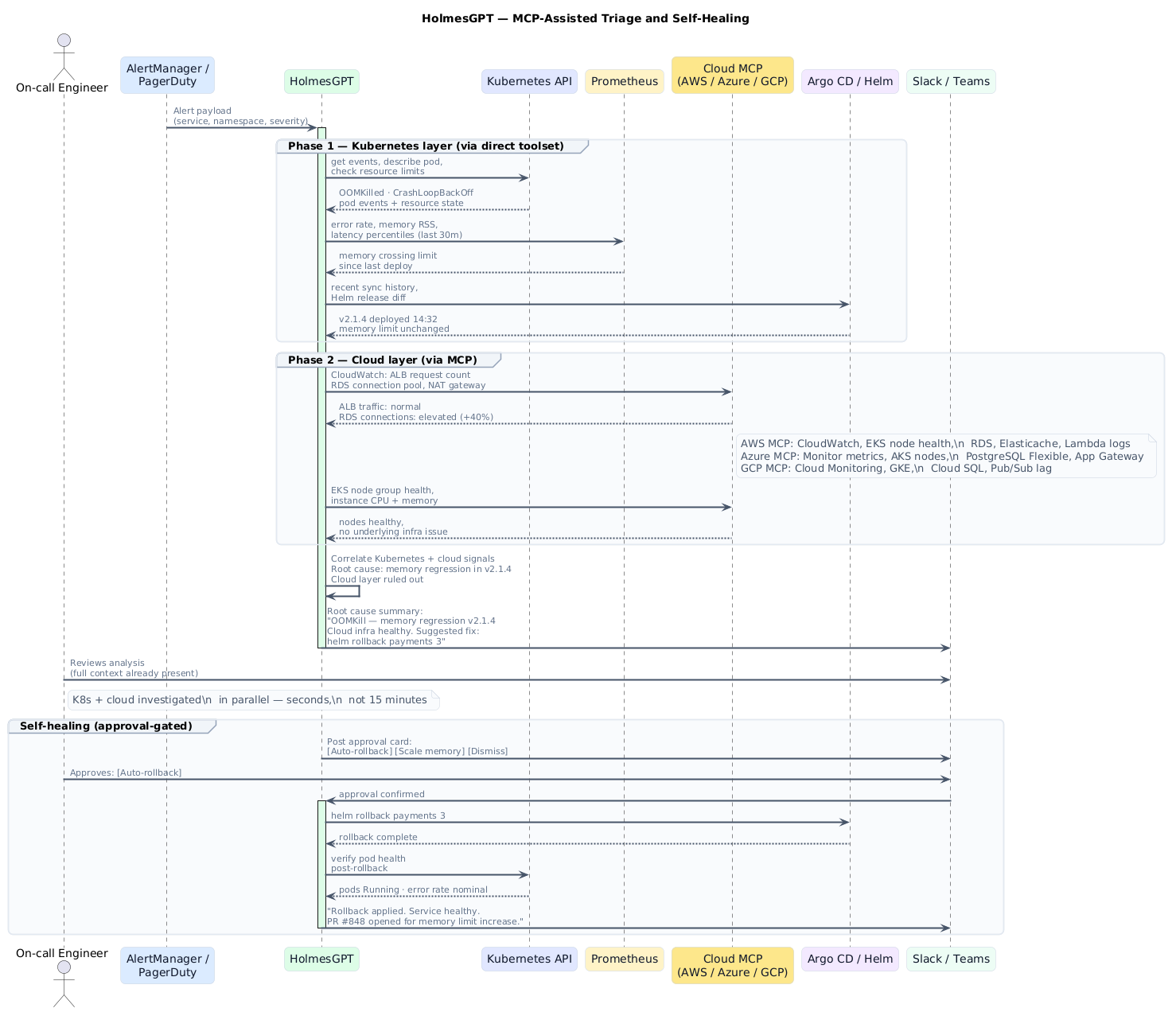
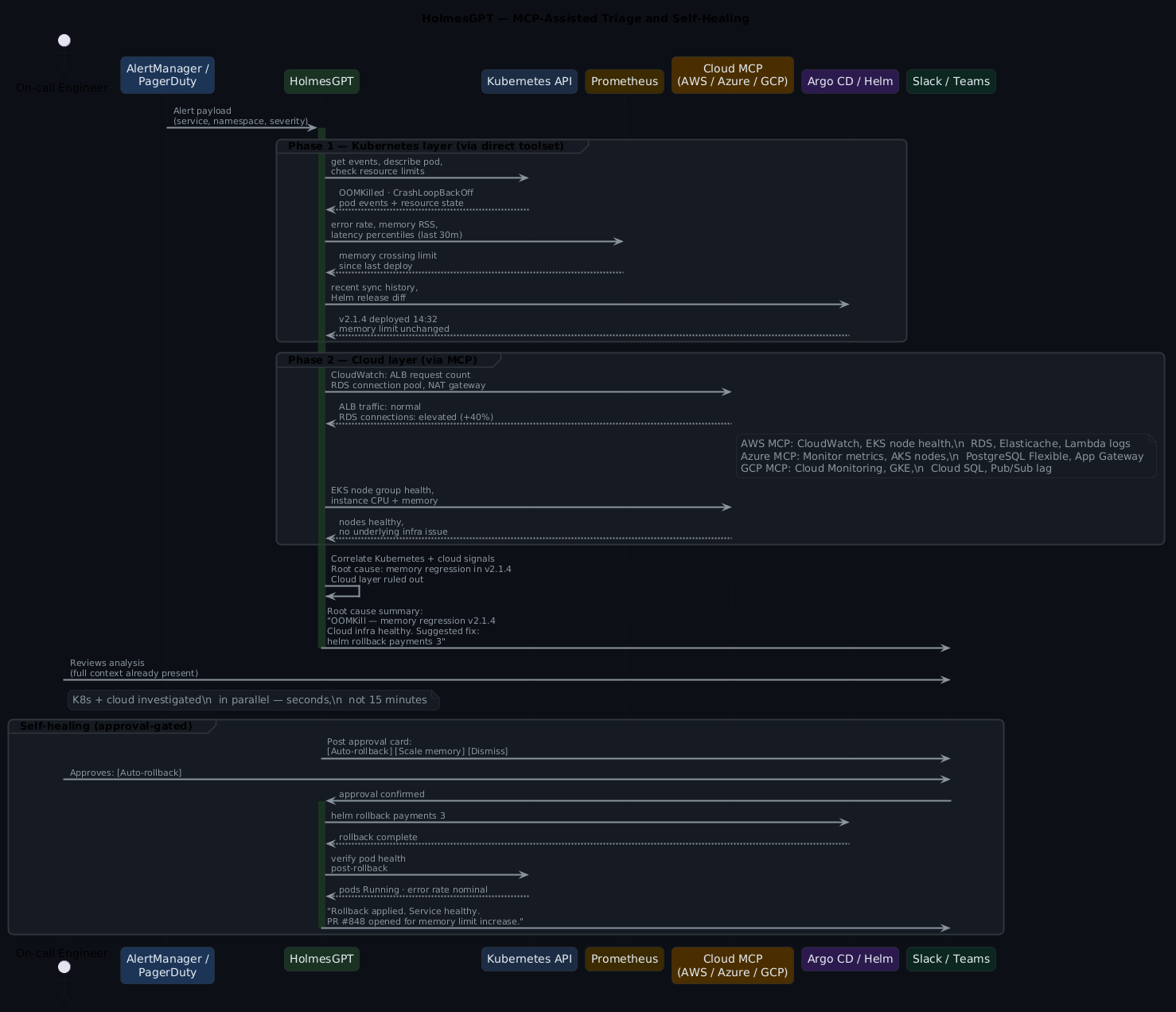
Why this cuts MTTR
The reason this works isn't because AI is smarter than your team. It's because your team stops reinventing the investigation process every time an incident fires. That first twelve minutes? It's almost always the same twelve minutes — the same kubectl commands, the same Prometheus queries, the same Confluence searches. Holmes automates the orientation phase so humans start at hypothesis, not at "what namespace is this in?"
A real Holmes invocation¶
Concrete example. OOMKill on the payments service, Prometheus alert firing:
holmes ask "Why is the payments service showing a high error rate? \
  CrashLoopBackOff on payments-api-7d4f9c-xkp2r, production namespace." \
  --prometheus-url http://prometheus.monitoring.svc:9090
Investigation summary
---------------------
Root cause (high confidence): payments-api is OOMKilled. Memory limit
256Mi, RSS climbing since 14:32 deploy of v2.1.4. Prometheus confirms
memory_working_set_bytes crossed threshold 18 minutes ago.

Hypothesis 1 (confirmed): Memory regression in v2.1.4
  - 3x OOMKilled events in kubectl describe
  - Linear memory growth in Prometheus since 14:32
  - CloudWatch: no upstream traffic spike from ALB (checked)

Hypothesis 2 (ruled out): External traffic surge
  - AWS ALB request count: normal. Ruled out.

Suggested next steps:
  1. helm rollback payments 3
  2. Or: kubectl set resources deployment/payments-api --limits memory=512Mi
  3. Diff v2.1.4 for new connection pool or caching changes

Confidence: High. Estimated confirm time: 2 minutes.
Notice the CloudWatch check — Holmes reached into AWS automatically because the AWS MCP server was configured, and it knew ALB traffic data was relevant context for ruling out the traffic spike hypothesis.
MCP tooling — extending Holmes beyond Kubernetes¶
The MCP ecosystem is what turns Holmes from a Kubernetes tool into a full operations assistant. Here's the complete picture of what it can reach:
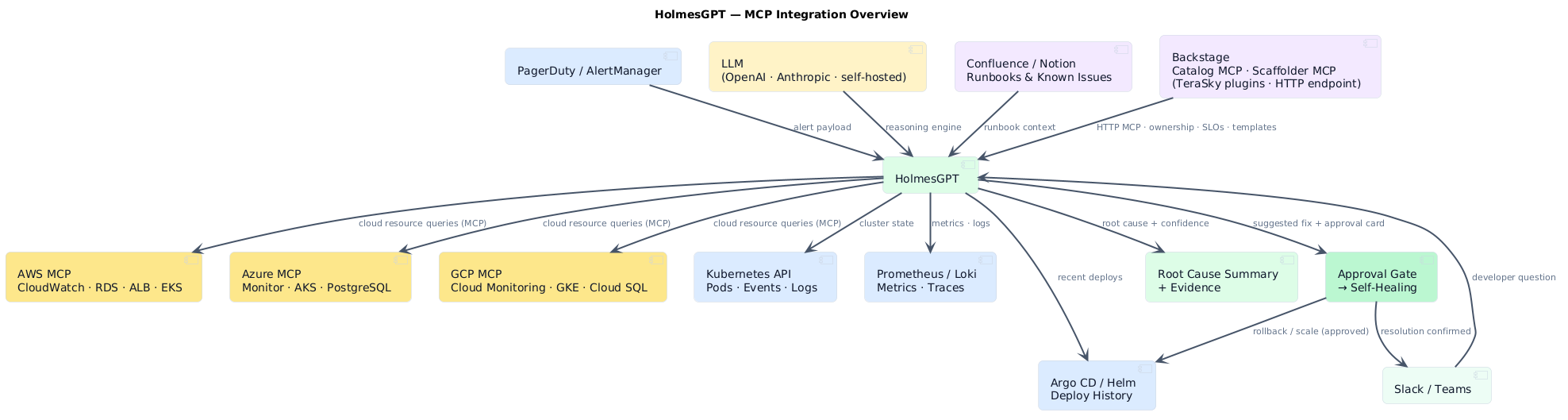
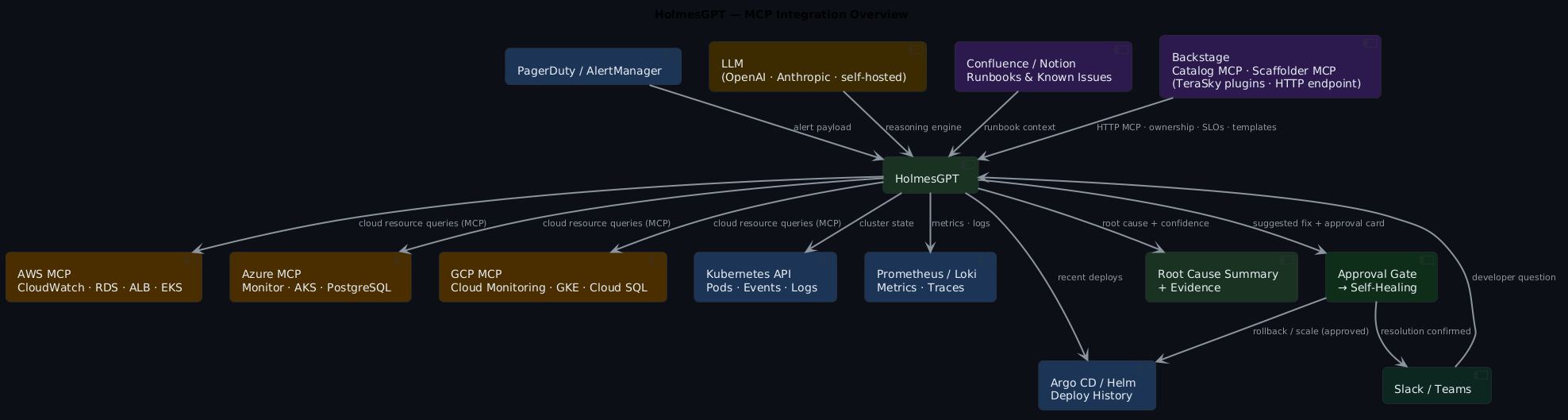
Every box in that diagram is an MCP server Holmes can query as naturally as it queries kubectl. You wire them in once in config — Holmes decides at runtime which ones are relevant to the current investigation.
Cloud provider context: AWS, Azure, GCP¶
The most immediately valuable MCP integrations are the cloud provider servers. When a Kubernetes incident has a cloud-layer cause — throttled API calls, a flapping load balancer, a saturated RDS instance, a degraded NAT gateway — kubectl and Prometheus won't show you that. You need the cloud console. Holmes goes there automatically.
AWS MCP server
The most-used integration. Holmes calls CloudWatch directly during an investigation — not to dump metrics at you, but to answer specific questions it's already formed: is the RDS instance CPU-throttled? Are any EC2 nodes in the node group showing unhealthy? What's in the Lambda error logs for this time window? EKS cluster health, S3 bucket policies, IAM-scoped resource queries — all available in the same investigation chain that's already querying kubectl and Prometheus.
Azure MCP server
Same pattern for AKS clusters. Holmes can query Azure Monitor, pull Log Analytics results, and check AKS node pool state without you opening a browser. Useful when the cluster is fine but something upstream in Azure-managed infrastructure isn't.
GCP MCP server
Cloud Monitoring time-series, GKE node pool health, Cloud Logging, Pub/Sub subscription lag. Holmes picks which tools are relevant to the question — you don't have to tell it.
Cross-cloud investigations in one command
A checkout service latency spike where Postgres runs on RDS and Redis on Elasticache — Holmes will query Prometheus for the latency, check Argo CD for recent deploys, then hit the AWS MCP server for RDS connection counts, Elasticache cache hit rate, and ALB response time breakdown. That's a fifteen-minute manual cross-console investigation, automated into a single holmes ask.
Confluence knowledge base integration¶
During an active incident, the question isn't just "what's broken?" — it's "have we seen this before, and what did we do about it?"
Your Confluence space almost certainly has runbooks for the common failure patterns. The problem is nobody reads them under pressure. Holmes does.
With the Confluence MCP server configured, Holmes automatically searches your knowledge base as part of every investigation:
Holmes investigation (with Confluence context)
----------------------------------------------
Root cause: OOMKill in payments-api (confirmed)

Confluence match: "payments-api Memory Issues — Runbook v3"
  Space: Platform Engineering / Runbooks
  Last updated: 2026-02-14

Relevant sections:
  § Known causes: connection pool leak on high-concurrency deploys
  § Resolution: rollback + set POOL_SIZE=10 env var
  § Escalation: if recurs within 24h, page payments-team-lead

Previous incidents: 3 occurrences (Jan 14, Feb 03, Feb 21)
  All resolved by rollback + pool size fix.
  Root cause PRD: PLAT-2847 (open, scheduled Q3)
Apply this: scope Confluence to relevant spaces
The CONFLUENCE_SPACES filter is important — without it Holmes will search your entire wiki and the noise degrades quality significantly. Scope it to the spaces where your operational knowledge lives: CONFLUENCE_SPACES: "PE,RUNBOOKS,PLATFORM". This is the difference between Holmes surfacing the right runbook and Holmes returning a hit from a team offsite agenda.
Configure it in holmes-config.yaml:
mcpServers:
  - name: confluence
    command: uvx
    args: ["mcp-confluence@latest"]
    env:
      CONFLUENCE_URL: https://yourco.atlassian.net/wiki
      CONFLUENCE_TOKEN: ${CONFLUENCE_API_TOKEN}
      CONFLUENCE_SPACES: "PE,RUNBOOKS,PLATFORM"  # limit to relevant spaces
Access requests via Slack and Teams¶
This is a use case that surprised people when it landed: HolmesGPT as an access request handler. Not triage — provisioning. The same MCP tooling that lets Holmes investigate incidents lets it handle "I need access to X" requests from Slack or Teams, end to end.
Here's the flow:
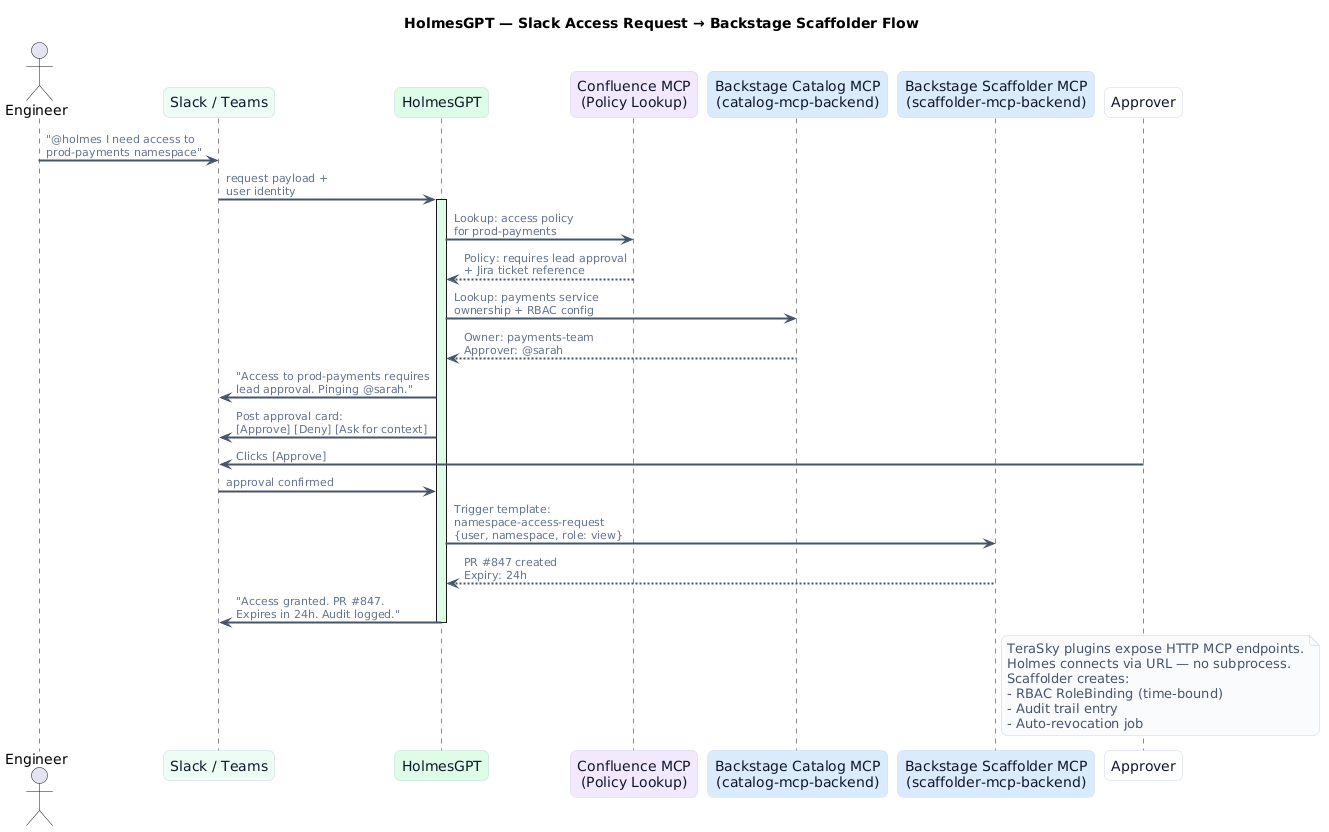
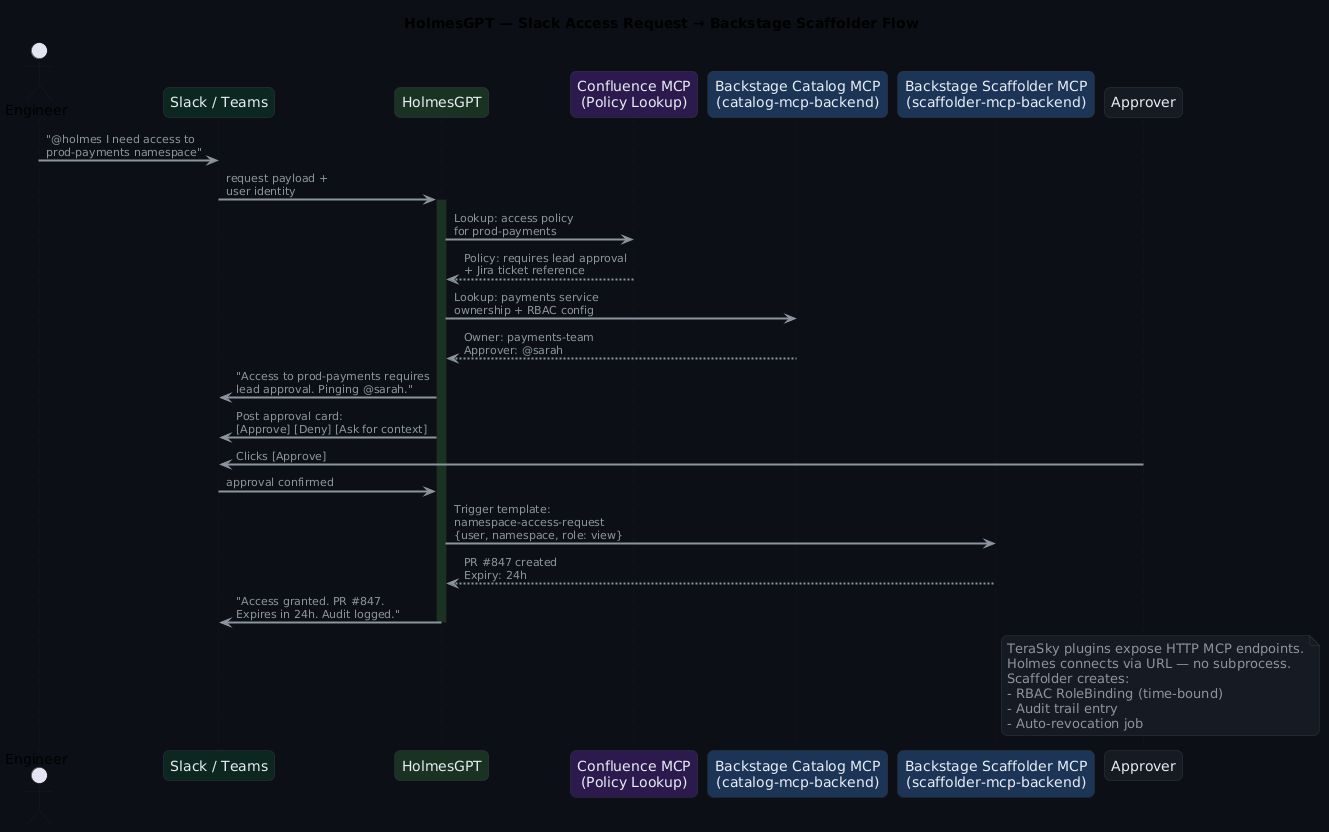
In practice, the conversation looks like this in Slack:
engineer: @holmes I need access to prod-payments namespace, debugging
          a live issue

holmes:   Checking access policy for prod-payments...
          Policy requires: lead approval + active incident ticket.

          Found incident: INC-4821 (payments high error rate, P1, your name)
          Policy requirement met.

          Pinging @sarah (payments-team-lead) for approval.

[Approval card appears with: [Approve] [Deny] [Ask for context]]

sarah:    [Approve]

holmes:   Access granted.
          RoleBinding created: engineer@co → payments-prod-viewer (24h)
          PR #847: https://github.com/co/platform/pull/847
          Auto-revocation scheduled: 2026-05-05 03:14 UTC
          Audit entry logged.
20 seconds from request to access
No ticket. No waiting for a human to find the right RBAC yaml and remember to revert it. The time-bound RoleBinding gets created, the PR is the audit trail, and the auto-revocation means you're not cleaning up forgotten access six months later. This is the access provisioning pattern your team actually needs at 2am.
Configuring the Slack workflow
# holmes-config.yaml
slackConfig:
  accessRequestChannel: "#access-requests"
  approvalTimeout: 30m          # auto-deny if no response
  requireApproverInChannel: true

mcpServers:
  - name: backstage-scaffolder
    url: https://backstage.internal/api/scaffolder-mcp/sse
    headers:
      Authorization: "Bearer ${BACKSTAGE_TOKEN}"
Teams works identically — replace slackConfig with teamsConfig and point it at your webhook.
Backstage Scaffolder for access provisioning¶
Backstage gives Holmes two things, via two separate backend plugins from TeraSky's plugin library. Install both into your Backstage instance and they expose HTTP MCP endpoints Holmes connects to directly.
The Catalog MCP gives Holmes service ownership context — when it's investigating the payments service, it already knows who owns it, what it depends on, what SLO is attached, and who's on-call. That shapes the investigation before you've typed a word.
The Scaffolder MCP is where it gets interesting. Your Backstage instance almost certainly has software templates for the common provisioning operations — namespace access, environment spin-up, service registration, secret rotation. Holmes can trigger those templates via the MCP endpoint, which means the provisioning goes through your platform's standard path rather than someone's ad-hoc kubectl session.
holmes ask "Create a dev environment for the new payments-v2 service. \
  It needs a Postgres database and a Redis cache, \
  same config as payments-v1."
Backstage Scaffolder response
------------------------------
Template: new-service-environment (v1.4)
Inputs resolved:
  - service: payments-v2
  - environment: dev
  - database: postgres (from payments-v1 config)
  - cache: redis (from payments-v1 config)
  - namespace: payments-v2-dev (created)

Actions taken:
  PR #851: Crossplane XRD for payments-v2-dev PostgreSQL
  PR #852: Crossplane XRD for payments-v2-dev Redis
  Namespace registered in Backstage catalog

Estimated provision time: 8 minutes (async)
Track progress: https://backstage.internal/tasks/12847
The scaffolder doesn't just create the resources — it creates them through your platform's standard path. Crossplane XRDs, GitOps PRs, catalog registration. Everything your platform team already built, triggered by a plain-English request.
The access provisioning template is typically simpler:
# backstage/templates/namespace-access/template.yaml
apiVersion: scaffolder.backstage.io/v1beta3
kind: Template
metadata:
  name: namespace-access-request
spec:
  parameters:
    - user: string
    - namespace: string
    - role: {enum: [view, edit]}
    - expiryHours: {type: integer, default: 24}
  steps:
    - id: create-rolebinding
      action: kubernetes:apply
      input:
        manifest: |
          apiVersion: rbac.authorization.k8s.io/v1
          kind: RoleBinding
          metadata:
            name: {{ parameters.user }}-{{ parameters.role }}
            namespace: {{ parameters.namespace }}
          subjects:
            - kind: User
              name: {{ parameters.user }}
          roleRef:
            kind: ClusterRole
            name: {{ parameters.role }}
    - id: schedule-revocation
      action: http:backstage:request
      input:
        method: POST
        path: /api/scheduler/revoke
        body: {user: "{{ parameters.user }}", namespace: "{{ parameters.namespace }}", after: "{{ parameters.expiryHours }}h"}
Holmes fills in the parameters based on the Slack request, the Confluence policy lookup, and the approver's decision. The template handles the mechanics.
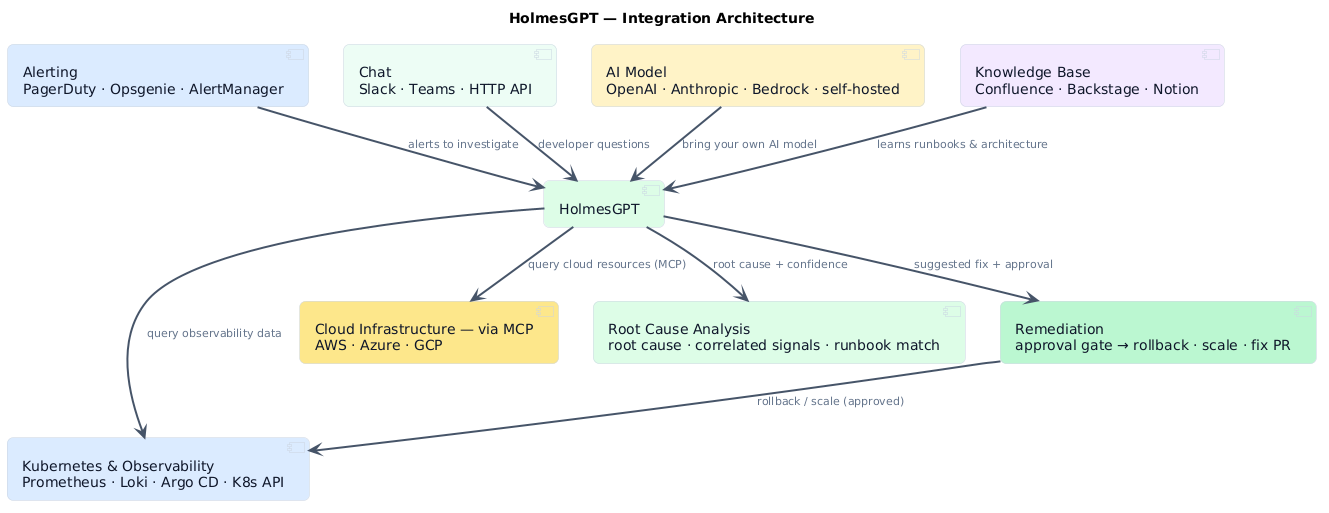
Integration architecture¶
Here's the full picture of how everything connects:
Self-healing with guardrails¶
More capability means the guardrail question matters more, not less.
Start Holmes in investigation mode — read-only, no write actions — and keep it there until you trust the quality of the analysis. That's usually a few weeks. When you're ready to enable write actions, tier them by risk. Pod restart, deployment scale: auto-approved. Helm rollback, RoleBinding creation: Slack approval required. Production config changes, IAM modifications: always human-initiated, full stop.
Time-bound everything Holmes provisions
Permanent access created through an automated flow is audit debt and security surface you'll regret. The Backstage template above hard-codes an expiry — that's intentional. And log everything: every MCP call, every tool invocation, every action taken. A post-incident review should be able to replay the full investigation from logs, not reconstruct it from memory.
The mental model: Holmes is a capable junior SRE with access to a lot of systems. You'd let them restart a pod. You'd let them pull a runbook. You wouldn't let them modify production IAM without a second pair of eyes. Same rules, same instincts.
Noise reduction and alert grouping¶
One underrated capability: HolmesGPT groups a cluster of related alerts into a single incident narrative.
When a deployment goes wrong you get ten or fifteen alerts firing — memory pressure, error rate, latency, health checks. All technically correct. All the same root cause. Without correlation your team triages ten incidents simultaneously.
Alert grouping is the hidden MTTR win
HolmesGPT groups them: "These twelve alerts are all downstream effects of the OOMKill in payments-api." One thread. One narrative. One person owns it. The cognitive load reduction is significant, especially at 2am — and it means your on-call isn't burning time correlating what's already been correlated.
Quick takeaways¶
- HolmesGPT is Kubernetes-native and MCP-extensible — it queries your cluster, your cloud, your docs, your service catalog
- Cloud provider context (AWS, Azure, GCP) turns Kubernetes-layer investigations into full-stack ones
- Confluence integration means runbooks actually get read during incidents, not after
- Backstage Catalog gives Holmes service ownership context; Backstage Scaffolder lets it provision access and environments
- Slack and Teams access request flows replace ticket-based access with a 20-second approval loop
- Self-healing and provisioning are only safe behind approval gates with time-bound, reversible actions
- Start read-only, add MCP servers incrementally, log everything
Frequently asked questions¶
Does HolmesGPT replace my runbooks?
No — and you wouldn't want it to. It reads your runbooks and applies them. The Confluence integration is what makes this real: Holmes surfaces the relevant runbook section during the investigation rather than after. But write the runbooks. They're the institutional knowledge that makes the AI useful.
What LLM does it use? Can I run it with a local model?
OpenAI and Anthropic by default, but it supports any OpenAI-compatible API. Ollama, vLLM, self-hosted models all work. Quality scales with model capability — test on real incidents before trusting a self-hosted model at 2am.
How does this differ from just asking ChatGPT about my incident?
Tools. HolmesGPT actively queries your cluster, your cloud, your runbooks — it doesn't reason about logs you've pasted. Every data point in its investigation is live, not hypothetical.
The Slack access request flow — how does it handle policy edge cases?
It defers to Confluence. If the policy lookup returns ambiguous or missing coverage for a request, Holmes flags it rather than guessing: "I couldn't find a clear policy for this access level. Recommend manual review." The confidence threshold for automated action is deliberately high.
We're in a regulated environment — is log data leaving our cluster?
Depends on your LLM backend. OpenAI and Anthropic APIs send context externally. For data residency requirements, use a self-hosted model — Holmes supports it. Audit what data flows through MCP tool calls before going to production; cloud provider MCP servers in particular may include resource metadata you need to classify.
Can it handle multi-cloud incidents?
Yes, and this is genuinely where it shines. If your payments service runs on EKS but your Postgres is on Azure Database and your CDN is on GCP — Holmes can reach all three simultaneously. It won't know to look in Azure unless you tell it "payments uses Azure Postgres," but once that context is in the investigation, it pulls from the right place.
What you actually get¶
Running HolmesGPT with the full MCP integration stack gives you:
- Root cause summaries in under 30 seconds, backed by cluster state, metrics, and cloud telemetry
- Runbook lookup that happens automatically — the right Confluence page, surfaced at the right moment
- Access provisioning that takes 20 seconds instead of a ticket queue
- Consistent triage quality regardless of who's on call
- Clean handoff notes with full investigation trail
- Fewer false positives — alerts get grouped and cloud-layer vs k8s-layer gets distinguished before humans engage
- A foundation for guardrailed self-healing as confidence in the tooling grows
The goal isn't to remove engineers from the loop. It's to make the loop faster, more consistent, and less dependent on whoever happens to be on call at 2am knowing the right twelve commands.
Companion files¶
holmes-config.yaml— full config with Prometheus, PagerDuty, Confluence, Backstage, and AWS MCP serversrobusta-values.yaml— Helm values for the Robusta + HolmesGPT deploymentbackstage-namespace-access-template.yaml— the Scaffolder template for time-bound access provisioningslack-access-request-workflow.yaml— Robusta workflow definition for the Slack → Holmes → Backstage loopexample-investigation.md— annotated investigation output from a real (anonymised) cross-cloud incident
The full Backstage MCP setup — plugin installation, Holmes config, Scaffolder template, and Slack approval gate — is in the holmesgpt-backstage-mcp example in the ai-capabilities repo.