AI Convention Files in Practice: Azure DevOps
The taxonomy post covered every AI convention file type — AGENTS.md, SKILL.md, .prompt.md, and the rest. This post puts them to work with Azure DevOps.
Every example below uses real WIQL queries, references actual ADO fields, and follows patterns extracted from a production agents.md that populates sprint review decks from ADO work items.
ADO automation in numbers
Teams running these patterns typically complete sprint review prep in under 5 minutes — compared to 30-60 minutes of manual ADO querying and copy-pasting. The key metric: 38 requests, categorised, calculated, and dropped into slides without touching a spreadsheet.
How agents talk to Azure DevOps
An AGENTS.md file defines what the agent should do. An MCP server provides the runtime connection to ADO. The agent reads the workflow from AGENTS.md, then calls the ADO MCP server to execute WIQL queries and retrieve work item data.
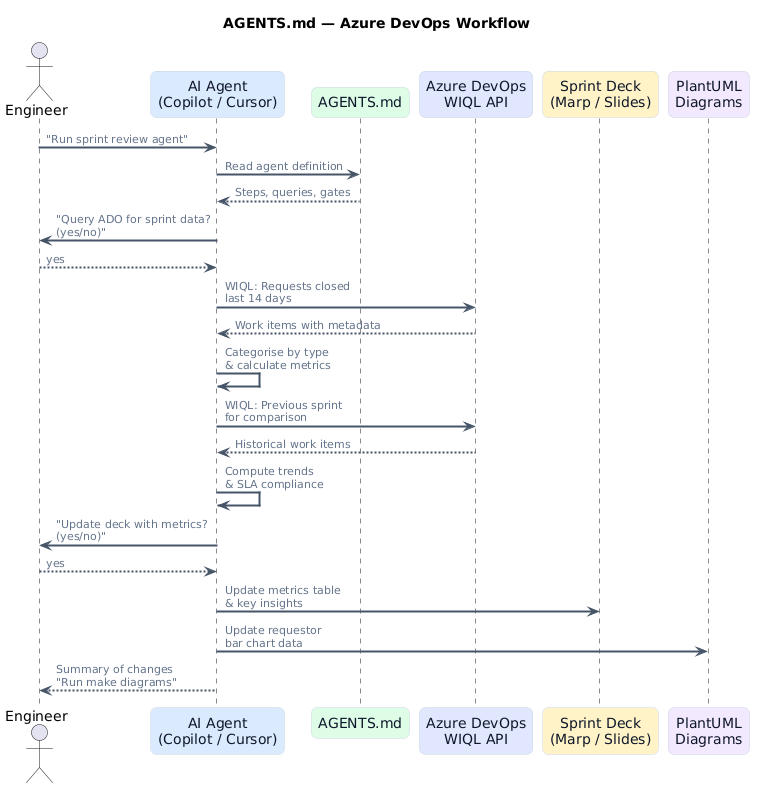
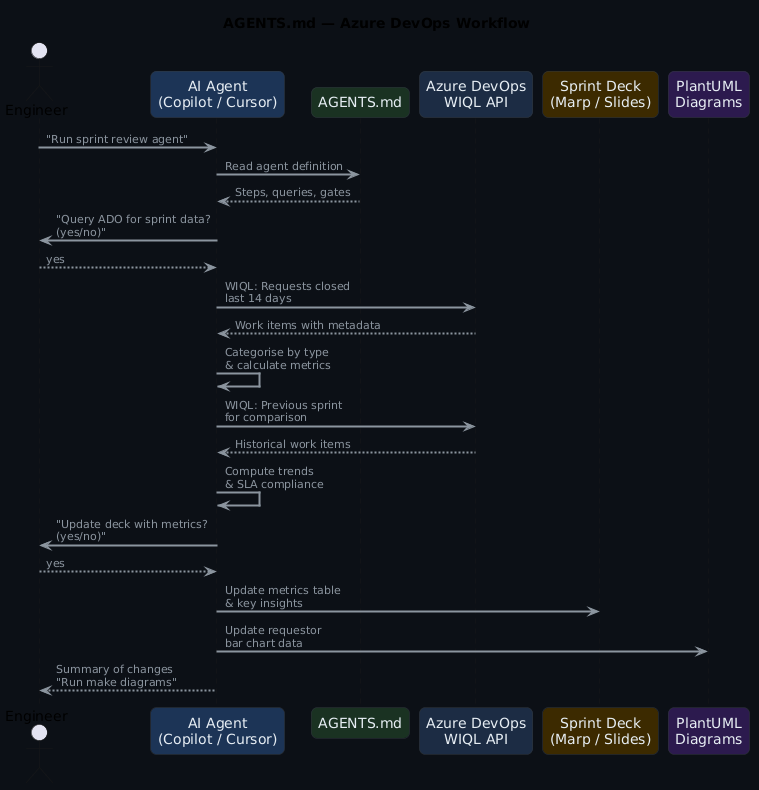
The ADO MCP server exposes tools such as wiql_query, get_work_item, and list_iterations. The agent never needs raw HTTP calls — it invokes these tools through the MCP protocol, and the server handles authentication, pagination, and field mapping.
Apply this: scope MCP tools to what agents actually need
The ADO MCP server loads all domain tools by default. Use the -d flag to restrict to core, work, and work-items. Fewer tools means less cognitive overhead for the agent and a smaller permission footprint — especially important when agents run in CI contexts.
What gets automated (and what does not)
Not everything in a sprint review can come from a query. Migrations, new platform capabilities, infrastructure redesigns — that work spans multiple sprints with epics and milestones, and reporting on it is narrative. What shipped, what slipped, what the team learnt. An agent cannot write that.
Operational work is different. Access provisioning, pipeline fixes, Azure resource configuration, troubleshooting — these arrive as Requests, get resolved, and pile up. Individually they are routine. In aggregate they tell a story: which categories dominate, how resolution times trend, whether the same teams keep submitting. That is numbers, and numbers come from WIQL.
The agents in this post target operational work. They query ADO, run the calculations, and drop the results into a Marp sprint review deck. Project slides stay in the same deck as fixed templates — same layout every sprint, content filled in by hand.
In ADO terms: operations work typically lives under a shared Area Path (like Engineering\Platform Consulting) with a Request work item type. Projects live under their own Area Paths with Feature, User Story, and Task types.
The mixed work-type tell
If your Area Path contains both Request items and project Feature/Story items, WIQL queries will silently include project work in operational metrics unless you filter by [System.WorkItemType] = 'Request' explicitly. Validate your query results against a manual count before trusting the numbers in your first sprint review run.
Use case 1: Sprint review deck automation
A single agents.md file orchestrates multiple agents that query ADO, categorise completed work, calculate metrics, and update a Marp presentation deck — no manual data gathering needed.
The agent definition
## Agent: Update Request Metrics Summary

Task: Update deck.md with request metrics from the current sprint

Steps:
1. Query ADO for all Requests in area path from last 2 weeks
2. Calculate metrics:
   - Count by category (Access, Infrastructure, Pipeline, Azure Config)
   - Average resolution time (ClosedDate - CreatedDate)
   - SLA compliance % (resolved within 24 hours)
   - Unique requestors and repeat request %
3. Show calculated metrics to the user
4. Ask: "Update deck.md with these metrics? (yes/no)"
5. If approved, update the metrics table and key insights
6. Report what was updated
The WIQL query
SELECT [System.Id], [System.Title], [System.Tags],
       [System.CreatedDate], [System.ClosedDate], [System.CreatedBy]
FROM WorkItems
WHERE [System.WorkItemType] = 'Request'
  AND [System.AreaPath] = @AreaPath
  AND [System.State] = 'Done'
  AND [System.ClosedDate] >= @StartDate
  AND DATEDIFF(day, [System.ClosedDate], GETDATE()) <= 14
ORDER BY [System.ClosedDate] DESC
@AreaPath is defined in the agent configuration — typically in the agents.md header or passed as a parameter when the agent runs. This keeps the queries portable across teams and organisations.
What the agent produces
The agent calculates metrics from the query results and updates the deck:
| Category | Count | % |
|---|---|---|
| Access & Permissions | 10 | 26% |
| Pipeline & CI/CD | 8 | 21% |
| Infrastructure Provisioning | 7 | 18% |
| Environment Configuration | 5 | 13% |
| Secrets & Certificates | 4 | 10% |
| Troubleshooting | 3 | 8% |
| Other | 1 | 3% |
Key metrics: 38 requests completed, 1.4 day average resolution, 89% SLA compliance.
The human confirms before any file is written. The agent explains what changed and suggests running make diagrams to regenerate presentation PNGs.
Use case 2: Requestor pattern analysis
A companion agent analyses who is requesting work, identifying top requesting teams and spotting patterns that suggest automation opportunities.
## Agent: Update Requestor Patterns

Steps:
1. Query ADO for all Requests from last 2 weeks
2. Extract requesting team from Custom.RequestedTeamName
3. Group by team and count requests
4. Get top 5 requesting teams
5. For each team, identify:
   - Most common request types
   - Repetitive patterns (automation candidates)
6. Update the PlantUML bar chart with actual data
SELECT [System.Id], [System.Title], [System.CreatedBy],
       [System.Tags], [Custom.RequestedTeamName]
FROM WorkItems
WHERE [System.WorkItemType] = 'Request'
  AND [System.AreaPath] = @AreaPath
  AND [System.CreatedDate] >= @StartDate
  AND DATEDIFF(day, [System.CreatedDate], GETDATE()) <= 14
The agent updates a PlantUML bar chart data array directly — no placeholder values, just real numbers from ADO.
Repetition patterns are your automation backlog
When one team accounts for 30%+ of requests and their top category is always the same (usually access provisioning or environment config), that is a self-service candidate. Run this agent for three sprints before drawing conclusions — one sprint of high volume might just be a project launch.
Use case 3: Sprint-over-sprint trend comparison
This agent compares the current sprint against the previous one to identify improvements and regressions.
## Agent: Key Insights & Improvements

Steps:
1. Query current sprint (last 2 weeks) AND previous sprint (2-4 weeks ago)
2. Compare:
   - Average resolution time change
   - SLA compliance change
   - Repeat request pattern change
   - Volume by category trends
3. Identify positive trends (with percentages)
4. Identify areas for improvement
5. Suggest specific, data-driven actions
6. Update the Key Insights slide
The previous sprint query:
SELECT [System.Id], [System.Title], [System.Tags],
       [System.CreatedDate], [System.ClosedDate]
FROM WorkItems
WHERE [System.WorkItemType] = 'Request'
  AND [System.AreaPath] = @AreaPath
  AND [System.State] = 'Done'
  AND [System.ClosedDate] >= @PreviousStartDate
  AND DATEDIFF(day, [System.ClosedDate], @StartDate) <= 14
The agent produces data-driven insights: "Resolution time improved 18% (1.5 days → 1.2 days). SLA compliance up from 85% to 91%. Infrastructure Setup requests increased 40% — consider self-service template."
Use case 4: Release checklist with ADO gates
A SKILL.md that verifies all release criteria are met by querying ADO boards and pipelines.
---
name: ado-release-checklist
description: Verify release readiness using ADO pipeline and board data
argument-hint: Provide the release version number
---
# ADO Release Checklist

1. Query ADO for open bugs with priority 1-2 in the release scope
2. Check pipeline status for the release branch
3. Verify all test plans have passed
4. Confirm no blocked work items remain
5. Check that release notes work item is marked Done
6. Report pass/fail for each gate
-- Open blockers check
SELECT [System.Id], [System.Title], [System.State]
FROM WorkItems
WHERE [System.WorkItemType] IN ('Bug', 'Issue')
  AND [Microsoft.VSTS.Common.Priority] <= 2
  AND [System.State] <> 'Closed'
  AND [System.IterationPath] = @ReleasePath
Use case 5: SLO compliance report
A prompt that generates an SLO report from ADO data, suitable for weekly stakeholder updates.
---
description: Generate SLO compliance report from ADO request data
agent: agent
tools: ['search', 'editFiles']
---
Query the last 30 days of Request work items from ADO.
Calculate resolution time percentiles (p50, p90, p99).
Compare against SLO targets:
- p50 < 4 hours
- p90 < 24 hours
- p99 < 72 hours
Generate a markdown table and trend summary.
Use case 6: Incident runbook population
An agent that pulls recent incident data from ADO and updates the team's runbook with resolution patterns.
## Agent: Incident Runbook Updater

Steps:
1. Query ADO for Incidents closed in the last 30 days
2. Group by root cause category
3. For each category with 2+ incidents:
   - Extract common resolution steps from work item descriptions
   - Identify detection patterns (how was it found?)
   - Note mean time to resolution
4. Update the runbook with new entries
5. Flag categories with increasing incident counts
SELECT [System.Id], [System.Title], [System.Description],
       [System.CreatedDate], [System.ClosedDate],
       [System.Tags], [Custom.RootCause]
FROM WorkItems
WHERE [System.WorkItemType] = 'Incident'
  AND [System.State] = 'Closed'
  AND [System.ClosedDate] >= @today - 30
  AND [System.AreaPath] UNDER @AreaPath
ORDER BY [System.ClosedDate] DESC
Apply this: run the runbook agent before the retrospective
Pull the last 30 days of Incident data the day before your sprint retrospective. Patterns that felt anecdotal in the moment become undeniable when the numbers show the same root cause appearing four times. The agent gives the retro something concrete to act on.
The master agent pattern
Individual agents are useful on their own. Orchestration makes them better. A master agent runs all the sub-agents in sequence, handles errors, and produces a summary.
## Master Agent: Populate All Diagrams and Slides

Steps:
1. Calculate start date (2 weeks ago from today)
2. Calculate previous sprint start date (4 weeks ago)
3. Ask user for permission to proceed
4. If approved, run Agent: Update Requestor Patterns
5. Run Agent: Update Request Metrics Summary
6. Run Agent: Key Insights & Improvements
7. Report summary of updates made
8. Suggest running 'make diagrams' to regenerate PNGs

Before executing:
- Display the configuration (project, area path, time period)
- Ask: "I will query Azure DevOps and update diagrams and slides.
  Do you want to proceed? (yes/no)"
- Only proceed if user confirms with "yes"
The confirmation gate is critical. Every agent asks before making changes. The human stays in control.
ADO-specific configuration
The agents work with ADO's specific field model:
| ADO concept | How agents use it |
|---|---|
| Area Path | Scope queries to team boundaries (Engineering\Platform Consulting) |
| Iteration Path | Map to sprint boundaries for time-based analysis |
| Work Item Type | Filter by Request, Bug, Incident, Task |
| Custom fields | Extract team info from Custom.RequestedTeamName |
| WIQL | The query language — SQL-like, supports DATEDIFF, UNDER, @today |
| Tags | Categorise requests for metric grouping |
MCP server setup
The Azure DevOps MCP server connects your AI agent to ADO. Add a .vscode/mcp.json to your project:
{
  "inputs": [
    {
      "id": "ado_org",
      "type": "promptString",
      "description": "Azure DevOps organization name (e.g. 'contoso')"
    }
  ],
  "servers": {
    "ado": {
      "type": "stdio",
      "command": "npx",
      "args": ["-y", "@azure-devops/mcp", "${input:ado_org}"]
    }
  }
}
Authentication happens via the browser — the first time a tool runs, it opens a login prompt for your Microsoft account. No PAT required.
To limit loaded tools, use the -d flag with domains: "args": ["-y", "@azure-devops/mcp", "${input:ado_org}", "-d", "core", "work", "work-items"]. Available domains: core, work, work-items, search, test-plans, repositories, wiki, pipelines, advanced-security.
Anti-patterns to avoid
The hardcoded date tell
The most common breakage in ADO agents is hardcoded date ranges. WHERE ClosedDate >= '2026-03-01' means the query silently returns nothing after the sprint window closes. Always use @today and DATEDIFF — the query should work equally well run today or six months from now.
- No confirmation gates — Agents that write files without asking lead to surprise changes
- Hardcoded dates — Use
@todayandDATEDIFFso queries remain dynamic - Querying everything — Scope with Area Path and Work Item Type to keep results relevant
- Skipping the previous sprint — Trend comparison needs two data points; single-sprint metrics lack context
- Manual data transfer — If you are copy-pasting from ADO into slides, the agent should be doing it
Getting started
Apply this: one agent at a time
Start with the request metrics agent (Use Case 1). Run it against a real sprint before building the rest. If the WIQL query returns sensible data and the deck updates correctly, add the next agent. Incrementally validated is better than five broken agents at once.
- Install the ADO MCP server in your editor
- Create an
agents.mdwith one agent (start with request metrics) - Run it against a real sprint
- Add agents incrementally as you identify more manual data-gathering tasks
The working examples will be available in the ai-capabilities repo.
Frequently asked questions
Do I need a PAT to connect the ADO MCP server?
No. The @azure-devops/mcp server authenticates via browser OAuth — it opens a Microsoft login prompt the first time a tool runs. No Personal Access Token setup required. The session token is cached locally for subsequent calls.
What if my work items use a custom type instead of 'Request'?
Swap the [System.WorkItemType] = 'Request' filter in the WIQL query for your custom type name (e.g. 'Service Task' or 'Support Item'). Everything else in the query stays the same. You may also need to update the @AreaPath to match where those items live in your project hierarchy.
Can these agents run on a schedule rather than manually?
Yes — wrap the agent invocation in a GitHub Actions workflow with a schedule trigger. The challenge is authentication: scheduled runs cannot do interactive OAuth. You'll need a Service Principal or Managed Identity configured in the ADO MCP server. Check the azure-devops-mcp docs for non-interactive auth options.
How do I handle agents that query multiple Area Paths?
Define @AreaPath as a list and use the UNDER operator: [System.AreaPath] UNDER @AreaPath. You can pass multiple paths as a union query or run the same agent definition with different configuration blocks per team. The master agent pattern handles this naturally — parameterise the config block, run once per area path.
What's the difference between using Tags vs Area Path for categorisation?
Area Path is structural — it reflects your ADO project hierarchy and is hard to change. Tags are additive labels anyone can apply to any work item. For categorising operational requests, Tags are more flexible: teams can tag items as access, pipeline, azure-config without changing the ADO project structure. Use Area Path for team ownership scope, Tags for metric grouping.
Further reading
- AI Convention Files: The Complete Taxonomy — every AI markdown file explained
- Using AGENTS.md for Platform Engineering — the control plane pattern
- AI Convention Files in Practice: GitHub — the same use cases with GitHub GraphQL
- AI Convention Files in Practice: Jira — the same use cases with Jira JQL
- MCP specification — the Model Context Protocol standard