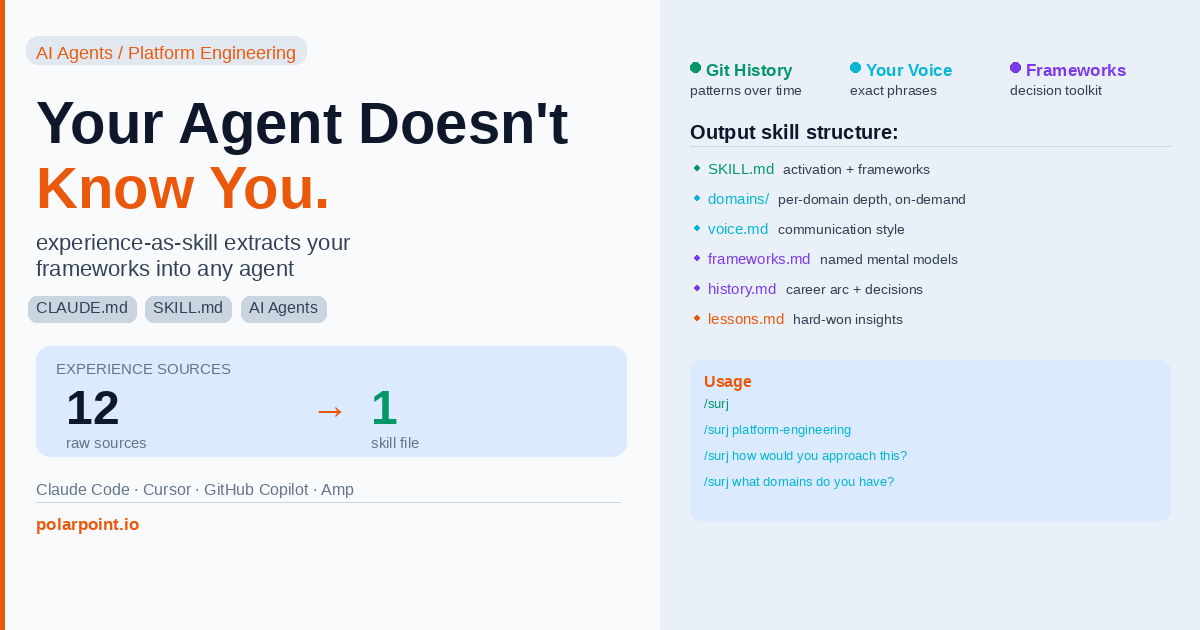
Your AI Agent Doesn't Know You. Here's How to Fix That.
You open a new agent session. You paste in the problem. And the agent starts from zero.
It doesn't know you spent eighteen months migrating that monolith. It doesn't know you have a strong opinion about when to introduce abstractions (late) versus when not to (almost never). It doesn't know your default response to "let's just ship it and fix it later" is to ask what the rollback plan is. It doesn't know any of it. Every session is amnesia.
That's the cold-start problem. And most people solve it by writing better prompts — which works, until you forget to write the prompt, or the context window fills up, or you're halfway through a task before realising the agent is reasoning nothing like you would.
There's a better fix. Point a tool at your CV, your git history, your notes, your Slack export — and let it extract a behavioral profile. Not a biography. Not a career summary. A decision toolkit. The answer to "what would you do?" for every type of problem you routinely face.
That's experience-as-skill.
What your git history actually says about you
Here's the angle that surprised me when I first ran this.
Your commit history isn't just a log of what shipped. It's a signal of how you solve problems — the ratio of features to refactors, the technical domains you were active in, the types of bugs you kept fixing (and therefore the mistakes you kept making until you stopped). Five years of commits, read correctly, is a picture of an engineer's mind.
The tool reads it with that lens:
found  git         18,504 words  api-server
found  git          6,241 words  platform-tooling
found  obsidian     3,241 words  PKM
found  text           847 words  cv.md
found  text         1,204 words  notes-2024.md
It's not scanning commit messages for keywords. It's looking for patterns: problem-solving style over time, technical depth by domain, refactoring vs feature ratio, how long you stayed with things before moving on.
Combined with your notes, your CV, your Slack export if you have one — it builds something the synthesizer calls a behavioral profile. The guiding principle in the synthesis prompt is this: every sentence should answer "what would they DO?" not "who are they?". That distinction is what separates a useful skill from a LinkedIn About section.
Git history is a problem-solving fingerprint
The extractor doesn't read commit messages for keywords — it looks for patterns across thousands of commits: what domains you were active in, feature vs refactor ratio, how long you stayed with problems before pivoting. Five years of commits, analysed correctly, reveals a lot more than any CV summary.
Running it
Install takes about thirty seconds:
Start with --analyze — this shows you exactly what it finds without writing anything:
Output:
🔍 Sources discovered:

  git repo      → projects/api-server           (18,504 words, 847 commits)
  git repo      → platform-tooling              (6,241 words, 312 commits)
  obsidian      → PKM                           (3,241 words, 94 notes)
  text          → cv.md                         (~2 pages)
  text          → notes-2024.md                 (1,204 words)
  ──────────────────────────────────────────────
  ✓ 5 source(s) discovered

💡 Planned extraction:
  - Career arc and domain expertise from cv.md
  - Technical depth signal from git repos (2 repos, 5+ years)
  - Personal frameworks from PKM notes
  - Problem-solving patterns from commit history

⏱ Estimated time: ~3 minutes
📁 Output: ~/.config/agents/skills/surj/
Check the plan looks right, then run for real:
Watch it work:
Extracting  (×4 threads) ████████████  5/5
  ✓  git        18,504 words  api-server
  ✓  git         6,241 words  platform-tooling
  ✓  obsidian    3,241 words  PKM
  ✓  text          847 words  cv.md
  ✓  text        1,204 words  notes-2024.md

Synthesising with anthropic/claude-haiku-4-5-20251001…
The synthesis streams to your terminal as it generates. Takes two to four minutes for a typical set of sources.
Apply this: run --analyze before committing
The --analyze flag is free — it shows you exactly what sources the tool found and what it plans to extract, without making any API calls. Run it first. Check the source list looks complete and the planned extraction covers what you actually want in your skill file. It takes thirty seconds and prevents a four-minute synthesis run that uses sources you didn't intend.
What comes out
The core output is a SKILL.md — a structured file your agent loads at session start. But it's not a summary. The activation block at the top reads like an instruction set:
## Activation

**Reasoning mode**: lead with conclusion, then evidence. Never build slowly to a recommendation
when the recommendation is already clear.

**Default orientation**: skeptical of complexity — always asks "what's the simplest version
of this that could work?"

**Invoke these first**:
1. Rollback-first thinking — when evaluating any change to running systems
2. Scope discipline — when a task description could be interpreted broadly or narrowly
3. Pre-mortem — when a plan looks clean and the team is moving fast

**Push back when you see**:
- "Let's ship and fix later" without a rollback plan
- Abstractions introduced for a single use case
- Success criteria that can't be verified without asking

**Hard limits**:
- Won't approve a change that can't be reverted
- Won't ship without knowing who's on-call

**Register**: Direct, warm — says what they mean, asks what they need, doesn't hedge.
**Signature phrases**: "what's the rollback?", "what does done look like?"
That second-person framing ("you reason like this, you push back when you see this") is how the agent actually uses it. It's an instruction set, not a description.
Below the activation block: named frameworks extracted from your notes, domain expertise files (loaded on-demand, not burned in the context window until needed), voice calibration, hard-won lessons, and an honest "Profile Gaps" section that tells you what it couldn't determine and what sources would fill those gaps.
The full structure:
~/.config/agents/skills/surj/
├── SKILL.md         — core frameworks + activation (~4,000 tokens)
├── domains/
│   ├── platform-engineering.md
│   ├── api-design.md
│   └── engineering-leadership.md
├── voice.md         — communication style calibration
├── frameworks.md    — named personal mental models
├── history.md       — career arc and key decisions
└── lessons.md       — hard-won insights and anti-patterns
The domain files don't load until you ask for them — they sit on disk until you invoke the skill with a domain argument. That keeps the core context window usage low.
Domain files load on-demand to keep context usage low
The SKILL.md activation block is ~4,000 tokens — that's the always-loaded core. Domain files only load when you invoke them explicitly (/surj platform-engineering). If you have five domain files averaging 2,000 tokens each, you're not paying 10,000 tokens up front — you load what you need for the current task. That's a meaningful difference in context budget for long sessions.
Using it in a session
In Claude Code or Amp:
/surj                                   # load core frameworks
/surj platform-engineering              # load that domain file too
/surj how would you approach this PR?   # reason from your frameworks
/surj what domains do you have?         # browse what's available
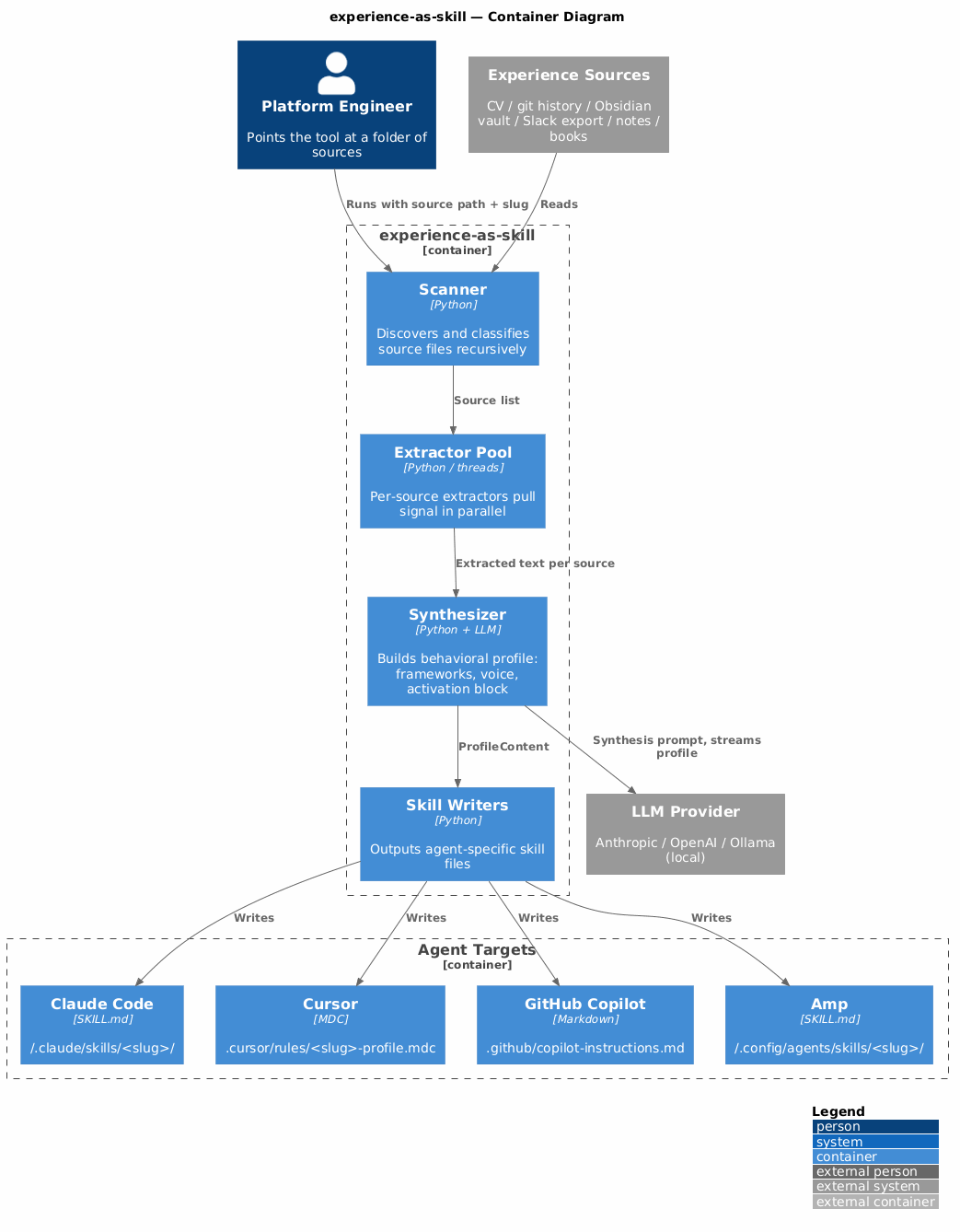
In Cursor and GitHub Copilot, it injects automatically via workspace rules — you don't invoke it, it's just there.
The difference in practice is that the agent now has a bias. When you ask it to review a design, it checks for rollback plans. When you ask it to write a task description, it asks about success criteria. When you ask it whether to ship, it asks who's on-call. Those are your patterns, now baked in.
No API key? No problem
If you don't want to use an API key, --export-prompt writes the full synthesis prompt to a file:
Open the file, paste the two blocks into any chat interface — Claude, ChatGPT, whatever — copy the response, save it as your SKILL.md. Same result, no API dependency.
Local models
If you're on Apple Silicon with 32GB+ RAM and want to run everything offline:
ollama pull qwen2.5:32b

uv run experience-as-skill ~/Documents surj \
  --name "Surj Bains" --yes -j 8 \
  --provider openai \
  --base-url http://localhost:11434/v1 \
  --model qwen2.5:32b \
  --api-key ollama
Eight parallel extraction threads, local synthesis, nothing leaves your machine. Quality is slightly below the Anthropic default but good enough for most use cases.
Apply this: --export-prompt for air-gapped or policy-constrained environments
If your team can't use cloud AI APIs — either for security policy reasons or because you're working on sensitive IP — --export-prompt gives you the full extraction without any API calls. Run the tool, get the prompt file, take it to an approved chat interface, generate the SKILL.md manually. Same quality output, no API dependency.
The complement to CLAUDE.md
Last week's post was about Karpathy's four rules — constraints that govern how an agent behaves on a project. Think before acting, simplicity first, surgical changes, verifiable success criteria.
This is the other half of that picture. CLAUDE.md constrains the agent's behaviour on the code. The experience skill contextualises who the agent is working with — what that person values, how they reason, where they push back.
One governs the agent. The other calibrates it to you.
Together they're a meaningful step toward the thing most agentic workflows still don't have: an agent that behaves like a careful, knowledgeable colleague rather than a capable stranger who's never met you before.
Without context, the agent optimises for the average engineer
An uncalibrated agent doesn't know your risk tolerance, your codebase conventions, or your hard lines. It reasons from training data averages. That's fine for generic tasks. For anything where your experience and judgement actually matter — architecture decisions, rollback planning, scope negotiation — the average is the wrong prior. The skill file replaces the average with you.
Quick takeaways
- Every agent session starts from zero without an experience skill — and it shows in the outputs
- Git history is a signal of problem-solving style over time, not just a list of commits
- The activation block is the key output — it's an instruction set, not a biography
- Domain files load on-demand so the context cost is low until you need the depth
--export-promptworks with zero API key if you want to run this manually- This is the complement to CLAUDE.md — that constrains the agent, this calibrates it to you
Frequently asked questions
Does this mean the agent pretends to be me?
Not quite. It reasons from your frameworks, adopts your reasoning style, and pushes back on the patterns you'd push back on. It's closer to "a well-briefed colleague who knows how you think" than "you in disguise". The output sections are all framed as decision support, not impersonation.
What if my git history is a mess?
Messy commit history is actually informative — it tells you something about working style too. The extractor looks for patterns at the level of technical domains, problem types, and change frequency, not commit message quality. Squash-merged PRs work fine. Conventional commits aren't required.
How often should I regenerate the profile?
When your working patterns meaningfully change — after a significant role change, after a year of new domain experience, or after you've deliberately shifted how you approach a type of problem. Running --analyze first on a fresh set of sources takes about thirty seconds and tells you whether the new material would change the profile meaningfully.
What if I don't have an Obsidian vault or Slack export?
Start with what you have. A CV and a git repo will produce a usable profile. The tool generates a "Profile Gaps" section that tells you exactly which sources would fill in what's missing — so you get a clear to-do list for what to add next time.
Can this run entirely locally with no API calls?
Yes — either via --export-prompt (paste into any chat UI manually) or with a local Ollama model. See the repo README for the full Ollama setup. On Apple Silicon with 32GB+ RAM, qwen2.5:32b produces good results with eight parallel extraction threads.
The repo is at github.com/polarpoint-io/experience-as-skill. It includes 136 tests, supports four agent targets, and works with any OpenAI-compatible provider if you'd rather not use Anthropic.
Run --analyze first. See what it finds. The profile gaps section alone is usually worth it — it tells you what you haven't written down that you should have.