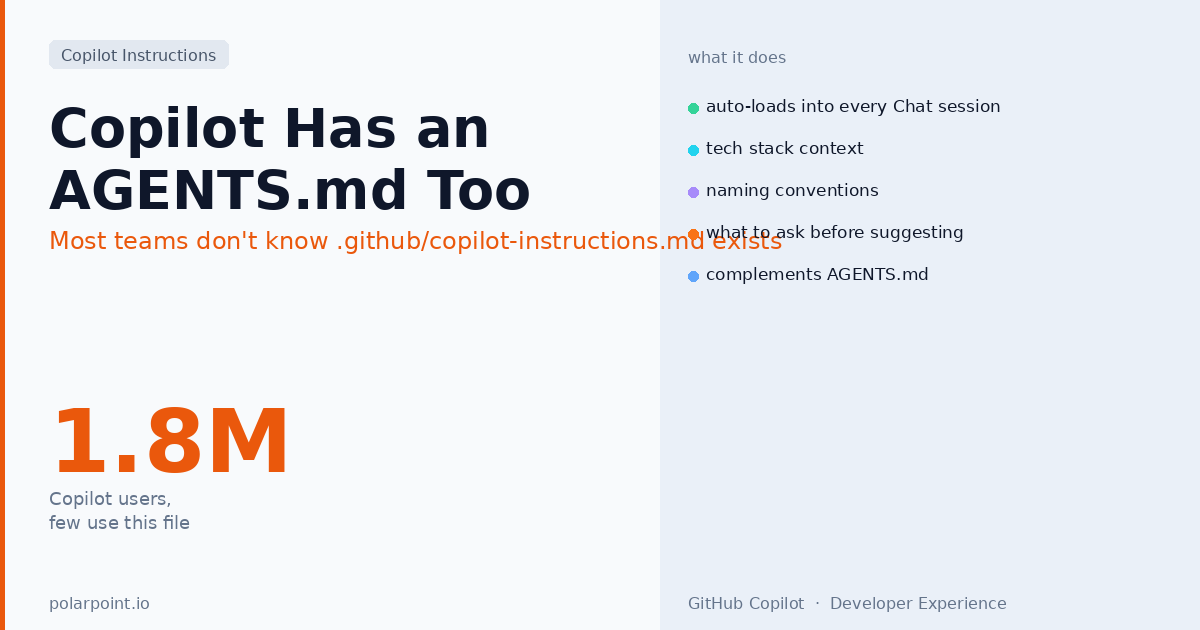
GitHub Copilot Has an AGENTS.md. Most Teams Don't Know It Exists.
There are somewhere north of 1.8 million active GitHub Copilot users. Most of them use it through VS Code or the GitHub web UI. Almost none of them have a .github/copilot-instructions.md in their repos — and that file would meaningfully change how Copilot behaves on every question they ask.
The file has been available since late 2024. GitHub documents it quietly. It doesn't show up in most tutorials. And for platform engineers who've spent time getting AGENTS.md right, it looks at first glance like a redundant thing. It isn't — it covers different surface area and reaches a different audience within your team.
Quick takeaways
.github/copilot-instructions.mdloads automatically into every Copilot Chat session when a developer opens the repo — no setup required from the developer's side- It differs from
AGENTS.mdin scope: AGENTS.md is for agents taking actions; copilot-instructions is for Copilot Chat answering questions - The file is additive — it doesn't replace
AGENTS.md, it covers the conversational context that AGENTS.md doesn't - Best uses: tech stack context, PR description style, code review conventions, what Copilot should ask before suggesting changes
- Limitations: no enforcement semantics, no forbidden path mechanism — it's context, not policy
What the file actually does
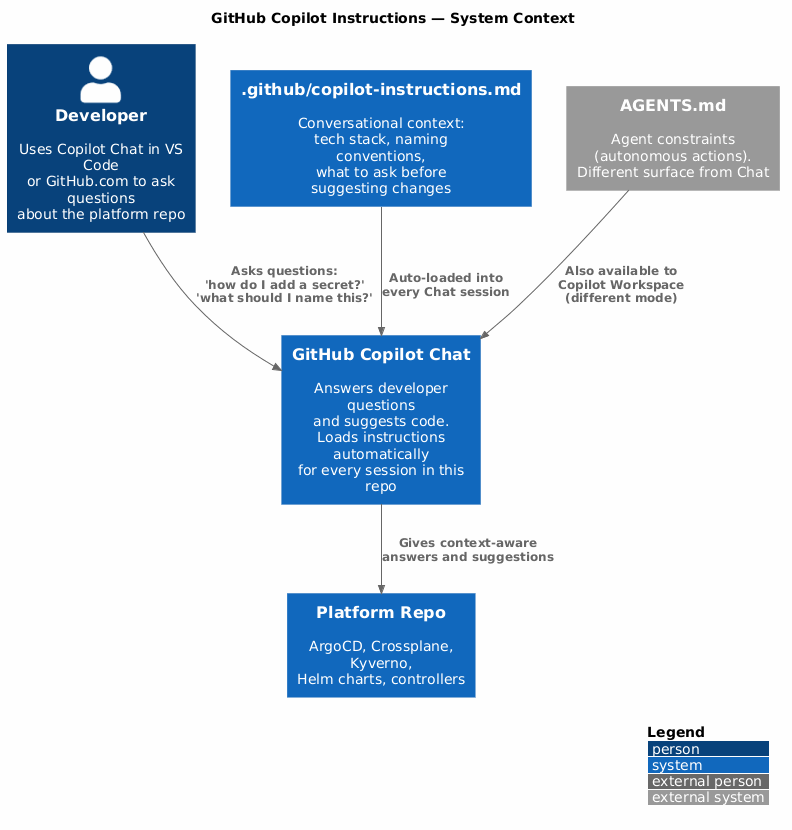
When a developer opens a repo in VS Code (or GitHub.com) and starts a Copilot Chat session, GitHub automatically loads .github/copilot-instructions.md into the context. Every question the developer asks gets this file prepended. The developer doesn't have to do anything — they don't have to invoke it, they don't have to mention it.
That automatic, invisible loading is the key difference from something like a prompt template. The instructions are always there. If you've written them well, Copilot will reflect them without any prompting from the developer.
The practical effect: Copilot Chat starts with knowledge of your tech stack, your conventions, your terminology, and what questions it should ask before making suggestions. A developer asking "how do I add a new secret to this repo?" will get an answer that reflects your External Secrets Operator setup rather than a generic Kubernetes secrets explanation.
Think of it as onboarding context for Copilot
The mental model that works best: .github/copilot-instructions.md is the context you'd give a new contractor on their first day — here's what we use, here's how we name things, here's what you should check before proposing changes. It's not policy enforcement. It's briefing.
How it differs from AGENTS.md
The two files have different jobs:
AGENTS.md is for agents taking autonomous actions in your repo — Claude Code, Copilot Workspace, Codex CLI, Cursor in agentic mode. It defines what the agent can and cannot do, what commands to run, what paths are off limits. It's read before the agent acts.
.github/copilot-instructions.md is for Copilot Chat answering conversational questions in your repo. It's read before Copilot responds to a developer's question. The developer is still in control — Copilot isn't taking actions, it's answering questions and suggesting code. The instruction file makes those answers more accurate and contextually appropriate.
Put differently: AGENTS.md governs agent behaviour, copilot-instructions.md improves Copilot answers.
There's genuine overlap on conventions and naming — both files should describe how ArgoCD Applications are named, for instance. That's fine. The audiences are different: AGENTS.md tells the agent how to behave autonomously, copilot-instructions tells Copilot how to answer a developer asking "what should I name this Application?".
Don't copy AGENTS.md wholesale into copilot-instructions
The forbidden paths section, the sync model warning, the secrets handling rules — those belong in AGENTS.md where they enforce constraints on autonomous agents. In copilot-instructions, they become noise that dilutes the conversational context. Keep copilot-instructions focused on answering questions well, not on constraining autonomous behaviour.
What to put in it
A good .github/copilot-instructions.md for a platform repo covers four things:
1. Tech stack context — what the repo uses, so Copilot doesn't suggest alternatives you've already evaluated and rejected.
## Tech stack

- Kubernetes platform managed with ArgoCD (GitOps, not kubectl apply)
- Secret management via External Secrets Operator pointing at AWS Secrets Manager
- Policy enforcement via Kyverno (not OPA/Gatekeeper)
- Infrastructure as code via Crossplane Compositions (not Terraform for K8s resources)
- CI/CD via GitHub Actions; PR validation includes `make validate` and `helm lint`
2. Naming conventions — so code suggestions use the right patterns immediately, without the developer correcting the first draft.
## Naming conventions

ArgoCD Applications: `<team>-<service>-<env>` (e.g. `payments-api-prod`)
- No underscores, no abbreviated env names (`prod` not `prd`)
- Helm release names must match Application names exactly

Kubernetes Namespaces: `<team>-<env>` (e.g. `payments-prod`)

Kyverno policies: `<scope>-<action>-<resource>` (e.g. `cluster-deny-privileged-pods`)
3. What to ask before suggesting changes — this is underused but genuinely valuable.
## Before suggesting changes

When asked to help with a new ArgoCD Application, ask:
- Which team owns this service?
- Which environment (prod/staging/dev)?
- Does it need auto-sync or manual sync?

When asked to help with a new ExternalSecret, ask:
- What AWS Secrets Manager path will hold the value?
- Which namespace will the resulting Secret live in?
4. Code and PR style — consistent suggestions that match your existing codebase.
## PR descriptions

PR titles follow Conventional Commits: `feat:`, `fix:`, `chore:`, `docs:`
PR descriptions should include:
- What changed and why
- Which ArgoCD Applications are affected (if any)
- Whether this requires a deployment window or is safe to auto-sync

## Code style

YAML: 2-space indent, no tabs
Python: black formatting, type hints required, docstrings for public functions
Shell: shellcheck-clean, set -euo pipefail at top of every script
A complete example for a platform repo
# Copilot Instructions — Platform Repository

This repo manages our Kubernetes platform. Changes to `main` auto-deploy
via ArgoCD. Read this before answering questions about this repository.

## What this repo does

- ArgoCD Application definitions for all services
- Crossplane Compositions for cloud resource provisioning
- Kyverno policies for admission control
- Helm charts for platform components

## Tech stack

- ArgoCD for GitOps (auto-sync on main, manual sync on feature branches)
- External Secrets Operator for secret management (AWS Secrets Manager backend)
- Kyverno for policy enforcement (v1.17+, prefer CEL over JMESPath)
- Crossplane v2.x for cloud resources (use Compositions, not raw MRs)
- GitHub Actions for CI (make validate, helm lint, kyverno test)

## Naming conventions

ArgoCD Applications: `<team>-<service>-<env>` — no underscores, no abbreviated envs
Namespaces: `<team>-<env>`
Helm releases: must match Application name exactly
Kyverno policies: `<scope>-<action>-<resource>`

## Before suggesting code changes

For new ArgoCD Applications: ask what team, service, and environment
For new ExternalSecrets: ask what AWS path and which namespace
For new Kyverno policies: ask whether to start in Audit or Enforce mode
For changes to sync settings: flag that auto-sync affects production immediately

## What not to suggest

Do not suggest `kubectl apply` — all applies go through ArgoCD
Do not suggest raw Kubernetes Secrets — always ExternalSecret pointing at AWS
Do not suggest Terraform for Kubernetes resources — use Crossplane
Do not suggest editing `crds/` or `infra/providers/` directly
Keep it under 400 lines
Copilot loads the full file into context for every message. Long files crowd out the actual conversation. Aim for 200–400 lines — enough context to meaningfully improve answers, not so much that the instructions themselves become the dominant context.
Using it alongside your other AI context files
The full picture for a well-configured platform repo:
| File | Loaded by | Purpose |
|---|---|---|
AGENTS.md |
All agents (Claude Code, Cursor, Copilot Workspace, Codex) | Autonomous agent constraints: forbidden paths, sync model, naming |
.github/copilot-instructions.md |
Copilot Chat | Conversational context: tech stack, conventions, what to ask |
CLAUDE.md |
Claude Code only | Claude-specific: memory, MCP config, custom commands |
.cursor/rules/*.mdc |
Cursor only | Cursor-specific: scoped rules by file type, inline edit behaviour |
Each file serves a different surface. None of them duplicate each other correctly — the overlap is incidental, not designed. When you update a naming convention, update it in AGENTS.md (which flows to all agents) and in copilot-instructions (which flows to Copilot Chat). Two places, not four.
FAQ
Does copilot-instructions.md work in GitHub.com Copilot Chat, not just VS Code?
Yes — it loads in Copilot Chat on GitHub.com as well as in VS Code and other supported IDEs. Any Copilot Chat session scoped to the repository will receive the instructions.
Can I have multiple copilot-instructions files for different directories?
No, as of mid-2026 GitHub supports one file per repository at .github/copilot-instructions.md. If you need different instructions for different teams or services, put them in clearly labelled sections within the single file, or use .cursorrules / MDC files for Cursor-specific needs.
Does this affect Copilot autocomplete, or only Chat?
Only Chat. Copilot autocomplete (the grey inline suggestions as you type) doesn't load this file. It only applies to Copilot Chat conversations — whether that's the VS Code chat panel, the GitHub.com interface, or Copilot in pull request reviews.
Should I commit copilot-instructions.md to the platform-standards template?
Yes. If you're using the fleet management pattern from the AGENTS.md at Scale post, include a copilot-instructions.md template in platform-standards alongside your AGENTS.md template. The Zone 1 / Zone 2 / Zone 3 concept doesn't apply here since GitHub doesn't have a sync mechanism for it, but you can ship a base template and let teams extend it below a ## Team-specific context section.
How do I test that the instructions are actually working?
Ask Copilot Chat a question that the instructions should influence — "how do I add a new secret to this repo?" — and verify it recommends ExternalSecret rather than a raw Kubernetes Secret. Ask "what should I name a new ArgoCD Application for the auth service in production?" and check it uses the correct pattern. Manual spot-checks are the most reliable verification.
Related posts: Your Platform Repo Needs an AGENTS.md · Cursor MDC Rules: The More Powerful AI Context File · AI Convention Files: The Complete Taxonomy