Git is the Source. Confluence is the Search Layer. Here's What Connects Them.
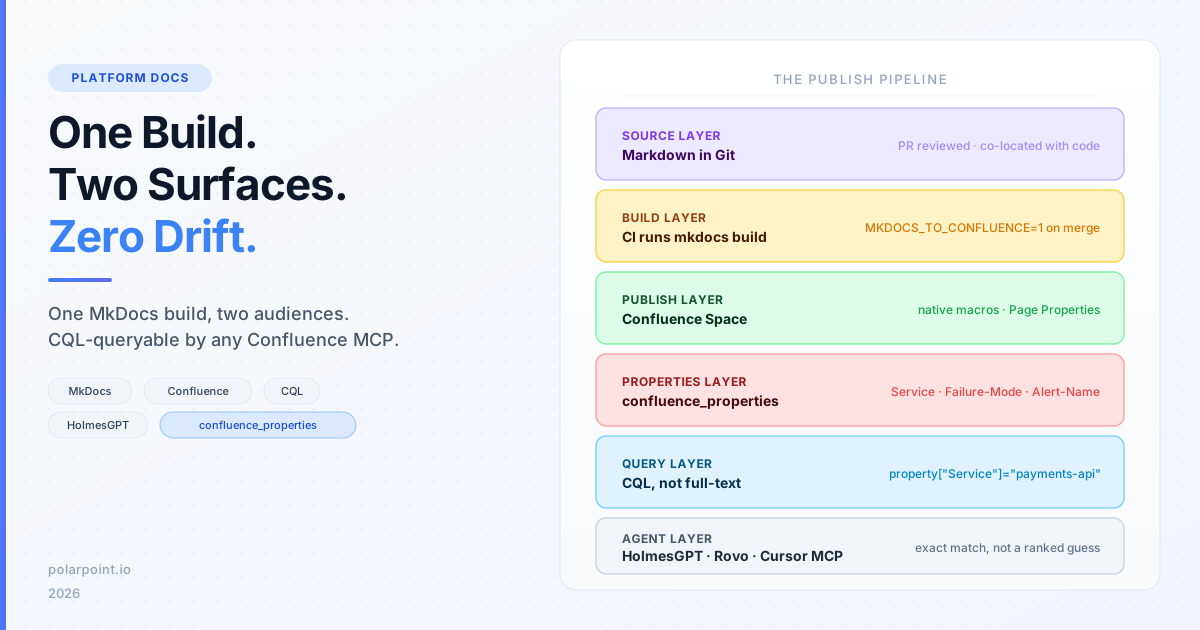
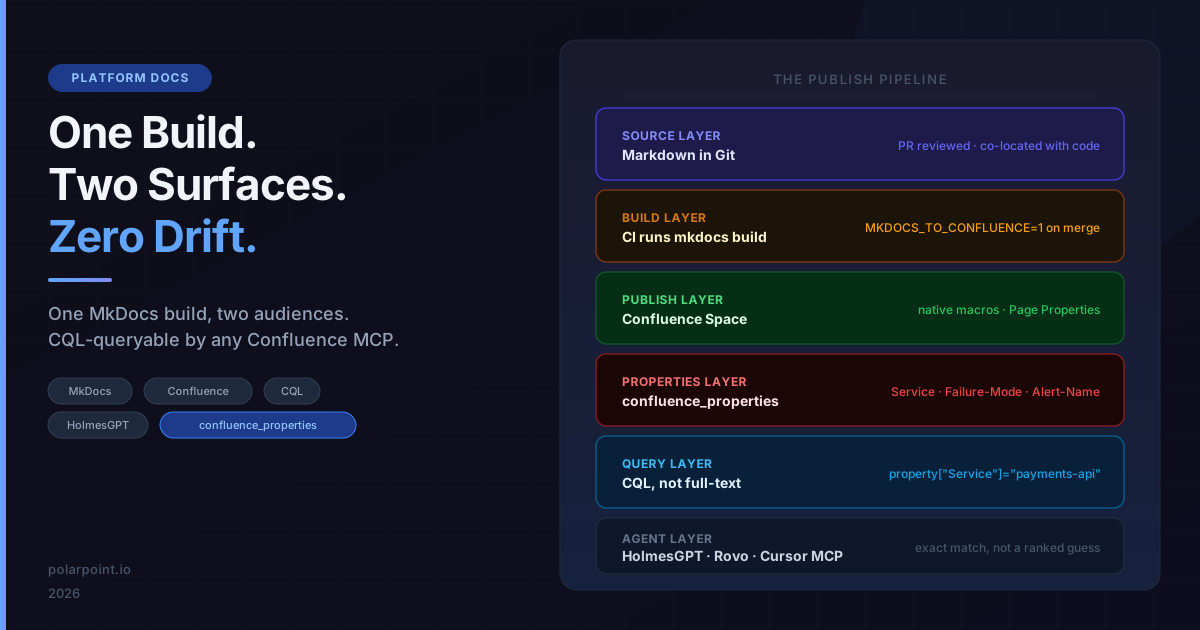
Your engineers write markdown in Git. Your ops team lives in Confluence. Your AI agents query Confluence via MCP during incidents. You've been choosing between these audiences every time you write documentation — or maintaining two copies and watching them diverge.
There's a build step that eliminates the choice. This post shows you how to wire it up, and explains the one frontmatter block that makes every published page queryable by an AI agent without relying on fuzzy text search.
If you came here from HolmesGPT Knows What Your Runbooks Are Missing, this is the infrastructure layer that makes that loop possible. If not, you don't need that context — this post stands alone.
Quick takeaways
python-mkdocs-to-confluencepublishes your entire MkDocs site to Confluence on every CI build — no manual copy-paste, no divergence.- Admonitions, code blocks, collapsible sections, and task lists all render as native Confluence macros.
confluence_properties:frontmatter creates a Confluence Page Properties macro — the same one used by Page Properties Reports. This makes pages queryable by CQL, not just searchable by text.- Any Confluence MCP client (HolmesGPT, Atlassian Rovo, Cursor) can now run
property["Service"]="payments-api"to find the exact page, not guess from body text. - The whole thing is ~15 lines of
mkdocs.ymlconfig and one CI environment variable.
The split that makes documentation painful
Every platform team has a version of this problem:
- Git is the source of truth. Runbooks, ADRs, and operational guides live alongside the code they describe. PRs, reviews, history, blame — all available. Engineers trust it.
- Confluence is where operations happens. On-call engineers look there during incidents. Management tracks it. AI agents query it via the Confluence REST API.
- They diverge immediately. The moment you copy-paste from one to the other, you've created two documents with no enforcement that they stay in sync.
Some teams solve this by committing to one. "Everything in Confluence" means losing Git history, PR reviews, and the ability to co-locate docs with code. "Everything in Git" means your on-call engineer is searching GitHub at 2am during an incident.
The plugin makes the question moot. Git is the authoring surface. Confluence is the rendering surface. The build publishes both.
How the plugin works
The python-mkdocs-to-confluence plugin hooks into the MkDocs build lifecycle. When you run mkdocs build with the plugin enabled and MKDOCS_TO_CONFLUENCE=1 set, it:
- Processes your markdown through MkDocs's normal pipeline
- Converts the output to Confluence storage format
- Publishes each page to the Confluence space and parent you've configured
- Preserves your folder hierarchy as a Confluence page tree
Markdown maps onto Confluence's own macro set:
| Markdown | Confluence output |
|---|---|
!!! note admonition |
Info/Note/Tip/Warning macro |
??? collapsible |
Expand macro |
| Fenced code block | Code macro with syntax highlighting |
- [x] task list |
✅ checkbox |
=== "Tab" tabbed content |
Expand panels |
confluence_properties: frontmatter |
Page Properties macro |
toc: true frontmatter |
Table of Contents macro |
That's the difference from a plain markdown-to-HTML dump: someone reading the page in Confluence gets the same admonitions and macros they'd get if a person had built the page by hand in the editor.
Wiring it into your MkDocs config
Add the plugin to mkdocs.yml:
plugins:
  - awesome-nav:
      filename: ".nav.yml"
  - confluence:
      host_url: https://your-org.atlassian.net/wiki/rest/api/content
      space: RUNBOOKS
      parent_page_name: 'Platform / Runbooks'
      git_base_url: "https://github.com/your-org/markdown-pol-docs/blob/main"
      enable_header: true
      enable_footer: true
      header_text: "Auto-updated — {edit_link}"
      footer_text: "Auto-updated — {edit_link}"
      enabled_if_env: MKDOCS_TO_CONFLUENCE
      dryrun: false
      debug: false
Set enabled_if_env: MKDOCS_TO_CONFLUENCE — this means local builds (mkdocs serve) never touch Confluence. Only your CI pipeline publishes.
Install:
The CI step
A single step in your pipeline, triggered on merge to main:
# .github/workflows/docs.yml
- name: Publish to Confluence
  env:
    CONFLUENCE_USERNAME: ${{ secrets.CONFLUENCE_USERNAME }}
    CONFLUENCE_PASSWORD: ${{ secrets.CONFLUENCE_API_TOKEN }}
    MKDOCS_TO_CONFLUENCE: "1"
  run: mkdocs build
That's it. Every merge to main publishes the full site. The edit_link in the header points back to the GitHub file — so readers in Confluence can find the source, and contributors know where to make changes.
The part that makes it agent-readable: confluence_properties
Standard runbook publishing gives you full-text search. It's fine for humans. It's not great for AI agents querying Confluence via MCP during an incident — fuzzy text search across hundreds of pages introduces ambiguity when you want precision.
The plugin's confluence_properties: frontmatter key changes this. Add it to any page's YAML frontmatter:
---
title: 'RB - payments-api OOMKill'
toc: true
confluence_properties:
  Service: payments-api
  Failure-Mode: OOMKill
  Alert-Name: KubePodOOMKilled
  Severity: P1-P2
  MTTR: 15m
  Owner: platform-team
  Status: Approved
  Last-Tested: 2026-06-28
labels: [runbook, payments, critical]
---
The plugin renders this as a native Confluence Page Properties macro — the same one used by Page Properties Reports across a space. Once published, the page is queryable via CQL:
type=page
AND space=RUNBOOKS
AND label=runbook
AND property["Service"]="payments-api"
AND property["Failure-Mode"]="OOMKill"
Compare that to a full-text search query:
The CQL property query returns one page. The text search returns every page that mentions either term, in any context. For a human browsing Confluence, the difference is a ranked list. For an AI agent making a tool call in the middle of an incident response, the difference is finding the right runbook on the first query vs. reading six pages and guessing.
What your runbook frontmatter should include
Not every page needs the full property set. Runbooks and operational guides do — anything an on-call engineer or AI agent might need to retrieve under pressure.
A minimal useful set:
confluence_properties:
  Service: [service name — matches what your alert labels use]
  Failure-Mode: [the failure class — OOMKill, CrashLoop, HighLatency, etc.]
  Alert-Name: [exact Prometheus/Alertmanager alert name]
  Owner: [team or Slack handle]
  Status: Approved  # or Draft — makes it easy to filter out unreviewed pages
Extended set for runbooks that are part of an automated loop (e.g. HolmesGPT gap fill):
confluence_properties:
  Service: payments-api
  Failure-Mode: OOMKill
  Alert-Name: KubePodOOMKilled
  Severity: P1-P2
  MTTR: 15m
  Owner: platform-team
  Status: Approved
  Last-Tested: 2026-06-28
  Source: holmesgpt-gap-analysis  # or human-authored
The Source field lets you filter to only human-approved runbooks, or query the agent-drafted ones specifically:
The full pipeline
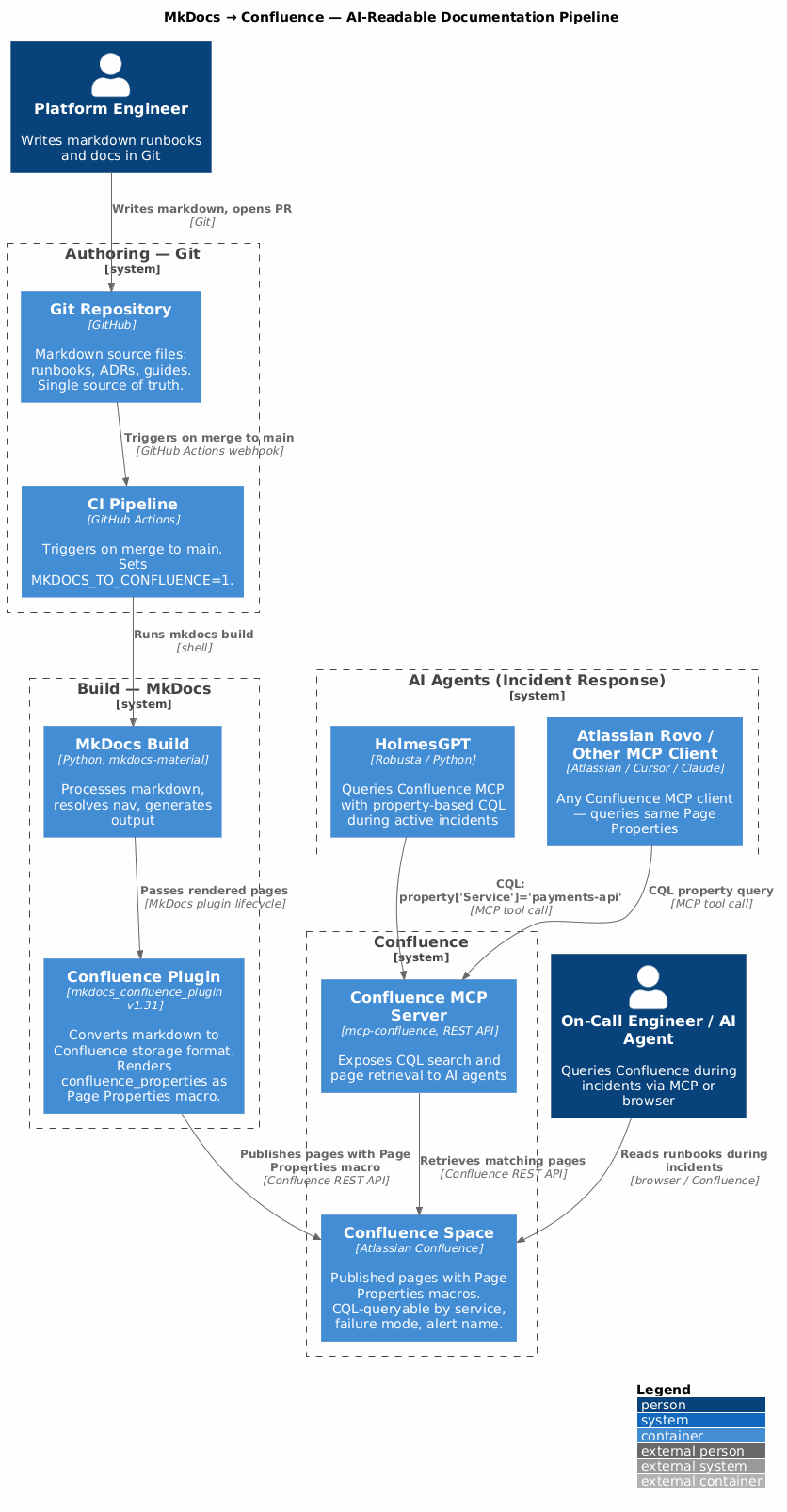
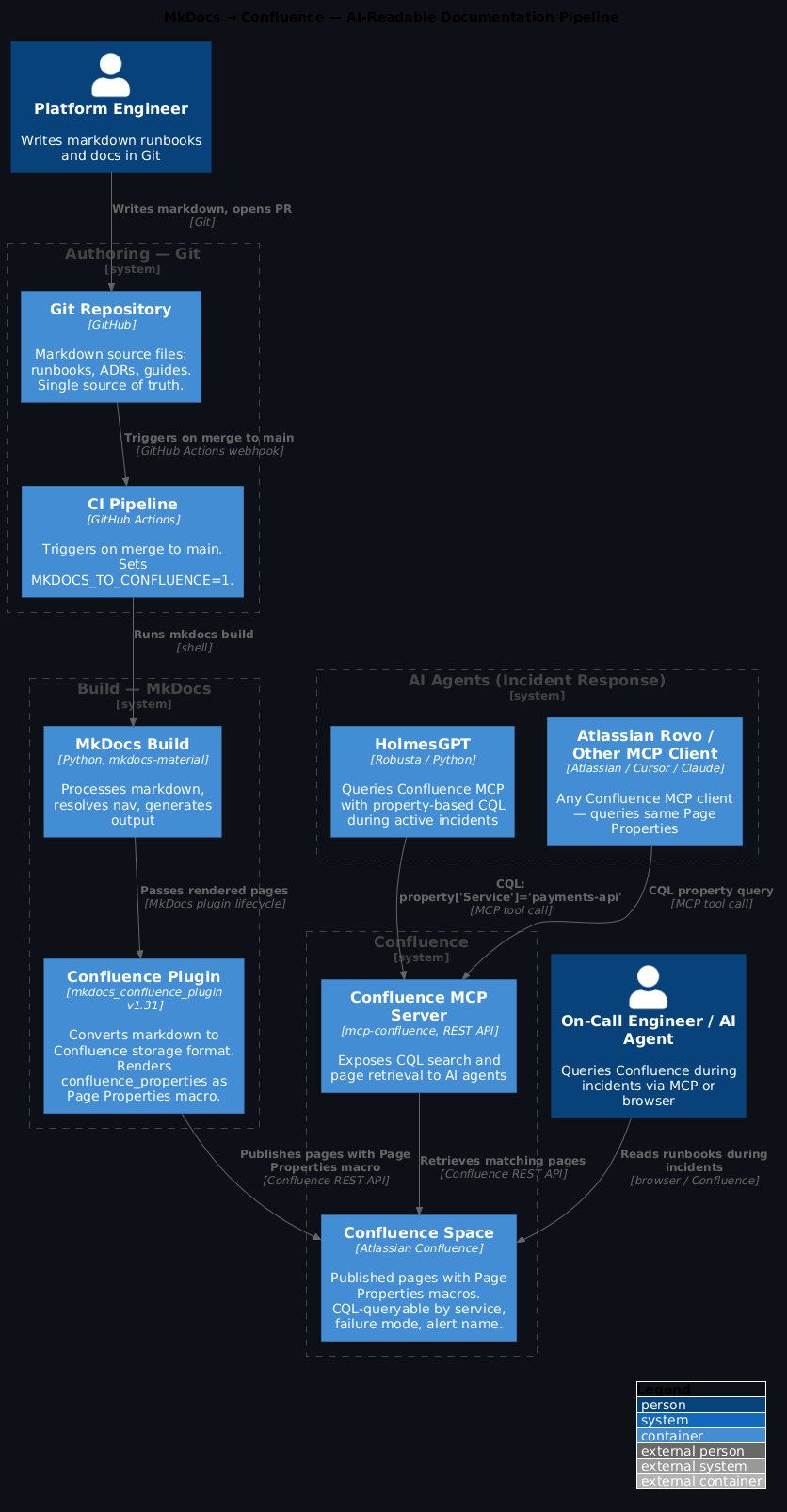
End to end:
- Engineer writes markdown — runbook, ADR, operational guide. Lives in Git, reviewed as a PR, co-located with the code it documents.
- PR merges to main — CI picks it up.
- MkDocs builds — the plugin publishes the page to Confluence with the
confluence_propertiesfrontmatter rendered as a Page Properties macro. - Confluence is the operational surface — on-call engineers find runbooks there, Atlassian Rovo reads it, HolmesGPT queries it via the Confluence MCP.
- AI agent queries precisely — CQL on
property["Alert-Name"]="KubePodOOMKilled"returns the exact page, not a ranked guess.
The Git source never changes. Confluence stays current. Agents get structured data, not prose.
Configuring the Confluence MCP for HolmesGPT
If you're running HolmesGPT, wire the Confluence MCP to your space:
# holmes-config.yaml
mcpServers:
  - name: confluence
    command: uvx
    args: ["mcp-confluence@latest"]
    env:
      CONFLUENCE_URL: https://your-org.atlassian.net/wiki
      CONFLUENCE_TOKEN: ${CONFLUENCE_API_TOKEN}
      CONFLUENCE_SPACES: "RUNBOOKS"  # limit to the space the plugin publishes to
HolmesGPT will now prefer CQL property queries when it has enough signal from the alert (service name, alert name) — and fall back to text search when it doesn't. The structured frontmatter makes the preferred path hit more often.
Limit the MCP to your runbook space
Setting CONFLUENCE_SPACES to just your runbook space reduces noise. Holmes doesn't need to search your HR space or marketing wiki during an incident.
Handling the navigation hierarchy
The plugin preserves your MkDocs navigation structure as a Confluence page tree. If you use mkdocs-awesome-nav, the .nav.yml file controls the hierarchy:
# docs/technical-practices/monitoring-observability/runbooks/.nav.yml
nav:
  - Runbook Template: rb_template_ai_optimized.md
  - AWS Health Dashboard: rb_aws_health_dashboard_runbook.md
  - payments-api OOMKill: rb_payments_api_oomkill.md
  - s3-events-exporter:
      - s3-events-exporter/**/*.md
This becomes a matching Confluence page hierarchy under Platform / Runbooks / Monitoring-Observability / Runbooks.
Navigation matching is smart, not brittle
The plugin uses semantic matching to map MkDocs nav entries to Confluence pages — abbreviation expansion (ADRs → Architecture Design Records), context-aware matching for nested directories, and fuzzy fallback for edge cases. You don't need exact title matches.
Running it locally without touching Confluence
Because the plugin is gated by enabled_if_env: MKDOCS_TO_CONFLUENCE, your local workflow is unchanged:
# Local — normal MkDocs serve, no Confluence publish
mkdocs serve

# Dry run — see what would be published without touching anything
MKDOCS_TO_CONFLUENCE=1 mkdocs build  # with dryrun: true in mkdocs.yml

# Full publish — what CI does
CONFLUENCE_USERNAME=your@email.com \
CONFLUENCE_PASSWORD=your-api-token \
MKDOCS_TO_CONFLUENCE=1 \
mkdocs build
What changes for your team
Before this pipeline: your runbook is in Git. To share it with on-call engineers in Confluence, someone copy-pastes it. Six weeks later, the Git version has been updated and the Confluence version hasn't.
After: every merge to main is the publish step. There's no copy-paste. The edit link in the Confluence header points back to GitHub, so readers know where to contribute changes. The confluence_properties frontmatter means every published page is precisely queryable by any Confluence MCP client, not just searchable by keyword.
The knowledge base your AI agents read is now exactly as current as your Git history.
FAQ
Does this replace the MkDocs-built static site?
No — both outputs are independent. mkdocs build still produces the static site (your docs portal or GitHub Pages). The Confluence plugin publishes alongside that. You get both: a static docs site for public or team-wide consumption and a Confluence integration for the teams that live in Atlassian tooling.
What happens if I rename or move a file in Git?
The plugin uses smart navigation matching to find the existing Confluence page by title and update it in place. If you rename the markdown file and update the nav entry, the plugin should match and update the existing page rather than creating a duplicate. Enable debug: true and run with dryrun: true to verify the matching before a real publish.
Can I control which pages publish to Confluence?
Yes — the enabled_if_env flag controls the whole plugin. For page-level control, you can set draft: true in frontmatter (standard MkDocs Material behaviour — these pages are excluded from the build entirely). Pages excluded from your .nav.yml are also excluded.
Does the confluence_properties approach work with Atlassian Rovo?
Yes. Rovo's Confluence search uses the same CQL interface. The Page Properties macro is a standard Confluence feature, not specific to HolmesGPT or any particular MCP client.
How do I backfill confluence_properties on existing runbooks?
Add the frontmatter block to your markdown files, commit, and let CI publish. The next build updates the existing Confluence pages with the Page Properties macro. You don't need to recreate pages — the plugin updates in place.
For the runbook gap-detection loop that generates drafts for missing runbooks, see HolmesGPT Knows What Your Runbooks Are Missing. For the AI-optimised runbook template that defines the confluence_properties fields used throughout this post, see the runbook template in the Polarpoint docs.