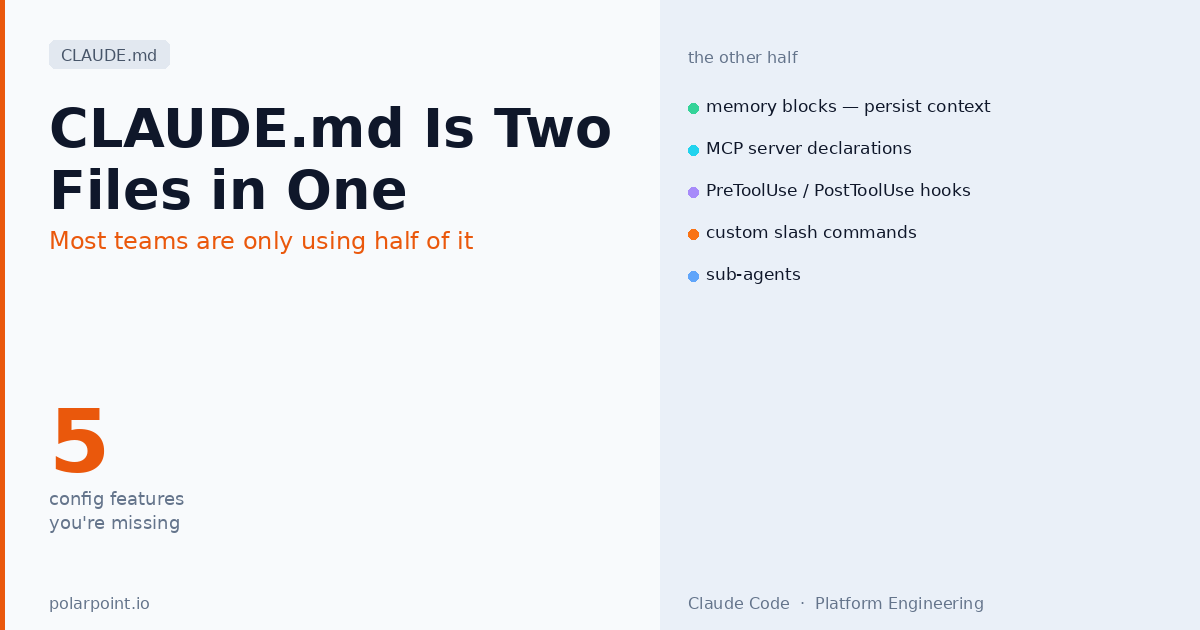
CLAUDE.md Is Two Files in One. Most Teams Are Only Using Half of It.
If you've read the Karpathy CLAUDE.md post — the four rules, the 41% to 11% error rate reduction — you know why CLAUDE.md matters as a rules file. Write clear constraints, get better agent behaviour. That framing is accurate and it's useful.
But it's about half the picture. CLAUDE.md is also a configuration file for Claude Code. And the configuration half — memory blocks, MCP server declarations, tool permissions, hooks, custom slash commands, sub-agents — is where platform engineers have the most to gain. These features aren't available in AGENTS.md, Cursor MDC rules, or Copilot instructions. They're Claude Code-specific, and most teams either don't know about them or haven't made the connection between these features and what they'd actually want to do with them.
Quick takeaways
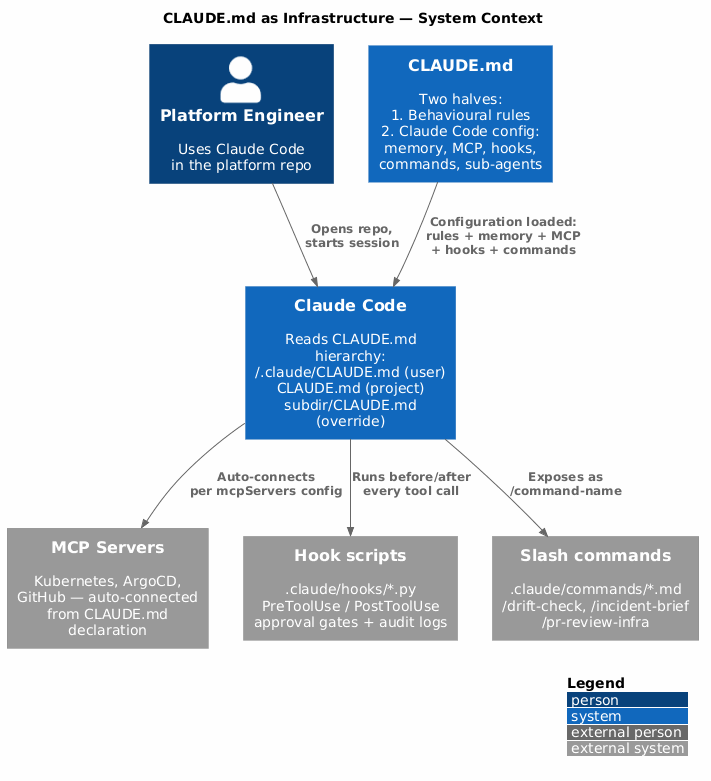
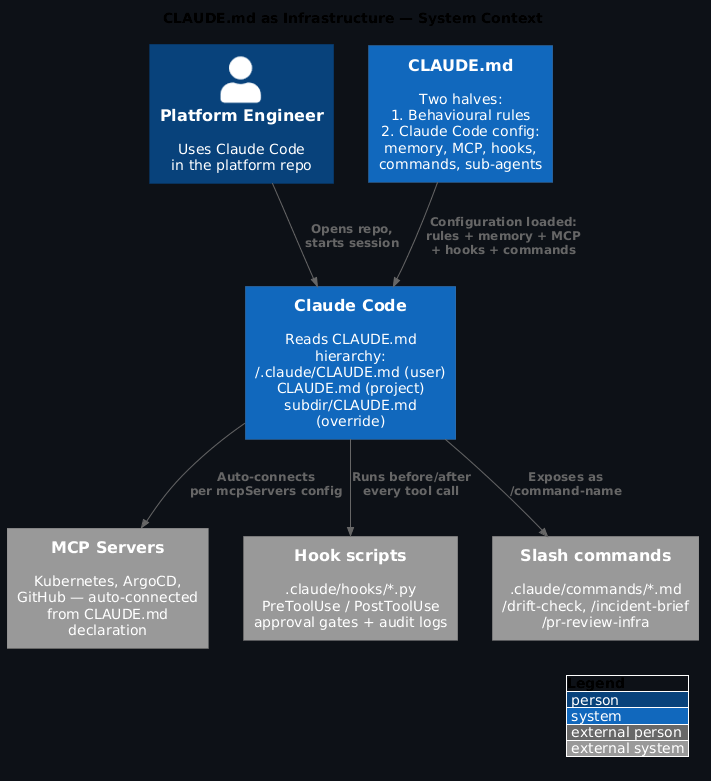
- CLAUDE.md has two distinct jobs: behavioural rules (like Karpathy's four) and Claude Code configuration (memory, MCP, hooks, tools, commands)
- Memory blocks (
@memory) persist facts across sessions so you don't reload the same context every time - MCP server declarations auto-connect Claude Code to your platform tools without manual setup per developer
PreToolUseandPostToolUsehooks let you add approval gates, audit logs, or notifications around tool calls- Custom slash commands in
.claude/commands/*.mdbecome first-class commands the whole team can use - The CLAUDE.md hierarchy (user → project → parent directories) lets you layer org-wide config with repo-specific config
The two halves of CLAUDE.md
Half 1: Behavioural rules — the stuff covered in the Karpathy post. How the agent approaches tasks, what it checks before acting, how it scopes changes, when it stops and asks. These apply to every session and every agent.
Half 2: Claude Code configuration — what makes CLAUDE.md different from AGENTS.md and every other convention file. This half configures Claude Code itself: which tools it can use, which MCP servers it connects to, what slash commands exist, how it handles memory, and what happens before and after tool calls.
You can have a CLAUDE.md that's entirely rules (like Karpathy's) or entirely configuration, or both. The distinction matters because the configuration half is much more powerful for teams than the rules half alone — and it's the part most people miss.
CLAUDE.md is configuration-as-code for Claude Code
Think of the configuration sections the same way you think about a .devcontainer/devcontainer.json or a .github/copilot-instructions.md — it's telling the tool how to behave in this project, not just what rules to follow. Commit it, version it, review changes in PRs.
Memory blocks
Memory blocks persist context across sessions without burning it into every system prompt. You use them when you have facts that are always true about the project — tech decisions, architectural context, team conventions — that would be wasteful to reload from scratch every session.
<!-- claude memory -->
## Project context

- We use External Secrets Operator (not Vault directly) for secrets
- ArgoCD auto-syncs main — never suggest `kubectl apply` in this repo
- Crossplane compositions are in `platform/compositions/`, not `infra/`
- Platform team: @surj (lead), @alex (SRE), @priya (networking)
- Incident channel: #platform-incidents (Slack)
<!-- /claude memory -->
The <!-- claude memory --> block is saved by Claude Code as persistent memory. When you open a new session, Claude Code loads these facts without you having to re-explain them. The difference in practice: you stop the first message of every session being "let me remind you what this repo does."
Apply this: memory blocks for team context, not rules
Memory blocks are best for facts that don't change often and would be tedious to type every time — tech stack decisions, team member names and responsibilities, key architectural choices. Don't use them for behavioural rules (those belong in the rules section of CLAUDE.md) or for things that change frequently (those should be read fresh from files each session).
MCP server declarations
The mcp section of CLAUDE.md declares which MCP servers Claude Code should connect to when working in this project. Without this, every developer has to configure MCP servers manually in their local Claude Code settings. With it, the project's MCP configuration is in version control and every team member gets the same tools automatically.
# In CLAUDE.md, the mcp section uses YAML frontmatter or a code block

## MCP servers

```json
{
  "mcpServers": {
    "kubernetes": {
      "command": "npx",
      "args": ["@polarpoint/kubernetes-mcp-server"],
      "env": {
        "KUBECONFIG": "${env:KUBECONFIG}"
      }
    },
    "argocd": {
      "command": "npx",
      "args": ["@polarpoint/argocd-mcp-server"],
      "env": {
        "ARGOCD_SERVER": "${env:ARGOCD_SERVER}",
        "ARGOCD_TOKEN": "${env:ARGOCD_TOKEN}"
      }
    },
    "github": {
      "command": "npx",
      "args": ["@modelcontextprotocol/server-github"],
      "env": {
        "GITHUB_TOKEN": "${env:GITHUB_TOKEN}"
      }
    }
  }
}
Now any developer who opens this repo in Claude Code gets Kubernetes, ArgoCD, and GitHub MCP tools available automatically. The `${env:VARIABLE}` syntax reads from the developer's local environment — credentials stay local, configuration lives in the repo.

!!! warning "MCP server declarations are project-wide defaults"
    Declaring an MCP server in CLAUDE.md means every developer who opens the project gets that server — including developers who might not have the required credentials set up. Declare servers your whole team uses, not personal or team-specific tools. For individual MCP servers, each developer should configure them in their user-level CLAUDE.md (`~/.claude/CLAUDE.md`) instead.

---

## Hooks

Hooks run before (`PreToolUse`) or after (`PostToolUse`) every tool call Claude Code makes. They're the most powerful and least-used feature in CLAUDE.md for platform engineers.

What hooks give you:

**Approval gates** — intercept destructive tool calls and require confirmation before they execute.

**Audit logs** — write every tool call and its result to a log file for compliance or debugging.

**Notifications** — post to Slack or create a Jira ticket when certain tool calls happen.

**Guardrails** — reject tool calls that violate your platform policies, even if the agent decided they were appropriate.

```python
# .claude/hooks/pre_tool.py
import json, sys, os

def handle(tool_call: dict) -> dict:
    tool = tool_call.get("tool_name", "")
    params = tool_call.get("parameters", {})

    # Block kubectl apply — all applies go through ArgoCD
    if tool == "bash" and "kubectl apply" in params.get("command", ""):
        return {
            "action": "block",
            "reason": "Direct kubectl apply is not allowed in this repo. "
                      "All applies go through ArgoCD. See AGENTS.md Zone 1."
        }

    # Require approval for any git push to main
    if tool == "bash" and "git push" in params.get("command", "") and "main" in params.get("command", ""):
        response = input(f"\nApprove push to main? (y/n): ")
        if response.lower() != "y":
            return {"action": "block", "reason": "Push to main declined by user."}

    return {"action": "allow"}

if __name__ == "__main__":
    tool_call = json.loads(sys.stdin.read())
    result = handle(tool_call)
    print(json.dumps(result))
In CLAUDE.md:
## Hooks

```json
{
  "hooks": {
    "PreToolUse": {
      "command": "python3 .claude/hooks/pre_tool.py"
    },
    "PostToolUse": {
      "command": "python3 .claude/hooks/post_tool.py"
    }
  }
}
!!! tip "Hooks are the enforcement layer for Claude Code-specific behaviour"
    AGENTS.md tells the agent not to run `kubectl apply`. Hooks *block* it even if the agent tries. This is the Claude Code equivalent of Kyverno — you're not relying on the agent reading the rules correctly, you're enforcing constraints structurally. If your platform has operations that should never happen autonomously in a Claude Code session, hooks are how you prevent them.

---

## Tool permissions

The `allowedTools` and `deniedTools` sections in CLAUDE.md control which tools Claude Code can use in this project. This is different from what MCP servers are connected — it's about which of those servers' tools the agent is allowed to call without user confirmation.

```markdown
## Tool permissions

```json
{
  "allowedTools": [
    "Read",
    "Grep",
    "Glob",
    "kubernetes:get_pods",
    "kubernetes:get_events",
    "kubernetes:describe_pod",
    "argocd:list_applications",
    "argocd:get_application",
    "github:list_pull_requests",
    "github:get_file"
  ],
  "deniedTools": [
    "kubernetes:delete_pod",
    "kubernetes:exec",
    "argocd:sync_application",
    "argocd:delete_application"
  ]
}
Tools in `allowedTools` run without confirmation. Tools in `deniedTools` are blocked entirely. Tools not listed in either require a one-time confirmation per session.

For platform repos, the split is usually: read-only tools go in `allowedTools` (Claude can read cluster state freely), destructive or state-changing tools go in `deniedTools` unless you want them confirmed interactively.

---

## Custom slash commands

`.claude/commands/*.md` files become slash commands in Claude Code. Every team member in the project can use them without knowing the underlying prompt — just type `/command-name`.

```markdown
# .claude/commands/drift-check.md

Check for GitOps drift in the current repo.

1. Run `argocd:list_applications` and note any OutOfSync applications
2. For each OutOfSync application, run `argocd:get_application` to get the diff
3. Check whether the drift is likely automated (e.g. HPA scaling) or manual (unexpected config change)
4. Produce a brief summary: which apps are drifted, likely cause, recommended action

Focus on production applications first. Ignore applications with `managedNamespaceMetadata` diffs — those are expected.
Now any developer can run /drift-check and get a structured drift report without having to know how to prompt Claude Code to do it. The command is version-controlled, reviewable, and consistent across the team.
Good commands to build for platform teams: /drift-check, /incident-brief (summarise a PagerDuty alert in context), /pr-review-infra (review an infra PR against your conventions), /cost-breakdown (query cloud cost data for the current sprint).
Commands as shared institutional knowledge
Slash commands are where implicit team knowledge becomes explicit and reusable. Every time someone discovers a useful way to prompt Claude Code for a platform task, that discovery should become a command. The first time someone runs /incident-brief and gets a better result than their manual prompting, they'll never go back to typing it from scratch.
Sub-agents
CLAUDE.md can declare sub-agents — specialist agents that the main Claude Code session can delegate to. Each sub-agent has its own CLAUDE.md with its own rules and tool access.
## Sub-agents

```json
{
  "subAgents": {
    "drift-investigator": {
      "description": "Specialist for GitOps drift analysis and ArgoCD operations",
      "claudeFile": ".claude/agents/drift-investigator.md",
      "tools": ["argocd", "kubernetes"]
    },
    "pr-reviewer": {
      "description": "Reviews infrastructure PRs against platform conventions",
      "claudeFile": ".claude/agents/pr-reviewer.md",
      "tools": ["github", "Read", "Grep"]
    }
  }
}
The main session delegates to the `drift-investigator` when drift analysis is needed, and to the `pr-reviewer` when reviewing PRs. Each sub-agent has focused tool access and focused rules — it can't accidentally drift into tasks outside its scope.

This is the Claude Code-native version of what A2A does at the service level: specialisation without monolithic capability sprawl.

---

## The CLAUDE.md hierarchy

CLAUDE.md files are read hierarchically. Claude Code merges them in order from broadest to most specific:

1. **User-level** — `~/.claude/CLAUDE.md`. Your personal rules and MCP servers that apply everywhere.
2. **Project-level** — `CLAUDE.md` in the repo root. Project-specific rules, MCP servers, hooks, and commands.
3. **Directory-level** — CLAUDE.md files in subdirectories. Overrides for specific parts of the repo.

Later (more specific) files override earlier ones for conflicting settings. For rules, all files are read and merged.

For platform engineering teams, the practical structure is:

- **User CLAUDE.md** — personal preferences, authentication helpers, your `experience-as-skill` skill file
- **Repo CLAUDE.md** — project conventions, team MCP servers, hooks, commands, memory blocks
- **Subdirectory CLAUDE.md** — overrides for specific directories (e.g., a stricter set of rules for the `prod/` overlay)

---

## Putting it together: a complete CLAUDE.md for a platform repo

```markdown
# CLAUDE.md — Platform Repo

## Rules (read by all agents, not just Claude Code)

- Think before acting. State what you understood before any file changes.
- Minimum viable change. Don't touch files not mentioned in the task.
- Surgical edits. Every changed line must trace to the user's request.
- Verify success criteria before stopping. Don't assume — check.

<!-- claude memory -->
## Always-on context

- ArgoCD auto-syncs main — never suggest `kubectl apply`
- Secrets: External Secrets Operator pointing at AWS Secrets Manager
- Platform team: @surj, @alex, @priya
- Incident channel: #platform-incidents
<!-- /claude memory -->

## MCP servers

[MCP server config JSON]

## Hooks

[Hook config JSON]

## Tool permissions

[allowedTools / deniedTools JSON]

## Custom commands

Available via `/command-name` — see `.claude/commands/` for all commands.
The rules section is what AGENTS.md and other cross-tool files also read. Everything else is Claude Code-specific configuration that makes the tool meaningfully more useful for your team.
FAQ
Is CLAUDE.md read by Cursor, GitHub Copilot, or Codex?
No — CLAUDE.md is Claude Code-specific. Cross-tool conventions (forbidden paths, naming, sync model) belong in AGENTS.md. CLAUDE.md is for features that only Claude Code supports: memory, MCP servers, hooks, slash commands, sub-agents. If you want Cursor to see your conventions, use .cursor/rules/*.mdc. If you want Copilot to see them, use .github/copilot-instructions.md.
Can I include other files in CLAUDE.md?
Yes. Claude Code supports @path/to/file includes in CLAUDE.md. This lets you share sections between CLAUDE.md files or keep large sections in separate files: @.claude/mcp-config.md or @.claude/hooks-config.md. Useful when the MCP server configuration gets long enough to be distracting in the main CLAUDE.md.
Where should I put hooks — in CLAUDE.md or as separate scripts?
Both. The hook declaration (which script to run) lives in CLAUDE.md. The hook logic lives in a separate script file under .claude/hooks/. This keeps CLAUDE.md readable and the hook logic testable — you can write unit tests for your pre-tool hook without involving Claude Code at all.
Can the user-level CLAUDE.md override project-level settings?
For most settings, project-level settings take precedence over user-level settings when they conflict. User-level settings fill in things not set at the project level. The exception is personal preferences (formatting, verbosity) where user-level typically wins. Check the Claude Code documentation for the current merge semantics — this is an area that's still evolving.
How is this different from just having a long system prompt?
The features in CLAUDE.md's configuration half — memory, MCP, hooks, commands — can't be replicated with a system prompt. Memory persists across sessions. MCP servers are connections to external tools, not text. Hooks run code outside the model. Custom commands are invocable templates. A long system prompt gives you better-instructed model behaviour. CLAUDE.md's configuration half changes what the tool is capable of.
Related posts: The Four Rules That Make AI Agents Actually Trustworthy · Your Platform Repo Needs an AGENTS.md · Cursor MDC Rules · GitHub Copilot Instructions · Claude Code for Platform Engineers