Your Platform Repo Needs an AGENTS.md. Here's What Goes In It.
There are now 60,000+ public repos with an AGENTS.md. Every major AI coding agent — Claude Code, OpenAI Codex CLI, Cursor, GitHub Copilot, Gemini CLI, Aider — reads it before touching your code. It's the file that tells an AI what it can do, what it can't touch, and how your repo actually works. And almost none of those 60,000 files are written for a Kubernetes platform repo. That gap is going to cost someone an incident.
Quick takeaways
AGENTS.mdis now a cross-tool standard under the Linux Foundation — it's not a Claude Code thing, it works everywhere.- AI coding agents without an
AGENTS.mdwill make plausible-looking changes that violate your GitOps conventions, break your ArgoCD sync, or touch files you never wanted modified. - A platform repo's
AGENTS.mdneeds to cover more than just "run pytest" — it needs to encode your naming conventions, forbidden directories, GitOps-specific rules, and the difference between a config change and a platform change. - It's infrastructure. Treat it like one.
Why platform repos are different
Most AGENTS.md guides assume you're working in a web app repo — run the tests, don't commit to main, follow the PR conventions. Fine advice. Not enough for a repo that manages living Kubernetes infrastructure.
When an AI agent makes a "reasonable" change to a web app and gets it wrong, you get a broken build. When the same agent makes a "reasonable" change to your ArgoCD Application manifests and gets it wrong, you get an OutOfSync cluster at 2am. Those aren't equivalent risks.
Here's the scenario that crystallised this for me. An agent was asked to "tidy up the applications directory" — a reasonable ask for a code repo. It renamed several ArgoCD Application resources to match what it thought was a more consistent naming pattern, standardising payments-api-prod to payments-api-production. The manifests were valid YAML. The change looked fine in review. It merged, ArgoCD synced, and thirty seconds later the Notification controller lost track of four applications because it was filtering on the old name pattern. The Grafana dashboards went blank. Two alert routing rules stopped firing. The rename cascaded into four other systems before anyone noticed. An AGENTS.md with two lines about the naming convention would have stopped all of it.
The naming convention incident
30 seconds from merge to four broken systems. The rename was valid YAML. It passed review. ArgoCD synced it without complaint. The Notification controller lost track of four applications, Grafana dashboards went blank, two alert routing rules stopped firing — all because one naming pattern changed. Two lines in AGENTS.md would have stopped every part of this.
Platform repos have several properties that an AI agent won't infer from the code alone:
- Sync is live. ArgoCD or Flux is watching your main branch. A merged commit isn't just merged — it's deployed. The agent doesn't know that.
- Naming conventions have downstream consequences. If your ArgoCD Application names follow a
<team>-<service>-<env>pattern and an agent renames one, that breaks the Notification controller, your Grafana dashboards, and any scripts that grep for Application names. - Some directories are frozen. Your
infra/folder might be managed by a separate Crossplane composition. Yourcrds/directory might be managed by an upgrade script. An agent that helpfully "refactors" either will cause a very bad day. - Secrets handling is non-obvious. Your repo probably uses External Secrets Operator or Sealed Secrets. The pattern looks different from a regular Kubernetes Secret — and an agent that doesn't understand the difference will either leak secrets or break the secret sync.
What belongs in your platform AGENTS.md
Here's the structure that works for a Kubernetes + ArgoCD + Crossplane platform repo. Adapt the specifics to your stack.
# AGENTS.md

---

## What this repo does

This repo manages our Kubernetes platform — cluster configuration, ArgoCD Applications,
Crossplane Compositions, Helm values overrides, and Kyverno policies.
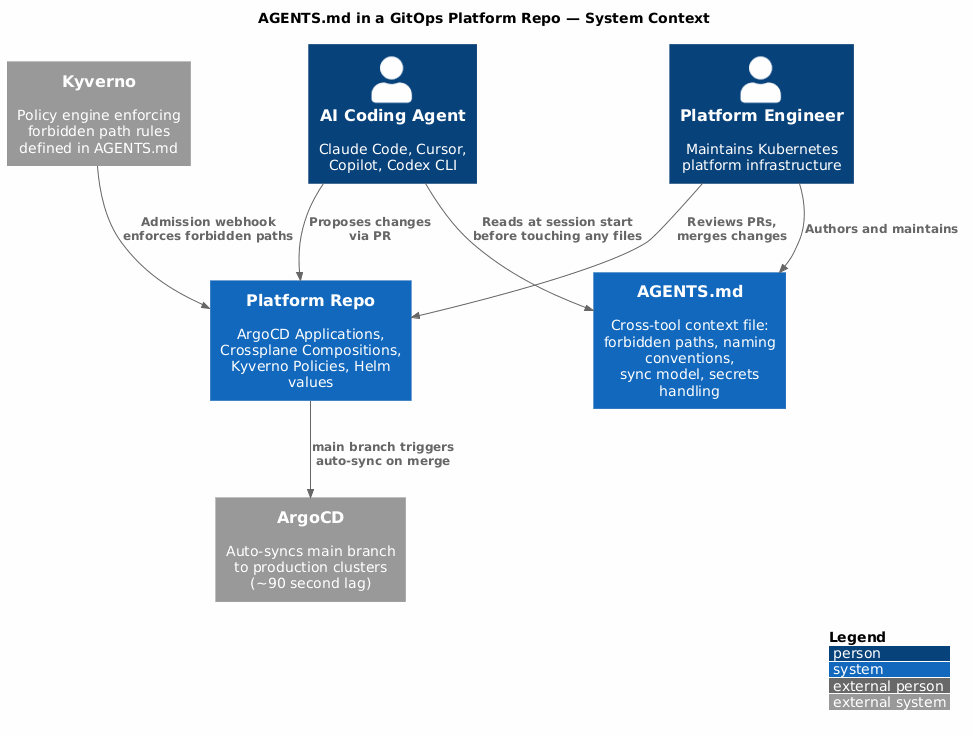
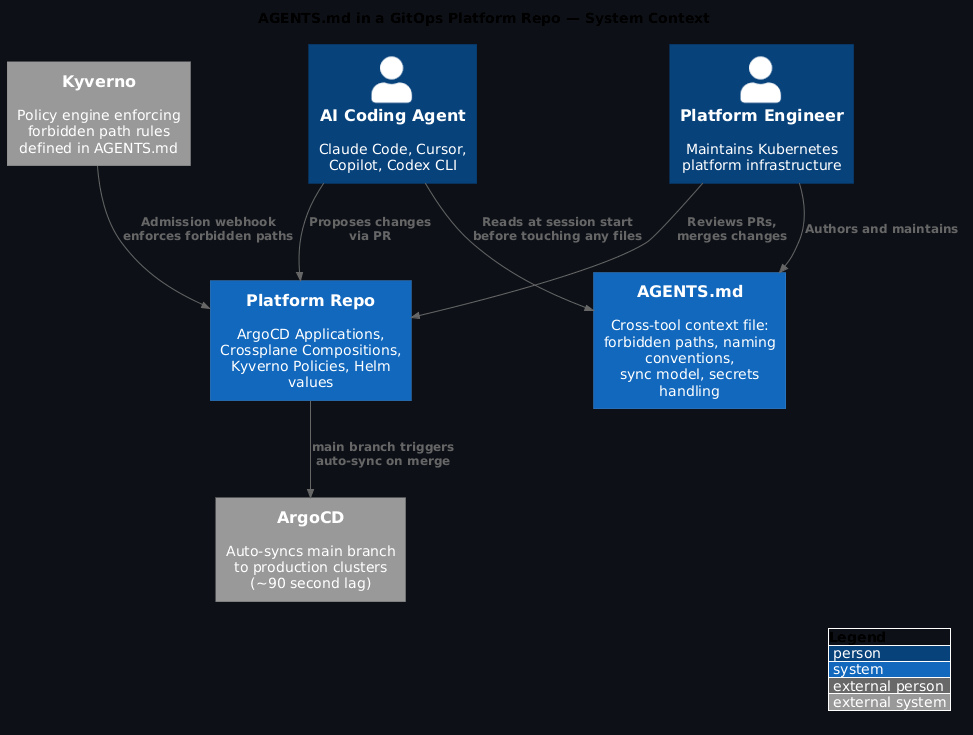
Changes merged to `main` are live within ~90 seconds via ArgoCD auto-sync.

---

## Before you change anything

Read this fully. The sync-on-merge behaviour means mistakes deploy automatically.
There is no staging buffer between a merged PR and a running cluster.

---

## Forbidden paths — do not modify

These directories are managed by automated systems. Manual changes will be overwritten
or will break the automation:

- `crds/` — managed by the upgrade-crds pipeline. Never edit directly.
- `infra/providers/` — Crossplane provider configs, managed by the bootstrap workflow.
- `secrets/` — Sealed Secrets encrypted blobs. Edit via `kubeseal`, never by hand.
- `.github/workflows/` — CI workflows are reviewed separately, never auto-generated.

---

## Naming conventions

Get these wrong and downstream tooling breaks silently.

**ArgoCD Applications:**
- Pattern: `<team>-<service>-<env>`
- Examples: `payments-api-prod`, `platform-backstage-staging`
- Do NOT use underscores. Do NOT abbreviate env names (use `prod`, not `prd`).

**Kubernetes Namespaces:**
- Pattern: `<team>-<env>`
- Examples: `payments-prod`, `platform-staging`

**Helm release names:**
- Must match the ArgoCD Application name exactly.

---

## How ArgoCD sync works here

- `main` branch → auto-sync to production clusters (prune: true, selfHeal: true)
- `staging` branch → auto-sync to staging cluster
- Feature branches → NOT synced. ArgoCD ignores them.

If you're testing a change, create a PR and ask for a preview deploy — don't push
directly to staging to test something.

---

## Running tests

```bash
# Validate all YAML in the repo
make validate

# Lint Helm charts
helm lint charts/*/

# Run Kyverno policy tests
kyverno test policies/tests/

# Dry-run ArgoCD sync (requires cluster access)
argocd app diff <app-name>
Never run kubectl apply directly in this repo. All applies go through ArgoCD.
Secrets handling
We use External Secrets Operator. A Secret in this repo is always an ExternalSecret
CRD pointing at AWS Secrets Manager — not a raw Kubernetes Secret.
If you need to add a new secret:
- Add the value to AWS Secrets Manager at the appropriate path
- Add an
ExternalSecretmanifest pointing at it - Never put plaintext values in this repo
What's out of scope for this repo
- Application code (that lives in service repos)
- Dockerfile changes
- CI/CD pipeline changes for individual services
- Anything in AWS infrastructure (that's Terraform, separate repo)
If you're unsure
Open a draft PR. Don't merge it. Tag @platform-team for review. The cost of a question is zero. The cost of a bad sync is an incident.
The `ExternalSecret` pattern looks like this:

```yaml
apiVersion: external-secrets.io/v1beta1
kind: ExternalSecret
metadata:
  name: my-service-creds
  namespace: payments-prod
spec:
  refreshInterval: 1h
  secretStoreRef:
    name: aws-secretsmanager
    kind: ClusterSecretStore
  target:
    name: my-service-creds
  data:
    - secretKey: DATABASE_URL
      remoteRef:
        key: /payments/prod/database-url
That's a real AGENTS.md. Not a placeholder. Every section is there because an AI agent will hit exactly that edge case if you don't tell it.
The bits that trip agents up most
From analysis of 2,500+ AGENTS.md files, the three most impactful additions are: executable test commands (not just "run tests"), explicit forbidden paths, and clear statements about what the repo is not responsible for.
For platform repos, there's a fourth: the sync model. An AI agent doesn't understand that git push to main means kubectl apply to production. You have to say that explicitly. Once it knows, it becomes appropriately cautious about scope.
The fourth thing most AGENTS.md guides miss
The sync model statement. Put it right after the two-line repo summary — not buried in a "how ArgoCD works" section. An agent that knows git push to main means live deployment becomes appropriately cautious before it reads anything else. Every other convention in the file lands differently once the agent understands the blast radius.
The sync model statement is also the most important thing to put near the top. Not buried in a "how ArgoCD works" section — right after the two-line summary of what the repo does. That way any agent reads it before it reads anything else.
Enforcing it with Kyverno
AGENTS.md is a GitOps-managed file like anything else in your repo. Check it in, review it in PRs, update it when conventions change.
One pattern worth implementing: add a Kyverno policy that fires a warning whenever a PR modifies a forbidden path. That catches human mistakes too, not just agent ones. And it means your AGENTS.md is actually enforced by policy, not just documented.
apiVersion: kyverno.io/v1
kind: ClusterPolicy
metadata:
  name: warn-forbidden-path-modification
  annotations:
    policies.kyverno.io/title: Warn on Forbidden Path Modification
    policies.kyverno.io/description: >-
      Fires an audit warning when a resource modification targets paths
      designated as forbidden in AGENTS.md. Catches both human and AI agent
      changes to CRD-managed or pipeline-managed directories.
spec:
  validationFailureAction: Audit
  background: false
  rules:
    - name: warn-crds-modification
      match:
        any:
          - resources:
              kinds:
                - ConfigMap
              namespaces:
                - platform-system
              names:
                - "crds-*"
      validate:
        message: >-
          Direct modification of CRD-managed resources is not permitted.
          Use the upgrade-crds pipeline. See AGENTS.md for details.
        deny: {}
    - name: warn-infra-providers-modification
      match:
        any:
          - resources:
              kinds:
                - Provider
                - ProviderConfig
              namespaces:
                - crossplane-system
      validate:
        message: >-
          Crossplane provider configs are managed by the bootstrap workflow.
          Do not modify directly. See AGENTS.md for details.
        deny: {}
Start with Audit, move to Enforce
Start with validationFailureAction: Audit and watch the warnings in your admission controller logs for a week before switching to Enforce. This lets you catch edge cases — legitimate automation that touches paths you listed as forbidden, or conventions that need refining — without blocking real work. One week of warnings tells you more than any amount of upfront planning.
Start with Audit mode and watch the warnings in your admission controller logs for a week before switching to Enforce. This lets you catch edge cases without blocking legitimate work.
The connection to the broader permission model is direct: the same thinking that drives MCP tool permission scoping applies here. You're defining what the agent is allowed to touch, at the infrastructure layer rather than the API layer. Both are necessary.
What you get
- An
AGENTS.mdthat actually prevents the incidents a generic one misses - Forbidden paths enforced by policy, not just documented
- A naming convention reference that keeps downstream tooling (Grafana, Notifications, scripts) from breaking silently
- A sync model statement that makes every AI agent appropriately cautious before touching production-bound manifests
FAQ
Do I need a separate AGENTS.md for each environment overlay?
Not necessarily. One root-level AGENTS.md covering the full repo is enough for most platform setups. If your repo structure puts prod and staging overlays in clearly separated subdirectories, you can add a local AGENTS.md in each overlay with environment-specific rules. But start with one at the root — most agents read the root file first.
Does AGENTS.md replace CLAUDE.md or .cursorrules?
It complements them. AGENTS.md is the cross-tool standard — it works everywhere. CLAUDE.md is Claude Code-specific and lets you add Claude-specific behaviour (memory, tools, MCP config). If you're not sure which to use, start with AGENTS.md at the repo root and add CLAUDE.md if you need Claude-specific configuration on top. The four rules from Karpathy's CLAUDE.md are a good baseline for that layer.
Will an AI agent actually follow what I put in AGENTS.md?
Mostly yes, with caveats. All the major agents that support AGENTS.md treat it as high-priority context — it's read at the start of every session, not buried in retrieval. Forbidden paths are generally respected. Where agents still slip up is on implicit conventions — things you haven't stated explicitly but assume are obvious. The rule of thumb: if you'd have to explain it in a code review, put it in AGENTS.md.
How do I keep it up to date as conventions change?
Treat it like a runbook: whoever changes the convention owns the AGENTS.md update in the same PR. A one-liner in your PR template ("Did this change a convention? Update AGENTS.md.") catches most drift. Set a quarterly reminder to read the whole file — it gets stale faster than you expect.
Building an AGENTS.md for your platform repo and hitting edge cases not covered here? Drop a comment below or find me on LinkedIn.