AI Convention Files in Practice: GitHub
The taxonomy post covered every AI convention file type. This post puts them to work with GitHub — using GraphQL queries against Issues, Projects V2, Pull Requests, and Actions.
Every example below uses real GraphQL queries and follows patterns suitable for a production agents.md that populates sprint review decks from GitHub project data.
How agents talk to GitHub
An AGENTS.md file defines what the agent should do. A GitHub MCP server provides the runtime connection. The agent reads the workflow, then calls the MCP server to execute GraphQL queries and retrieve project data.
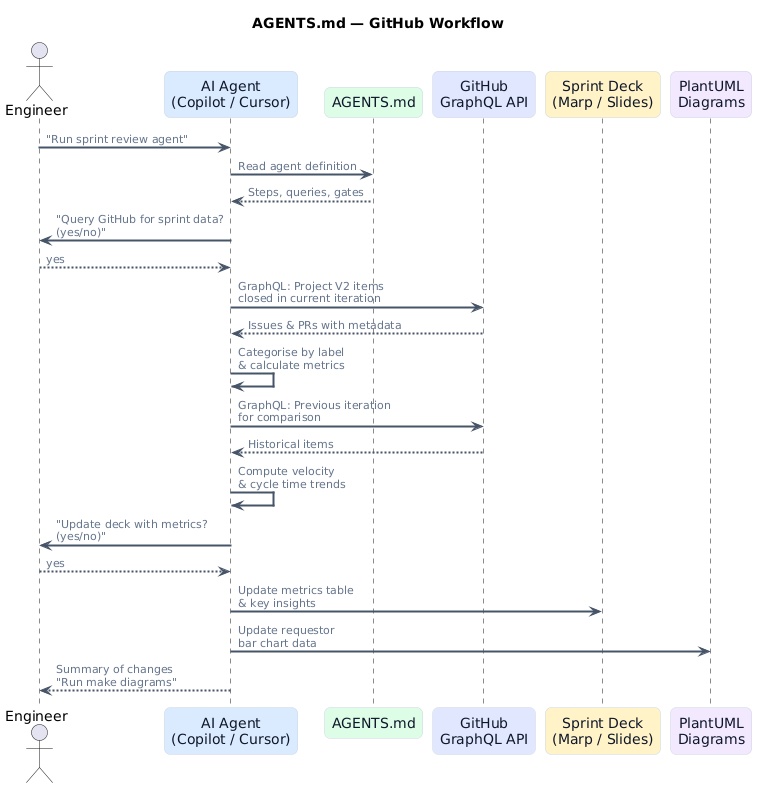
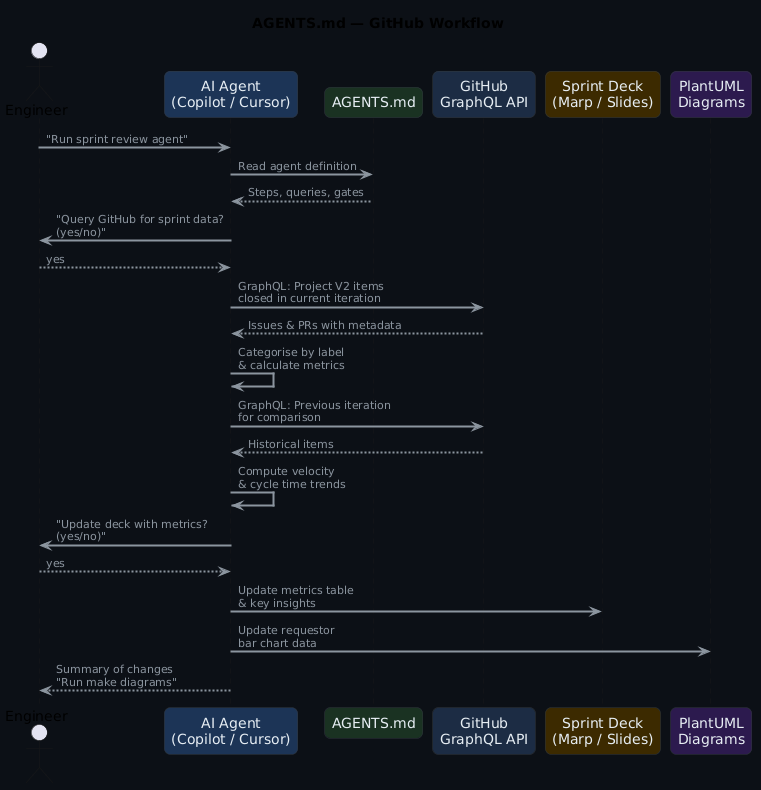
The GitHub MCP server exposes tools such as graphql_query, list_issues, list_pull_requests, and get_actions_runs. The agent invokes these tools through the MCP protocol — no raw HTTP calls needed.
GraphQL over REST for sprint data
GitHub's REST API requires many round trips to assemble sprint-level data — one call per issue, one call per PR. GraphQL gets nested project items, labels, assignees, and iteration data in a single query. For agents populating a sprint review deck, the difference is 1 call vs 50+. Always use GraphQL when querying Projects V2.
What gets automated (and what does not)
Not everything in a sprint review can come from a query. Platform migrations, new developer tooling, infrastructure redesigns — that work moves through GitHub Projects V2 iterations with milestones and roadmap views, and reporting on it is narrative. What shipped, what slipped, what the team learnt. An agent cannot write that.
Operational work is different. Access provisioning, pipeline fixes, environment configuration, troubleshooting — these arrive as issues, get closed, and pile up. Individually they are routine. In aggregate they tell a story: which labels generate the most volume, how cycle times trend, whether contributor load is balanced. That is numbers, and numbers come from GraphQL.
The agents in this post target operational work. They query GitHub, run the calculations, and drop the results into a Marp sprint review deck. Project slides stay in the same deck as fixed templates — same layout every sprint, content filled in by hand.
In GitHub terms: operations work uses labels like request, support, or ops on a shared repository. Projects track through GitHub Projects V2 with iteration fields, status columns, and tracked issues for epics.
Use case 1: Sprint review deck automation
The same pattern as the ADO version, adapted for GitHub Projects V2. The agent queries completed items from a project iteration, categorises them by label, and updates a Marp deck.
The agent definition
## Agent: Update Sprint Metrics from GitHub

Task: Update deck.md with sprint metrics from GitHub Projects V2

Steps:
1. Query GitHub for items completed in the current iteration
2. Calculate metrics:
   - Count by label category (bug, feature, infra, security)
   - Average cycle time (created → closed)
   - Items completed vs planned (velocity)
   - Unique contributors
3. Show calculated metrics to the user
4. Ask: "Update deck.md with these metrics? (yes/no)"
5. If approved, update the metrics table and key insights
6. Report what was updated
The GraphQL query
query SprintItems($projectId: ID!, $iterationId: String!) {
  node(id: $projectId) {
    ... on ProjectV2 {
      items(first: 100) {
        nodes {
          content {
            ... on Issue {
              title
              number
              state
              createdAt
              closedAt
              labels(first: 10) {
                nodes { name }
              }
              author { login }
              assignees(first: 5) {
                nodes { login }
              }
            }
            ... on PullRequest {
              title
              number
              state
              createdAt
              mergedAt
              author { login }
            }
          }
          fieldValueByName(name: "Iteration") {
            ... on ProjectV2ItemFieldIterationValue {
              title
              startDate
              duration
            }
          }
          fieldValueByName(name: "Status") {
            ... on ProjectV2ItemFieldSingleSelectValue {
              name
            }
          }
        }
      }
    }
  }
}
What the agent produces
| Category | Count | % |
|---|---|---|
| Features | 12 | 36% |
| Bug Fixes | 8 | 24% |
| Infrastructure | 6 | 18% |
| Security | 4 | 12% |
| Documentation | 3 | 9% |
Key metrics: 33 items completed, 2.1 day average cycle time, 94% velocity (33/35 planned).
Use case 2: Contributor activity analysis
The GitHub equivalent of ADO's requestor patterns — analysing who is contributing and how work is distributed.
## Agent: Contributor Activity Analysis

Steps:
1. Query GitHub for merged PRs and closed issues in current iteration
2. Group by author/assignee
3. Calculate per-contributor:
   - PRs merged
   - Issues closed
   - Average review turnaround
4. Identify review bottlenecks (PRs waiting > 24 hours)
5. Update the activity summary in the deck
query ContributorActivity($owner: String!, $repo: String!, $since: DateTime!) {
  repository(owner: $owner, name: $repo) {
    pullRequests(
      states: [MERGED]
      orderBy: { field: UPDATED_AT, direction: DESC }
      first: 100
    ) {
      nodes {
        title
        author { login }
        createdAt
        mergedAt
        reviews(first: 10) {
          nodes {
            author { login }
            submittedAt
          }
        }
        additions
        deletions
      }
    }
  }
}
Use case 3: Sprint-over-sprint trend comparison
Comparing the current iteration against the previous one using GitHub Projects V2 iteration fields.
## Agent: Sprint Trend Comparison

Steps:
1. Query current iteration items (status: Done)
2. Query previous iteration items (status: Done)
3. Compare:
   - Velocity change (items completed)
   - Cycle time trend
   - Label distribution shift
   - New contributor count
4. Identify positive trends with percentages
5. Flag areas needing attention
6. Update the Key Insights slide
The agent compares iterations by name:
query IterationComparison($projectId: ID!) {
  node(id: $projectId) {
    ... on ProjectV2 {
      field(name: "Iteration") {
        ... on ProjectV2IterationField {
          configuration {
            iterations {
              id
              title
              startDate
              duration
            }
            completedIterations {
              id
              title
              startDate
              duration
            }
          }
        }
      }
    }
  }
}
Use case 4: Release notes generation
A SKILL.md that generates release notes from merged PRs and closed issues between two tags.
---
name: github-release-notes
description: Generate release notes from merged PRs between two Git tags
argument-hint: Provide the previous and current tag (e.g. v1.2.0 v1.3.0)
---
# GitHub Release Notes Generator

1. List commits between the two tags
2. Find all merged PRs associated with those commits
3. Group PRs by label:
   - 🚀 Features (label: enhancement)
   - 🐛 Bug Fixes (label: bug)
   - 🔧 Infrastructure (label: infra)
   - 🔒 Security (label: security)
   - 📝 Documentation (label: docs)
4. For each PR, extract title, number, and author
5. Generate markdown release notes
6. Check for breaking changes (label: breaking-change)
7. Include contributor acknowledgements
query PRsBetweenTags($owner: String!, $repo: String!, $base: String!, $head: String!) {
  repository(owner: $owner, name: $repo) {
    ref(qualifiedName: $head) {
      compare(headRef: $base) {
        commits(first: 100) {
          nodes {
            message
            associatedPullRequests(first: 1) {
              nodes {
                title
                number
                author { login }
                labels(first: 5) {
                  nodes { name }
                }
              }
            }
          }
        }
      }
    }
  }
}
Use case 5: SLO compliance from issue response times
A prompt that calculates SLO compliance from GitHub issue response and resolution times.
---
description: Generate SLO compliance report from GitHub issue data
agent: agent
tools: ['search', 'editFiles']
---
Query the last 30 days of issues labelled 'support' or 'request'.
Calculate time-to-first-response (issue created → first comment by team member).
Calculate resolution time (issue created → issue closed).
Compare against SLO targets:
- First response: p50 < 2 hours, p90 < 8 hours
- Resolution: p50 < 24 hours, p90 < 72 hours
Generate a markdown table with percentile breakdown and trend.
Use case 6: Actions pipeline health report
An agent that analyses GitHub Actions workflow runs for reliability and performance.
## Agent: Pipeline Health Report

Steps:
1. Query GitHub Actions for workflow runs in the last 14 days
2. Calculate per-workflow:
   - Success rate (%)
   - Average duration
   - Failure patterns (most common failure step)
   - Flaky test detection (intermittent failures)
3. Compare against previous 14-day window
4. Update the pipeline health slide in the deck
5. Flag any workflow with < 90% success rate
query WorkflowRuns($owner: String!, $repo: String!) {
  repository(owner: $owner, name: $repo) {
    object(expression: "main") {
      ... on Commit {
        checkSuites(first: 50) {
          nodes {
            conclusion
            workflowRun {
              workflow { name }
              createdAt
              updatedAt
              runNumber
            }
            checkRuns(first: 20) {
              nodes {
                name
                conclusion
                startedAt
                completedAt
              }
            }
          }
        }
      }
    }
  }
}
The master agent pattern
## Master Agent: Populate Sprint Review from GitHub

Steps:
1. Calculate current iteration dates
2. Ask user for permission to proceed
3. If approved, run Agent: Sprint Metrics
4. Run Agent: Contributor Activity
5. Run Agent: Sprint Trend Comparison
6. Run Agent: Pipeline Health Report
7. Report summary of updates made
8. Suggest running 'make diagrams' to regenerate PNGs

Before executing:
- Display the configuration (org, repo, project, iteration)
- Ask: "I will query GitHub and update diagrams and slides.
  Do you want to proceed? (yes/no)"
- Only proceed if user confirms
GitHub-specific configuration
| GitHub concept | How agents use it |
|---|---|
| Projects V2 | Track iterations, status fields, and sprint boundaries |
| Labels | Categorise issues and PRs for metric grouping |
| Milestones | Alternative to iterations for release-based tracking |
| GraphQL API | Rich querying with nested fields — more flexible than REST |
| Actions | Pipeline health and deployment frequency metrics |
| CODEOWNERS | Map reviewers to areas for workload analysis |
Apply this: set GITHUB_TOOLSETS to limit loaded tools
The GitHub MCP server loads all tools by default. For sprint review agents that only need project data, set GITHUB_TOOLSETS=repos,issues,pull_requests to reduce the tool surface. Fewer tools means less cognitive overhead for the agent and a smaller permission footprint. Load only what the agent actually needs.
MCP server setup
The GitHub MCP server is GitHub's official server. The fastest setup is the remote server, which uses OAuth — no tokens to manage:
This works in VS Code 1.101+ with Copilot. For editors that do not support remote MCP, use the local Docker-based server with a PAT:
{
  "servers": {
    "github": {
      "command": "docker",
      "args": [
        "run", "-i", "--rm",
        "-e", "GITHUB_PERSONAL_ACCESS_TOKEN",
        "ghcr.io/github/github-mcp-server"
      ],
      "env": {
        "GITHUB_PERSONAL_ACCESS_TOKEN": "${input:github_token}"
      }
    }
  }
}
To limit loaded tools, set GITHUB_TOOLSETS (e.g. repos,issues,pull_requests,actions). See the toolset documentation for the full list.
The hardcoded iteration name tell
Agents that reference a specific sprint by name (sprint = "Sprint 24.06") break every two weeks when the sprint rolls over. Use the IterationField.configuration.iterations query to discover the current iteration dynamically. Your agent should find the active sprint, not be told which one to look at.
Anti-patterns to avoid
- REST when you need GraphQL — GitHub's REST API requires many round trips; GraphQL gets nested data in one call
- Ignoring project field types — Projects V2 uses typed fields (iteration, single select, text); query the right type
- Hardcoded iteration names — Use the iteration field configuration to discover current and previous iterations dynamically
- Skipping Actions data — Pipeline health is visible early signal; include it in sprint reviews
- Not filtering by label — Without label-based categorisation, metrics lack the granularity stakeholders need
Getting started
- Install the GitHub MCP server in your editor
- Create an
agents.mdwith one agent (start with sprint metrics) - Set up a GitHub Project V2 with iteration fields if you have not already
- Run the agent against a real iteration
- Add agents incrementally
The working examples will be available in the ai-capabilities repo.
Frequently asked questions
Does the GitHub MCP server require a Personal Access Token?
For the remote server (https://api.githubcopilot.com/mcp/) in VS Code 1.101+: no — it uses OAuth via GitHub Copilot. For the Docker-based local server, yes — a PAT with repo, project, and read:org scopes. The remote server is simpler to set up; the local server is needed for editors that don't support remote MCP.
Can agents query private GitHub Projects V2?
Yes, as long as the authenticated token has access. For the remote server, the OAuth flow grants access to your orgs and repos. For the PAT-based local server, ensure the PAT has project scope (classic PAT) or read:project and read:org (fine-grained PAT). Project visibility follows GitHub's existing permission model.
How do you handle Projects V2 with multiple iteration fields?
Query the field(name: "Iteration") with the specific field name you use. If your project has multiple iteration-type fields (e.g. "Sprint" and "Quarter"), query each by name separately. The ProjectV2IterationField.configuration.iterations object gives you the active iteration's startDate and duration so you can calculate boundaries dynamically.
What's the best way to categorise GitHub issues without labels?
Labels are the cleanest signal, but you can also group by assignee (for workload analysis), by milestone (for release tracking), or by the Projects V2 status field (for board column grouping). For teams that haven't adopted a labelling convention yet, milestone-based grouping is the easiest starting point — most teams already use milestones even when labels are inconsistent.
Can the same AGENTS.md work for both GitHub and GitHub Enterprise?
Yes — the GraphQL queries are identical. The only difference is the API endpoint: https://api.github.com/graphql for GitHub.com vs https://your-ghe.example.com/api/graphql for GitHub Enterprise Server. Parameterise the base URL in your MCP server configuration rather than hardcoding it in the agent definitions.
Further reading
- AI Convention Files: The Complete Taxonomy — every AI markdown file explained
- Using AGENTS.md for Platform Engineering — the control plane pattern
- AI Convention Files in Practice: Azure DevOps — the same use cases with ADO WIQL
- AI Convention Files in Practice: Jira — the same use cases with Jira JQL
- GitHub GraphQL API docs — the query reference