AI Convention Files in Practice: Jira
The taxonomy post covered every AI convention file type. This post puts them to work with Jira — using JQL queries against sprints, boards, components, and fix versions.
Every example below uses real JQL queries and follows patterns suitable for a production agents.md that populates sprint review decks from Jira project data.
How agents talk to Jira
An AGENTS.md file defines what the agent should do. A Jira MCP server provides the runtime connection. The agent reads the workflow, then calls the MCP server to execute JQL queries and retrieve issue data.
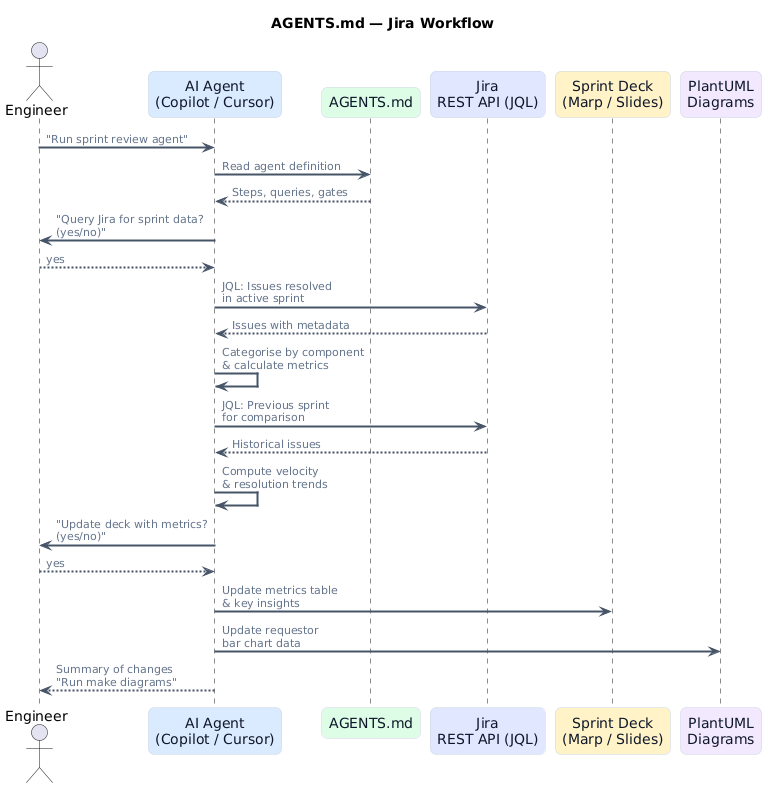
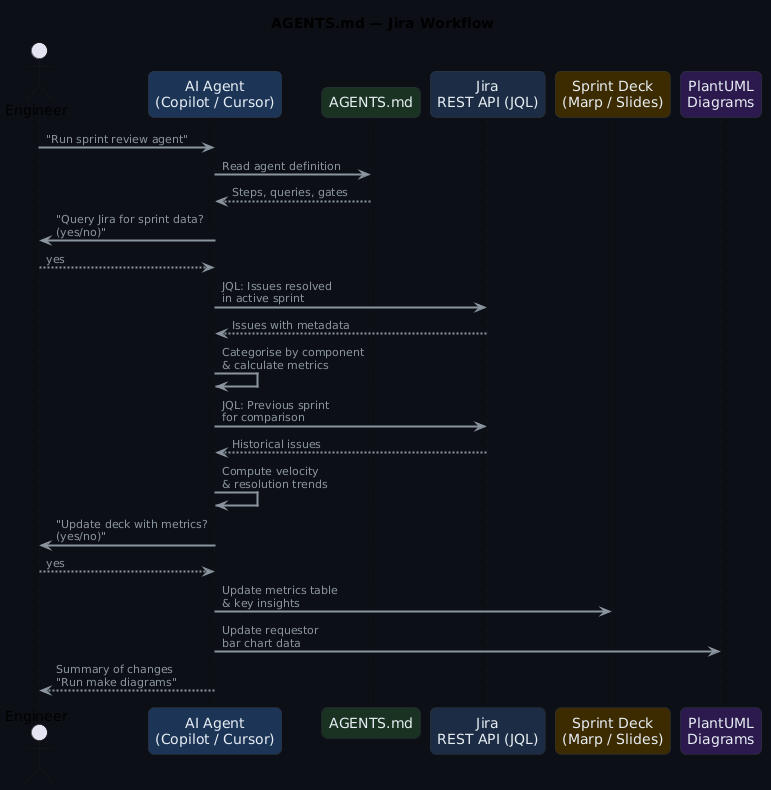
The Jira MCP server exposes tools such as jql_search, get_issue, get_sprint, and get_board. The agent invokes these tools through the MCP protocol — no raw HTTP calls or API tokens in your agent definitions.
JQL functions beat date ranges
sprint in openSprints() is dynamic — it always targets the active sprint. A hardcoded sprint = "Sprint 24.06" breaks every two weeks. Use Jira's built-in JQL functions (openSprints(), closedSprints(), -14d) so your agent definitions stay valid indefinitely without maintenance.
What gets automated (and what does not)
Not everything in a sprint review can come from a query. Platform migrations, IDP rollouts, infrastructure redesigns — that work moves through Epics and fix versions, and reporting on it is narrative. What shipped, what slipped, what the team learnt. An agent cannot write that.
Operational work is different. Access requests, pipeline failures, environment provisioning, certificate rotations — these arrive as Service Requests, get resolved, and pile up. Individually they are routine. In aggregate they tell a story: which components generate the most load, how resolution times trend, whether the same teams keep coming back. That is numbers, and numbers come from JQL.
The agents in this post target operational work. They query Jira, run the calculations, and drop the results into a Marp sprint review deck. Project slides stay in the same deck as fixed templates — same layout every sprint, content filled in by hand.
In Jira terms: operations work lives in a shared project with types like Service Request or Support, grouped by component. Projects use Epics tracked through sprints and fix versions.
Use case 1: Sprint review deck automation
The agent queries resolved issues from the active sprint, categorises by component, and updates a Marp deck.
The agent definition
## Agent: Update Sprint Metrics from Jira

Task: Update deck.md with sprint metrics from the active Jira sprint

Steps:
1. Query Jira for issues resolved in the active sprint
2. Calculate metrics:
   - Count by component (API, Frontend, Infrastructure, Security)
   - Average resolution time (created → resolved)
   - Story points completed vs committed (velocity)
   - Unique assignees
3. Show calculated metrics to the user
4. Ask: "Update deck.md with these metrics? (yes/no)"
5. If approved, update the metrics table and key insights
6. Report what was updated
The JQL query
project = "PLAT"
  AND sprint in openSprints()
  AND status = Done
  AND resolved >= -14d
ORDER BY resolved DESC
For more granular filtering:
project = "PLAT"
  AND sprint = "Sprint 24.06"
  AND status changed to Done
  AND component in (API, Frontend, Infrastructure, Security)
ORDER BY component ASC, resolved DESC
What the agent produces
| Component | Count | Story Points | % |
|---|---|---|---|
| API | 10 | 21 | 30% |
| Frontend | 8 | 18 | 24% |
| Infrastructure | 7 | 15 | 21% |
| Security | 4 | 8 | 12% |
| Documentation | 3 | 5 | 9% |
| DevOps | 1 | 2 | 3% |
Key metrics: 33 issues resolved, 69 story points completed (92% of committed 75), 2.3 day average resolution.
Use case 2: Team workload analysis
The Jira equivalent of requestor patterns — analysing assignee distribution and identifying workload imbalances.
## Agent: Team Workload Analysis

Steps:
1. Query Jira for issues resolved in the active sprint
2. Group by assignee
3. Calculate per-assignee:
   - Issues resolved
   - Story points completed
   - Average resolution time
4. Identify workload imbalances (> 2x average)
5. Check for unassigned resolved issues
6. Update the workload summary in the deck
project = "PLAT"
  AND sprint in openSprints()
  AND status = Done
  AND assignee is not EMPTY
ORDER BY assignee ASC
Use case 3: Sprint-over-sprint velocity comparison
Comparing the current sprint against the previous one using Jira's sprint functions.
## Agent: Velocity Trend Comparison

Steps:
1. Query current sprint issues (status: Done)
2. Query previous sprint issues (status: Done)
3. Compare:
   - Story points completed (velocity)
   - Issue count
   - Average cycle time
   - Component distribution shift
   - Carry-over items (not completed in previous sprint)
4. Identify positive trends with percentages
5. Flag areas needing attention
6. Update the Velocity Trends slide
-- Current sprint
project = "PLAT" AND sprint in openSprints() AND status = Done

-- Previous sprint
project = "PLAT" AND sprint in closedSprints()
  AND sprint not in openSprints()
  AND status = Done
ORDER BY resolved DESC
For named sprints:
Use case 4: Release notes from fix versions
A SKILL.md that generates release notes from a Jira fix version.
---
name: jira-release-notes
description: Generate release notes from a Jira fix version
argument-hint: Provide the fix version name (e.g. v2.4.0)
---
# Jira Release Notes Generator

1. Query issues with the specified fixVersion
2. Verify all issues are in Done status
3. Flag any non-Done issues as blockers
4. Group issues by type:
   - 🚀 Features (type: Story)
   - 🐛 Bug Fixes (type: Bug)
   - 🔧 Tasks (type: Task)
   - 📖 Sub-tasks (type: Sub-task)
5. For each issue, extract:
   - Key, summary, component, assignee
   - Labels for additional context
6. Generate markdown release notes
7. Check for issues labelled 'breaking-change'
8. Include contributor acknowledgements from assignee list
Use case 5: SLO compliance from resolution times
A prompt that calculates SLO compliance from Jira issue resolution data.
---
description: Generate SLO compliance report from Jira issue data
agent: agent
tools: ['search', 'editFiles']
---
Query the last 30 days of issues with type 'Service Request' or 'Support'.
Calculate resolution time percentiles (p50, p90, p99).
Use the 'resolutiondate' and 'created' fields for time calculations.
Compare against SLO targets:
- p50 < 4 hours (Priority: Highest)
- p50 < 24 hours (Priority: High)
- p90 < 72 hours (Priority: Medium/Low)
Generate a markdown table grouped by priority with trend arrows.
project = "PLAT"
  AND issuetype in ("Service Request", Support)
  AND resolved >= -30d
ORDER BY priority ASC, resolved DESC
Use case 6: Epic progress dashboard
An agent that summarises epic progress for stakeholder reviews.
## Agent: Epic Progress Dashboard

Steps:
1. Query Jira for active epics in the project
2. For each epic:
   - Count total child issues
   - Count completed child issues
   - Sum story points (completed vs total)
   - Calculate completion percentage
   - Find the earliest and latest due dates
3. Rank epics by completion percentage
4. Flag at-risk epics (< 50% complete with < 25% time remaining)
5. Update the Epic Progress slide in the deck
-- Active epics
project = "PLAT"
  AND issuetype = Epic
  AND status != Done
ORDER BY priority ASC

-- Child issues for a specific epic
"Epic Link" = PLAT-123 AND status = Done
The master agent pattern
## Master Agent: Populate Sprint Review from Jira

Steps:
1. Identify the active sprint name
2. Ask user for permission to proceed
3. If approved, run Agent: Sprint Metrics
4. Run Agent: Team Workload Analysis
5. Run Agent: Velocity Trend Comparison
6. Run Agent: Epic Progress Dashboard
7. Report summary of updates made
8. Suggest running 'make diagrams' to regenerate PNGs

Before executing:
- Display the configuration (project, board, sprint)
- Ask: "I will query Jira and update diagrams and slides.
  Do you want to proceed? (yes/no)"
- Only proceed if user confirms
Jira-specific configuration
| Jira concept | How agents use it |
|---|---|
| Projects | Scope queries by project key (project = "PLAT") |
| Sprints | Use openSprints(), closedSprints(), or named sprints |
| Components | Categorise issues for metric grouping (API, Frontend, Infra) |
| Fix Versions | Map to release milestones for release notes generation |
| Story Points | Calculate velocity and sprint commitment accuracy |
| JQL | The query language — supports functions like openSprints(), -14d, was, changed |
| Boards | Scrum or Kanban views that scope sprint data |
Apply this: set Jira defaults in AGENTS.md to save tokens
Add a configuration block to your AGENTS.md that sets the project key, board ID, and maxResults defaults once. Agents inherit these without repeating them in every JQL query definition. Fewer tokens per call, less chance of an agent querying the wrong project when operating across multiple Jira projects.
MCP server setup
The Atlassian MCP server is a remote server hosted by Atlassian that connects to Jira, Confluence, and Compass. For VS Code and other clients that support remote MCP:
Authentication uses OAuth 2.1 — a browser window opens to authorise your Atlassian account. All actions respect your existing Jira permissions.
For desktop clients that do not support remote MCP natively (e.g. Claude Desktop, Cursor), use the mcp-remote proxy:
{
  "mcpServers": {
    "atlassian": {
      "command": "npx",
      "args": ["-y", "mcp-remote", "https://mcp.atlassian.com/v1/sse"]
    }
  }
}
To reduce discovery calls and save tokens, set defaults in your AGENTS.md:
When connected to atlassian-rovo-mcp:
- Use Jira project key = PLAT
- Use cloudId = "https://your-site.atlassian.net"
- Use maxResults: 10 for all JQL search operations
Issue count without story points misleads stakeholders
Reporting "33 issues resolved" without story points hides effort. A sprint with 33 one-point bug fixes looks identical to one with 33 complex feature stories. Always report both: issue count for volume, story points for effort. If your team doesn't use story points, at least report by issue type distribution.
Anti-patterns to avoid
- Querying by date instead of sprint — Jira sprints have boundaries; use
sprint in openSprints()instead of date ranges to capture carry-overs correctly - Ignoring story points — Issue count alone does not reflect effort; include story points in velocity calculations
- Not using components — Without component-based grouping, sprint metrics lack actionable granularity
- Skipping epic context — Individual issue metrics miss the bigger picture; include epic progress for stakeholders
- Hardcoded sprint names — Use
openSprints()andclosedSprints()functions for dynamic sprint identification
Getting started
- Install the Jira MCP server in your editor
- Create an
agents.mdwith one agent (start with sprint metrics) - Ensure your Jira project has components and story points configured
- Run the agent against a real sprint
- Add agents incrementally
The working examples will be available in the ai-capabilities repo.
Frequently asked questions
Does the Atlassian MCP server require admin access to Jira?
No — it uses OAuth 2.1 and respects your existing Jira permissions. The agent can only query and act on projects, boards, and issues you have access to as the authenticated user. No elevated permissions required. Admin access would only be needed if an agent were creating boards or modifying project configuration.
How do agents handle Jira custom fields?
Custom fields are accessible via their field ID (e.g. cf[10016] for story points, depending on your Jira instance). The Atlassian MCP server exposes field metadata so agents can discover field IDs dynamically. For common custom fields you use repeatedly, add the field IDs to your AGENTS.md configuration block so agents don't have to look them up every run.
Can I run the same agent against multiple Jira projects?
Yes — parameterise @ProjectKey in the JQL queries and define it in the AGENTS.md configuration block. Run the master agent once per project by changing the config block. For teams with a shared operations project and multiple product projects, run ops metrics from one project and velocity from another in the same deck session.
What's the difference between using Jira sprints vs fix versions for release tracking?
Sprints are time-boxed iterations — good for velocity, cycle time, and operational metrics. Fix versions are milestone markers — good for release scope, scope creep tracking, and what shipped in a version. Use sprints for the sprint review deck. Use fix versions for release notes and stakeholder communication. They answer different questions.
How do you avoid the 'open sprints' query returning items from multiple active sprints?
In Jira, sprint in openSprints() returns all active sprints, which can include sprints on different boards. Scope it with the project key and board ID: query the board's active sprint directly via the Jira Agile API (/rest/agile/1.0/board/{boardId}/sprint?state=active) or add AND sprint = "Sprint 24.XX" with the dynamically discovered sprint name. The MCP server's get_sprint tool handles this cleanly.
Further reading
- AI Convention Files: The Complete Taxonomy — every AI markdown file explained
- Using AGENTS.md for Platform Engineering — the control plane pattern
- AI Convention Files in Practice: Azure DevOps — the same use cases with ADO WIQL
- AI Convention Files in Practice: GitHub — the same use cases with GitHub GraphQL
- Jira JQL reference — the query language reference