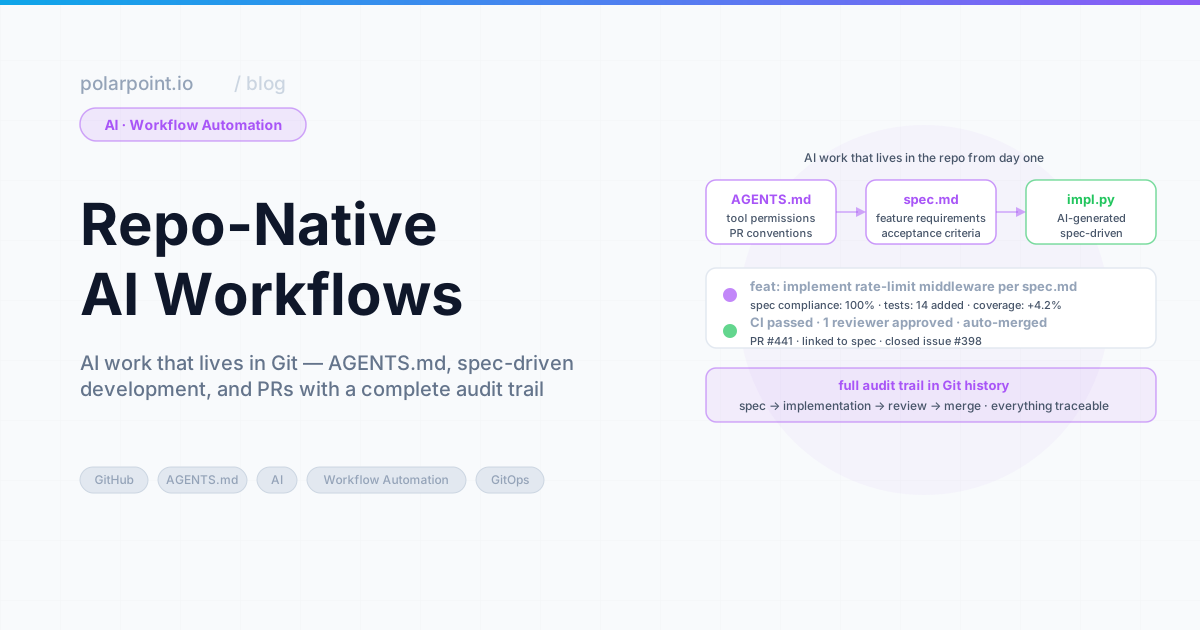
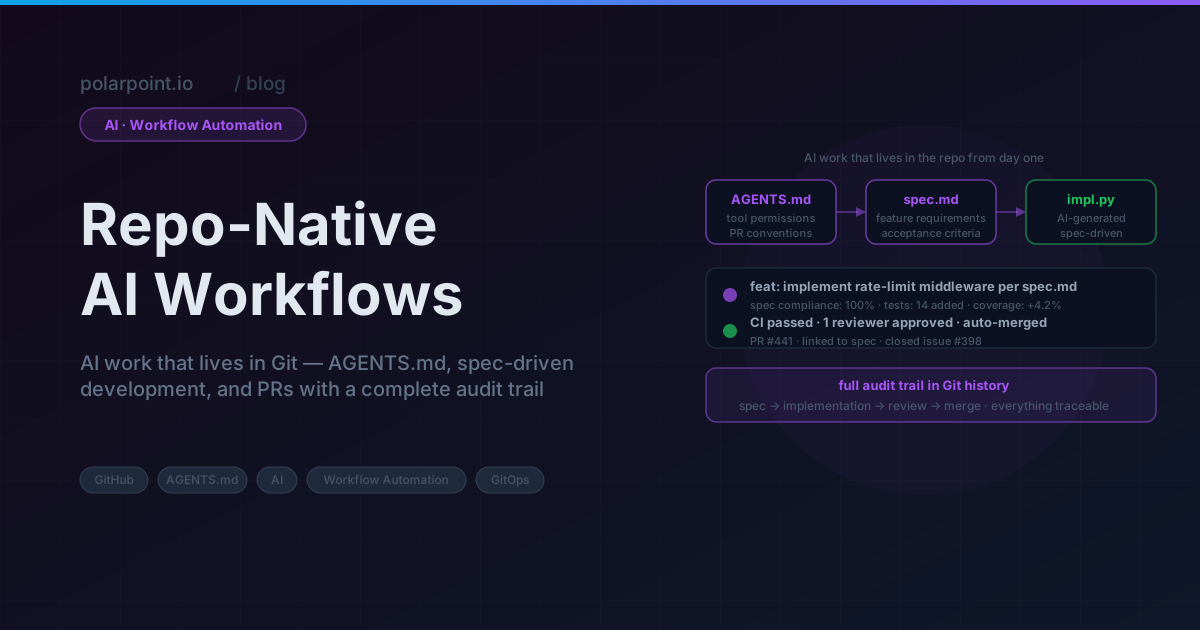
Repo‑Native AI Workflows: Keep AI Work in Git
We caught a configuration mistake because somebody ran the same AI query twice and got a different answer. The first run had recommended a change that was already applied. Neither the agent nor the engineer knew — because the first conversation had happened in a chat window three days earlier, and nobody had written it down.
That's the problem, right there. Not that the AI gave different answers. That's fine, models do that. The problem is that the first answer had nowhere to live. It wasn't in Git, it wasn't in a PR, it wasn't linked to the change it prompted. It existed in a chat thread that expired the moment the engineer closed the tab.
AI work in chat evaporates. The prompt, the reasoning, the decision, the output — all of it gone. The fix isn't to stop using AI. It's to stop treating AI work as a special category that doesn't need the same discipline as code work. Same thing: open an issue, work on a branch, open a PR, merge to main.
Quick takeaways
- Chat threads are genuinely the wrong place for AI work — nothing is reviewable, auditable, or reusable
- AI tasks as GitHub Issues create a real, traceable line from intent to output
- AGENTS.md is how you tell agents what matters in a given repo before they start guessing
- The PR is the audit trail — everything the agent produced is visible, reviewable, and reversible
The audit trail argument wins every time
When a security review or postmortem asks "why was this decision made?", a Git commit linked to an issue with full AI conversation context beats "I think someone asked Claude about it in Slack" by a very wide margin. The discipline pays off the first time you need the evidence.
Why chat threads fail
Chat is built for conversation. It's genuinely great at that. But it's not built for work — and when you use it for AI work, the gaps are painful:
- No context persistence: every new session starts blank. The agent has no idea what was tried last Tuesday, what failed, or what you already ruled out.
- No review: what the agent produced isn't reviewable by teammates unless you manually copy-paste it somewhere else. And honestly, nobody does that.
- No connection to code: the recommendation and the change it prompted live in completely separate places. You can't tell, six weeks later, whether the recommendation was ever acted on.
- No audit trail: compliance, security reviews, postmortems — none of them can reference a Slack thread as evidence that a decision was thought through.
And here's the thing that gets me: the same engineer who would never make a production change without a PR will happily plan that entire change in chat. Same person, same codebase, completely different standard.
Chat is where AI decisions go to disappear
Six weeks after the fact, nobody can reconstruct what the agent recommended, what alternatives were considered, or why the specific approach was chosen. For decisions that affect production infrastructure, "I think Claude suggested it" is not an acceptable answer. The fix is trivial: open an issue, work on a branch, open a PR.
The repo-native pattern
The simplest version works like this:
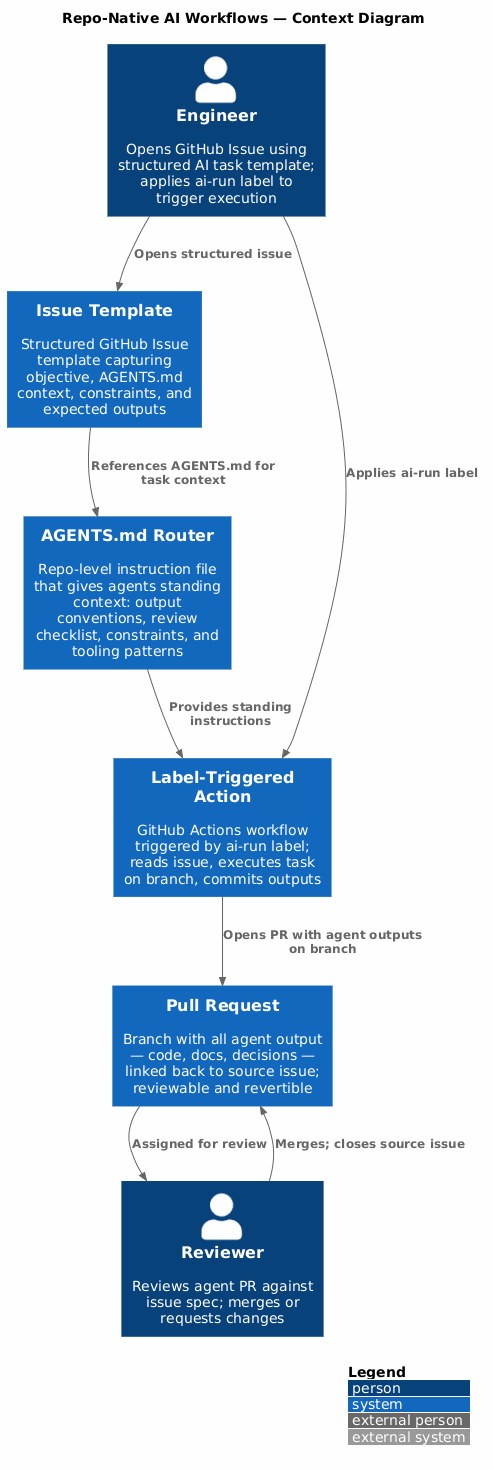
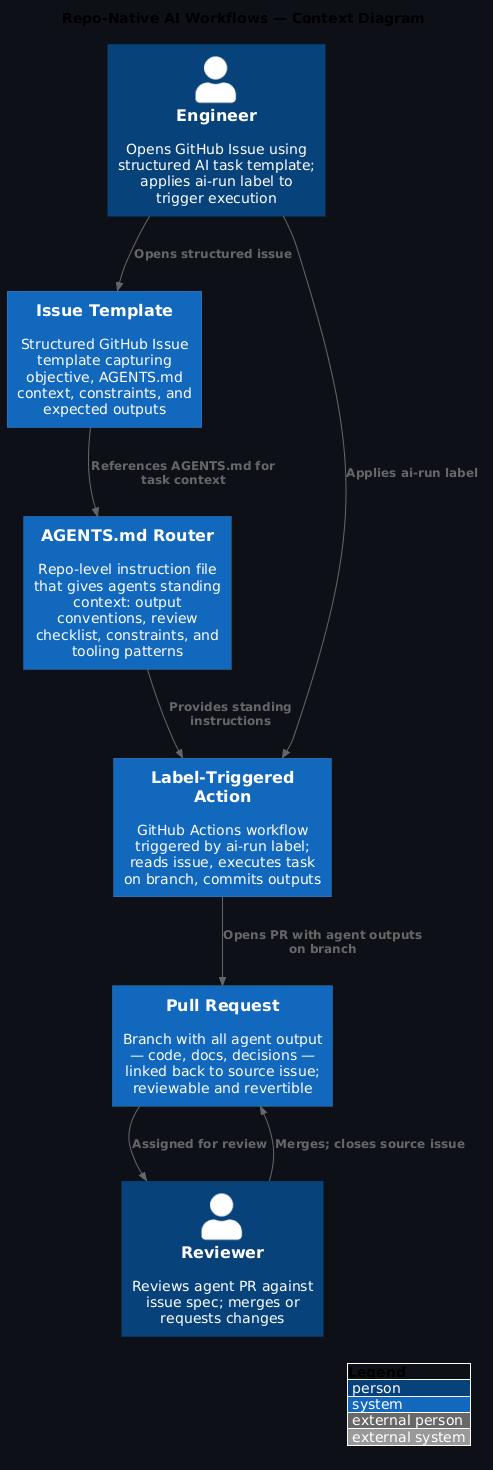
1. Engineer opens a GitHub Issue describing the AI task
2. Issue references the relevant AGENTS.md for context
3. Agent (or engineer + agent) works on a branch
4. All agent output goes into the branch: code, docs, scripts, decisions
5. PR is opened referencing the issue
6. Review happens in the PR - engineers can see exactly what the agent produced
7. Merge closes the issue
That's it. No new tooling, no new process. It's just the same discipline you already apply to code, extended to cover the AI work that feeds into it.
1) GitHub Issue template for AI tasks
<!-- .github/ISSUE_TEMPLATE/ai-task.yml -->
name: AI-Assisted Task
description: Track an AI-assisted workflow with clear scope and output
labels: ["ai-task"]

body:
  - type: input
    id: objective
    attributes:
      label: Objective
      description: What should the agent accomplish?
      placeholder: "e.g. Draft a migration plan for moving auth-service to the new cluster"
    validations:
      required: true

  - type: dropdown
    id: agent_context
    attributes:
      label: AGENTS.md context
      description: Which AGENTS.md should guide this task?
      options:
        - Platform engineering (agents/AGENTS.md)
        - Documentation updates (docs/AGENTS.md)
        - Infrastructure changes (infra/AGENTS.md)
    validations:
      required: true

  - type: textarea
    id: constraints
    attributes:
      label: Constraints and scope
      description: What should the agent avoid? What is out of scope?
      placeholder: "e.g. Do not propose changes to prod until staging is validated"

  - type: textarea
    id: expected_outputs
    attributes:
      label: Expected outputs
      description: What deliverables should the agent produce?
      placeholder: |
        - Migration plan document in docs/plans/
        - Updated Helm values for the target cluster
        - Rollback procedure in the plan
    validations:
      required: true
Apply this: required fields prevent vague tasks
The issue template's validations: required: true on objective and expected outputs does real work. A vague AI task produces vague output that's hard to review and impossible to verify. Forcing the engineer to specify what done looks like before the task runs makes both the execution and the review substantially better.
2) AGENTS.md for task execution
Think of AGENTS.md as the briefing you'd give a new team member before they touched the codebase. The standing context: how we work here, what we care about, what format things go in. The agent reads it before it starts — and you don't have to repeat yourself every time:
# AGENTS.md — Platform Engineering

## How to approach tasks

1. **Understand before proposing**: read the existing code and config before suggesting changes
2. **Propose, do not apply**: create files on a branch; never apply to the cluster directly
3. **Document decisions**: for each significant choice, add a note explaining why
4. **Check for existing patterns**: search the repo for similar existing approaches before creating new ones

## Output conventions

- Plans and proposals: `docs/plans/YYYY-MM-issue-NNN-brief-title.md`
- Kubernetes manifests: `k8s/<service>/<environment>/`
- Scripts: `scripts/<purpose>.sh` or `scripts/<purpose>.py`
- Rollback procedures: always included in the same file as the change

## Review checklist (include in PR body)

- [ ] Checked for similar existing approaches
- [ ] Rollback procedure included
- [ ] No hardcoded credentials or secrets
- [ ] Changes are scoped to the minimum necessary
For a full walkthrough of how AGENTS.md works as a platform engineering control plane — not just a readme, but an actual governance layer — see Using AGENTS.md for Platform Engineering.
3) Branch and PR naming convention
# Standard naming for AI-assisted branches
git checkout -b ai/issue-123-auth-service-migration

# PR title convention
# [AI] Issue #123: Draft migration plan for auth-service
When reviewers see an ai/ prefix branch, they know straight away what they're looking at. That context matters — they know to check:
- Did the agent stay within scope?
- Are the proposed changes actually correct?
- Is there anything that looks generated without being properly checked?
The ai/ prefix is a reviewer signal
Reviewers approaching an ai/ branch adjust their review posture: they're verifying agent output against the issue spec, not just checking code quality. That's a different mental mode. Making it visible in the branch name means reviewers arrive already calibrated.
4) Keeping the conversation in the issue comments
Replace the chat thread with GitHub issue comments. Timestamped, attributable, linked to the issue. Here's what that looks like in practice:
<!-- Example issue comment pattern -->

**Run 1** — 2026-04-09 14:32

Prompt: Analyse the current auth-service deployment and identify migration blockers.

Agent output summary:
- Found 3 hardcoded config values that need to move to ConfigMaps
- Session handling relies on in-memory state; will not survive rolling restarts across clusters
- No readiness probe configured; could cause traffic during startup

Next step: address session handling before planning the migration. Opening #456 for that.
Nothing is lost between sessions. The next person to pick this up — whether that's you in a week or a teammate during an incident — can read the whole thread and know exactly where things stand.
5) GitHub Actions for repeatable AI tasks
For tasks that run regularly or trigger on a specific condition, don't leave them dependent on someone remembering to run them. Move them into GitHub Actions entirely — label triggers the run, output lands in a PR:
# .github/workflows/ai-task-runner.yml
name: AI Task Runner

on:
  issues:
    types: [labeled]

jobs:
  run-ai-task:
    if: github.event.label.name == 'ai-run'
    runs-on: ubuntu-latest
    steps:
      - uses: actions/checkout@v4

      - name: Parse task from issue
        id: parse
        env:
          GITHUB_TOKEN: ${{ secrets.GITHUB_TOKEN }}
          ISSUE_NUMBER: ${{ github.event.issue.number }}
        run: python scripts/parse-ai-task.py

      - name: Execute task on branch
        env:
          ANTHROPIC_API_KEY: ${{ secrets.ANTHROPIC_API_KEY }}
          TASK_SPEC: ${{ steps.parse.outputs.task_spec }}
        run: python scripts/execute-ai-task.py

      - name: Open PR with outputs
        env:
          GITHUB_TOKEN: ${{ secrets.GITHUB_TOKEN }}
          ISSUE_NUMBER: ${{ github.event.issue.number }}
        run: python scripts/open-task-pr.py
Add the ai-run label to an issue and the workflow kicks off. Output lands in a PR. The issue stays open until that PR is reviewed and merged. That's your complete audit trail — trigger, work, review, done.
Apply this: label as the execution gate
Using a label rather than a comment command (/run-ai-task) to trigger the workflow means the trigger is visible in the issue timeline, auditable in the events log, and removable if you want to cancel before the workflow completes. It's a deliberate, one-click action — not something that happens accidentally from a comment.
Common objections
"This is slower than just asking Claude."
For a one-off question? Yes, absolutely, don't bother. But for anything that produces output that will actually be used or applied somewhere — no. Opening an issue and a PR adds maybe five minutes. Debugging a chat-based decision three weeks later, when nobody can remember what was decided or why, costs a lot more than that.
"Engineers won't adopt this."
Don't start with all engineers. Start with the platform team. Once the pattern exists and someone can point to a real example — "this saved us during the auth incident because we could see exactly what the agent had recommended" — adoption follows on its own. People don't need convincing; they need a working example.
"AI outputs change between runs."
That's exactly why you commit the output. What the agent produced on a given day, with a given prompt, against a given codebase — that's the record. The next run might produce something different, and that's fine. You've got the first run in Git. You're not trying to make AI deterministic; you're making its outputs traceable.
The upstream practice that gives AI tasks clear structure before they enter the repo is Spec-Driven Development with Convention Files.
Frequently asked questions
Why shouldn't AI tasks live in chat threads?
Because chat threads don't survive. The moment a session ends, the reasoning behind the decision, the alternatives that were considered, the evidence the agent used — all of it disappears. And when the same question comes up again in two months, or when something goes wrong and you're trying to understand what happened, there's nothing to reference. You're starting from scratch every single time.
What should an AI task GitHub issue template contain?
At minimum: the objective (what you actually want done), the acceptance criteria (how you'll know it's done), links to the relevant code or docs the agent will work with, and explicit constraints the agent must respect. A well-structured issue does two jobs — it's an instruction set for the agent, and it's a spec that reviewers can verify against when the PR comes in.
How do you trigger GitHub Actions from an AI task label?
Set a workflow trigger on issues.labeled and check for your specific label — say ai-run. When the label is applied, the workflow reads the issue body, constructs a prompt from the structured fields, calls the AI API, and posts the output either as a comment or as a PR. The label is the execution gate — deliberate, visible, and auditable.
What is the difference between a repo-native AI workflow and a traditional CI pipeline?
A traditional CI pipeline runs deterministic, pre-defined steps triggered by code changes. The output is predictable — same input, same result. A repo-native AI workflow is triggered by intent (an issue or a label) and executes reasoning-based steps whose output genuinely isn't predetermined. But what they share matters more: both live in the repo, both are version-controlled, and both produce auditable outputs.
How do you handle AI tasks that span multiple issues?
Use linked issues and cross-references. If a task spawns a sub-task (as in the auth-service example above — "address session handling first, opening #456"), the relationship is explicit in the issue comments and the linked issue numbers. The Git history then shows the full chain: parent issue → blocking sub-task → resolution → parent task completion.
What you get
- AI work is reviewable, auditable, and reusable — same properties you already require from code
- Engineers can hand off in-progress AI tasks because the context is in the issue, not locked in someone's chat history
- The connection from "we decided this" to "this is what was built" exists in Git — permanently, not until the session expires
- Compliance and security reviews have an actual audit trail to reference, not a vague memory of what the agent said
Walkthrough files
.github/ISSUE_TEMPLATE/ai-task.yml— structured issue template for AI tasksagents/AGENTS.md— standing instructions for AI work in this repo.github/workflows/ai-task-runner.yml— label-triggered AI task execution workflowscripts/parse-ai-task.py— parse issue body into structured task specscripts/execute-ai-task.py— run the task on a branch and commit outputsscripts/open-task-pr.py— open PR referencing the source issue
The pattern works best when AI tasks arrive with clear structure already built in. For the upstream discipline that makes that happen, see Spec-Driven Development with Convention Files.