Skip to content

Blog

AI-driven GitOps with MCP and Argo CD

Banner image Banner image

AI-driven GitOps with MCP and Argo CD

This was one of those talks where the demo felt uncomfortably close to real life. You could see the practical value straight away: fewer support bottlenecks, faster incident triage, and less context-switching for developers.


Quick takeaways

  • Put AI where engineers already work (Slack/Teams), not in a new interface.
  • MCP makes Argo CD actions discoverable and reusable for different AI clients.
  • Start with operational tasks where feedback is fast: deploy, check health, roll back.
  • Capture troubleshooting logic once and reuse it through Agent Skills.

The Slack bot beat the UI extension — by a lot

Intuit built the AI troubleshooting feature twice: once as an Argo CD UI extension (poor adoption) and once as a Slack bot in existing support channels (dramatically higher engagement). The lesson isn't that UI extensions are bad. It's that adoption follows workflow proximity. If your engineers debug in Slack, that's where the AI assistance belongs.


What was getting in the way

At KubeCon EU 2026, Alexander Matyushentsev (Argo CD co-founder) and Leonardo Luz Almeida (Intuit) laid out the problem clearly: managing 350+ Kubernetes clusters with 3,000+ production services across 50,000+ namespaces creates massive support bottlenecks. Developers wait in Slack channels for troubleshooting help. Expert DevOps engineers drown in repetitive diagnostic work. Traditional UI extensions fail because they don't meet users where they already are.


What we actually wanted

An AI-powered GitOps experience where developers use natural language to deploy applications, troubleshoot production issues, and automatically roll back failures - all through the tools they already use daily (Slack, Claude, Copilot).


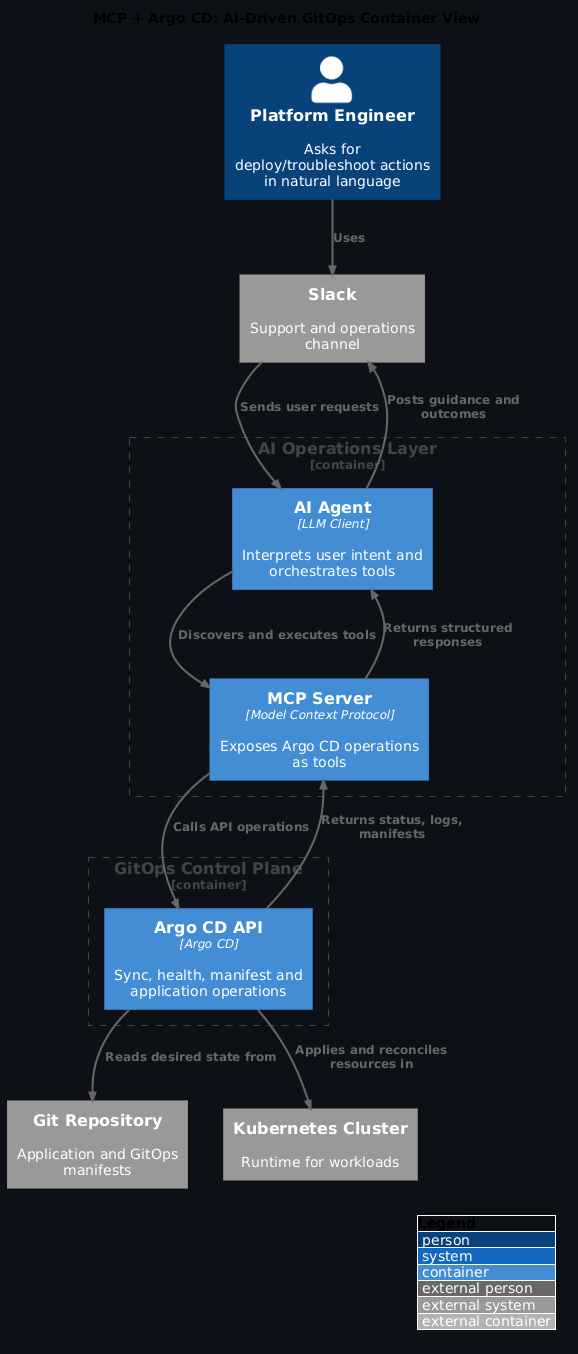
Architecture in one view
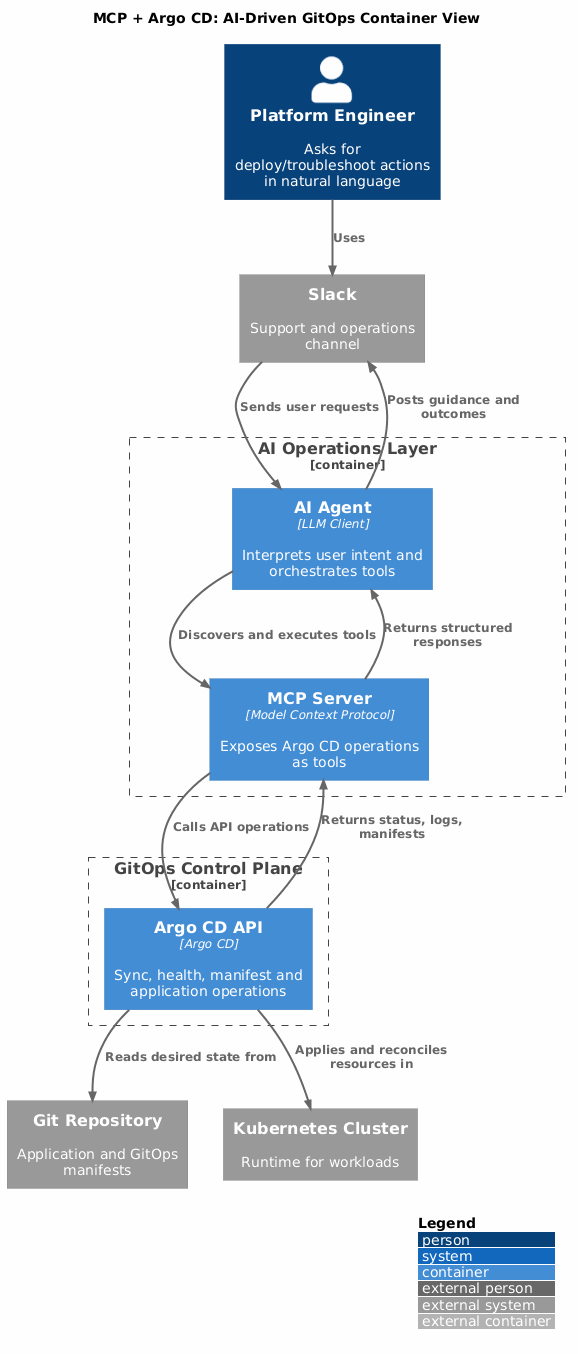
MCP + Argo CD container view MCP + Argo CD container view

Model Context Protocol (MCP): the universal connector

MCP is a standardised bridge between AI clients and services like Argo CD. Instead of building custom integrations for every LLM, MCP provides:

  • JSON-RPC protocol over stdio or HTTP (Server-Sent Events or polling)
  • Discovery API exposing tools (functions), resources (read-only data), and prompts (guidance text)
  • Token passthrough for authentication - MCP delegates auth to underlying services
  • One-to-one tool mapping with Argo CD CLI/UI capabilities (sync, inspect, logs, manifests)

Open Source MCP for Argo CD

Available at github.com/argoproj-labs/argocd-mcp with growing community adoption (#mcp-for-argocd on CNCF Slack with 16 members at conference time).


Three use cases that worked in practice

1. Natural Language Application Creation

Before: Fill out complex forms, specify manifest repos, branches, namespaces, sync policies
After: "Create an app called 'frontend' using the manifests from github.com/myorg/apps, main branch, deploy to production namespace"

The AI agent discovers available MCP tools, constructs the Argo CD Application resource, and deploys - faster than manual creation.

2. Batch Deployment from Git Directories

Prompt: "Connect to my GitOps repo and create an Argo CD application for each directory under /apps"

The agent: - Scans the Git repository structure - Identifies manifest directories - Creates multiple applications automatically - Implements app-of-apps patterns without manual intervention

This is genuinely faster than human assembly for repetitive structures.

3. Automated Deployment with Intelligent Rollback

Prompt: "Deploy version 2.0 of my service, monitor its health, and roll back to the previous version if it degrades"

The agent: 1. Syncs the new version 2. Continuously checks application health via Argo CD API 3. Analyzes degradation patterns from status conditions 4. Automatically reverts manifests on failure detection

This reduces Mean Time To Recovery (MTTR) from hours to minutes.


Intuit's production journey

Failed Experiment: Argo CD UI Extension

Intuit initially built an AI-powered troubleshooting extension directly in the Argo CD UI: - Extracted logs, Kubernetes events, live state, desired state via Argo CD API - Provided LLM-powered root cause analysis - Result: Poor adoption - experts went straight to logs, novices never opened Argo CD

Key Lesson: Don't build new interfaces; integrate where users already are.

Breakthrough: Slack Bot Integration

Moving AI troubleshooting into existing Slack support channels achieved dramatically higher engagement:

Example 1: Stack Trace Analysis
Developer: "I'm seeing warnings in argo logs, not sure if critical"
Bot: "Not critical. The class is attempting to cast byte array during schema validation. Check implementation at line 76, ensure serialization order is: byte array → deserialized logic → schema validation."

Example 2: Multi-Failure Triage
Developer: "Production deployment issue"
Bot: "I see TWO failures: (1) Recent deployment can't reach config server, (2) Current running version is degraded. Which should I investigate?"
Developer: "Current failure"
Bot (2.5 min later): "Application cannot retrieve configuration from Spring config server due to connection issue. Root cause: App configured with e2e environment URL while this is production. Update URL from config-e2e.company.com to config-prod.company.com"

Reverse Proxy Pattern

Single MCP server acts as facade for 40+ Argo CD instances, simplifying: - Developer access management - Service-to-service communication - Security boundaries and token distribution


Agent Skills: The Next Evolution

To avoid duplicating troubleshooting logic across UI extensions, bots, and CLI tools, Intuit is experimenting with Agent Skills - reusable markdown-based diagnostic recipes.

Skills define: - How to extract Argo CD base URLs and application names - Step-by-step troubleshooting procedures for degraded apps - Which API calls to make and how to interpret responses

This creates a library of operational knowledge that any agent can consume.

Apply this: document one troubleshooting flow as an Agent Skill before the next incident

Pick the most common Argo CD failure your team handles (image pull errors, resource limit violations, sync hook timeouts) and write it up as a SKILL.md. The next time that failure pattern appears, the agent has the diagnostic steps rather than someone having to remember them at 2am. One skill, written once, reused indefinitely.


Implementation Guide

For platform teams

  1. Deploy MCP for Argo CD from argo-cd-labs
  2. Configure HTTP transport for remote access (OAuth 2.0 or token passthrough)
  3. Integrate with existing support channels (Slack, Teams) rather than building standalone UIs
  4. Create prompts that instruct AI on common failure patterns:
  5. Image pull errors from Kubernetes events
  6. Resource limit violations from quota checks
  7. Config server misconfigurations from environment mismatches

For developers

  1. Test free-form application creation with natural language
  2. Experiment with batch operations via Git directory scanning
  3. Implement automated health monitoring with roll back conditions
  4. Measure engagement: track before/after metrics for bot interactions vs UI usage

For organisations

  1. Document troubleshooting workflows as Agent Skills in markdown format
  2. Share diagnostic logic across tools to eliminate duplication
  3. Consider MCP for other GitOps ecosystem tools (Flux, Argo Rollouts, External Secrets Operator)

The 'new interface' adoption trap

Intuit's first attempt failed because it built yet another UI tab — this time inside Argo CD. Experts bypassed it (they went straight to logs) and novices never opened Argo CD in the first place. Before building an AI interface, ask: where do engineers currently go when something breaks? Build there, not where you wish they'd go.


What changed in practice

Before: Weeks-long support backlogs, expert knowledge bottlenecks, manual deployments
After: Conversational GitOps operations, automated diagnostics, self-service at scale

The convergence of GitOps and AI through standardised protocols like MCP changes how platform teams operate. By meeting users where they are and encoding operational knowledge in reusable formats, teams move from "Platform as Code" to "Platform as Conversation".


References


Presented at KubeCon + CloudNativeCon Europe 2026 by Alexander Matyushentsev (Akuity) and Leonardo Luz Almeida (Intuit)


Frequently asked questions

Is the MCP for Argo CD project production-ready?

At KubeCon EU 2026, github.com/argoproj-labs/argocd-mcp had 16 members in the CNCF Slack channel — community adoption was early-stage. Intuit's production Slack bot predated the open-source MCP server and used custom integrations. Treat the open-source MCP server as a strong starting point for experimentation; validate it against your specific Argo CD version and scale before putting it on a critical support path.

Where can I watch the KubeCon session?

The talk by Alexander Matyushentsev (Akuity) and Leonardo Luz Almeida (Intuit) is on the CNCF YouTube channel. Search "AI-driven GitOps MCP Argo CD KubeCon EU 2026".

Does the reverse proxy pattern work with Argo CD OIDC authentication?

Yes — the MCP server acts as a facade and handles token distribution to the underlying Argo CD instances. OIDC tokens are passed through to each Argo CD instance, which enforces its own RBAC. The key benefit is that developers interact with one MCP endpoint rather than managing credentials for 40+ Argo CD instances separately.

How do Agent Skills relate to SKILL.md files?

They're the same concept. Intuit calls them Agent Skills; the open standard uses SKILL.md. A skill packages a diagnostic or operational procedure as a reusable markdown file any compliant agent can follow. The Kyverno session at KubeCon used the same pattern for policy operations. It's the same idea independently converging on the same solution — which is a strong signal the pattern is right.

Can this pattern be applied to other GitOps tools like Flux?

Yes — the MCP protocol is tool-agnostic. The ArgoCD MCP server exposes Argo CD-specific tools, but the same architecture applies to Flux: an MCP server that wraps Flux CLI operations and the Flux API would give AI agents the same natural language access to Flux-managed resources. The MCP session at KubeCon explicitly noted this as a direction for the broader GitOps ecosystem.

Setting Up OpenClaw: Skills, Tailscale, GitHub Config Sync, and Copilot

Banner image Banner image

Setting Up OpenClaw: Skills, Tailscale, GitHub Config Sync, and Copilot

A few months ago we onboarded a new environment “the fast way.” It worked… until it didn’t. No clear roll back, no consistent skills, and no shared way to answer the basic question: what’s running, where, and why?

This guide fixes that. It’s a clean Day‑1 setup that gets OpenClaw running securely, reproducibly, and in a way you can scale.


Principles (the why)

  • Secure access by default (no exposed ports)
  • Reproducible configuration (GitHub‑backed)
  • Productive workflows (skills + Copilot)

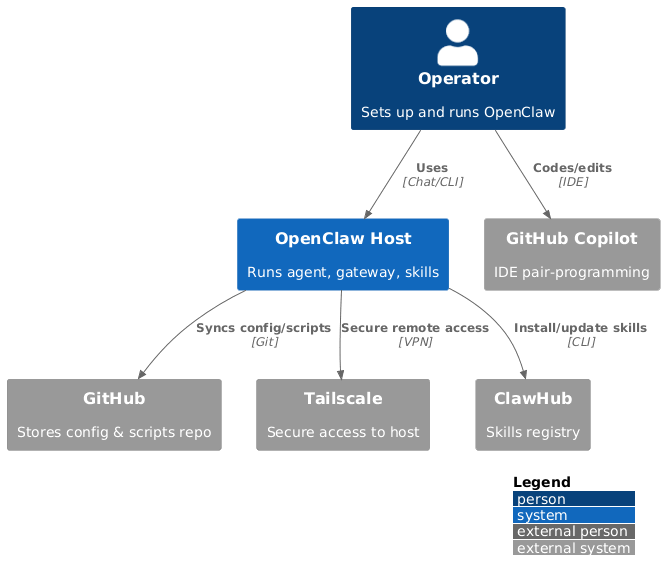
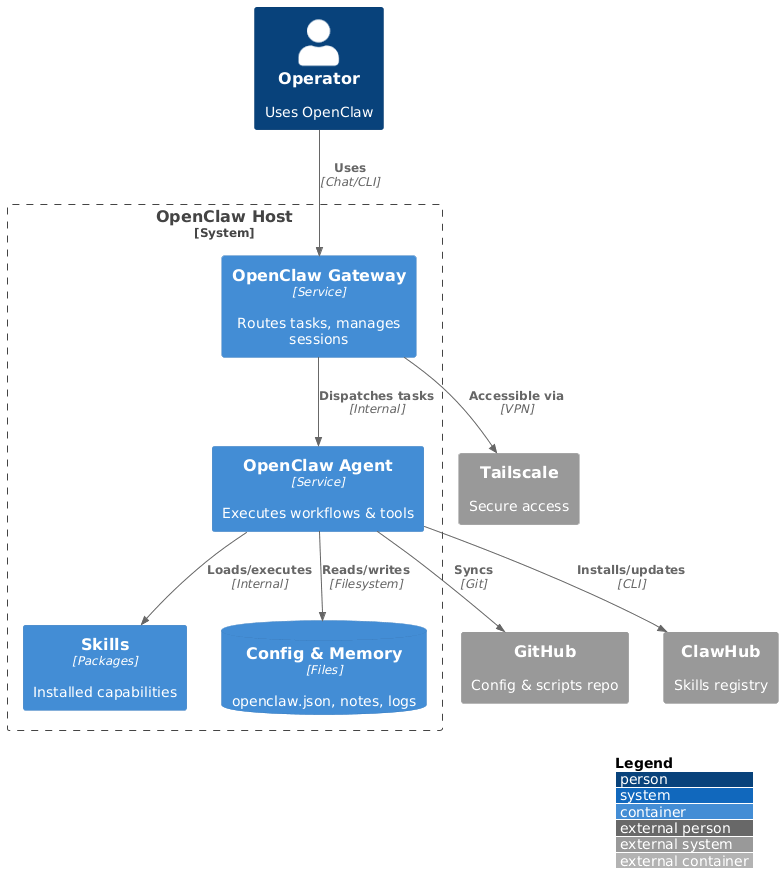
Architecture at a glance

OpenClaw system context OpenClaw container view


1) Install OpenClaw (quick path)

Use the official docs for your platform. If you want a guided setup with scripts, use the companion repo:

https://github.com/polarpoint-io/ai-capabilities

Ubuntu (reference setup)

sudo apt-get update
sudo apt-get install -y git curl ca-certificates

Install OpenClaw via the official docs, then verify:

openclaw status
openclaw gateway status
openclaw gateway start

Tailscale is the right default for remote access

Exposing OpenClaw's gateway port publicly is the fastest path to a compromised assistant. Tailscale gives you private, encrypted access without opening any firewall rules — the node is only reachable from devices on your tailnet. It takes about 5 minutes to set up and eliminates the most obvious attack surface for a process that has access to your files, SSH hosts, and messaging channels.


2) Bring up Tailscale (secure access)

Tailscale gives you private, encrypted access without opening ports publicly.

curl -fsSL https://tailscale.com/install.sh | sh
sudo tailscale up

Tip: tag the host and lock it down with ACLs.


3) Use the setup scripts (fast, repeatable)

The ai‑capabilities repo includes setup scripts for both Linux and macOS:

# Linux
./scripts/setup-linux.sh

# macOS
./scripts/setup-macos.sh

These scripts: - ensure Tailscale is installed and online - start the OpenClaw gateway

Snippet (Linux):

openclaw gateway start
openclaw gateway status

4) Enable your first skills

Installed skills right now: - self-improving-agent - captures learnings from failures and feedback - ddg-web-search - web search without an API key - github - GitHub ops via gh - kubernetes - cluster operations and manifests

List skills:

clawhub list

Install a new skill:

clawhub install <skill-name>

5) Sync config with GitHub

Store non‑secret config in GitHub for reproducibility.

Suggested layout:

openclaw-config/
  README.md
  openclaw.json (sanitized)
  skills/
  notes/

Never commit secrets. Use env vars or a secret manager instead.


Apply this: never commit secrets to your openclaw-config repo

The GitHub config sync layout in this post keeps non-secret configuration version-controlled and reproducible. The critical constraint: API tokens, SSH keys, and webhook secrets go in environment variables or a secret manager — never in the repo. The openclaw.json file in the repo should be a sanitised version with all credential fields replaced by $ENV_VAR references. Document this explicitly in the README so the next person doesn't wonder why the config file doesn't work as-is.


6) Pair with GitHub Copilot

Copilot helps with: - docs/blog drafts - refactors and cleanup - repetitive config work

Workflow: 1) OpenClaw automates 2) Copilot speeds edits 3) You review + ship


Skills missing after reinstall is the most common setup pain

When you reinstall OpenClaw or set up on a new machine, clawhub list will show zero skills even though you have them configured in your GitHub repo. Skills are installed to the local instance, not synced automatically from your config repo. Add a clawhub install step to your setup scripts and document which skills you depend on in openclaw-config/README.md. Otherwise you'll discover missing skills mid-task.


7) Validate the setup

Run these checks:

openclaw status
tailscale status
clawhub list

Quick checklist

  • ✅ OpenClaw running
  • ✅ Tailscale connected
  • ✅ Skills installed
  • ✅ Config synced (sanitized)
  • ✅ Copilot ready

Common pitfalls (and fixes)

  • Gateway not running → openclaw gateway start
  • Tailscale offline → tailscale up
  • Skills missing → clawhub list, reinstall
  • Secrets in Git → move to env vars/secret manager
  • No roll back → add a roll back note to openclaw-config/README.md

Next steps

Explore runnable examples and scripts in the companion repo: https://github.com/polarpoint-io/ai-capabilities


Frequently asked questions

What platforms does OpenClaw support?

OpenClaw runs on Linux (Ubuntu, Debian, and derivatives) and macOS. Windows is not officially supported — the setup scripts in the companion repo target Unix environments. If you need to run on Windows, a WSL2 environment works with the Linux scripts. The gateway process itself is a Node.js daemon that is theoretically cross-platform, but the skill ecosystem assumes Unix tooling.

How do I back up my OpenClaw configuration and memory?

Keep your workspace directory (~/.openclaw/workspace/ by default) in a private Git repo. Commit AGENTS.md, SOUL.md, USER.md, TOOLS.md, HEARTBEAT.md, and the memory/ directory. Exclude any files containing secrets. A daily cron job that commits and pushes gives you automatic version history of your agent's memory and personality evolution.

What's the difference between a skill and a built-in OpenClaw capability?

Built-in capabilities (messaging, file access, basic shell commands) are part of the OpenClaw gateway itself — they're always available. Skills are add-on packages from ClaWHub that provide higher-level domain capabilities: web search, GitHub operations, Kubernetes management. Skills follow the SKILL.md standard and can be installed, uninstalled, and updated independently via clawhub install and clawhub update.

Can OpenClaw access my local files and run shell commands?

Yes — with appropriate permissions. The gateway process runs with your user account's permissions and can read files, run commands, and access your SSH hosts (via the Kubernetes and GitHub skills). This is the power that makes it genuinely useful and also the reason Tailscale access control and careful skill selection matter. Grant skills only the access they need for the tasks you actually want to delegate.

How does OpenClaw authenticate to external services like GitHub?

Skill-level authentication varies by skill. The GitHub skill uses the gh CLI, which authenticates via gh auth login. The Kubernetes skill uses your local kubeconfig. OpenClaw itself doesn't store credentials — it delegates to the tools your account already has configured. This means setup is usually "do you have the CLI authenticated?" rather than "configure a new credential".

Secrets & GitOps: ArgoCD + External Secrets Done Right

Banner image Banner image

Secrets & GitOps: ArgoCD + External Secrets Done Right

What was getting in the way

GitOps worked — until secrets showed up. Teams either committed secrets or blocked releases waiting for manual secret creation. Neither option is sustainable once you have more than two clusters or three services rotating credentials.


What we actually wanted

A GitOps flow that keeps secrets outside of Git and still automates deployments end to end.

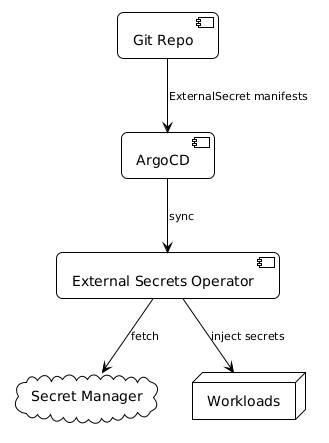
The GitOps secret pattern in one sentence

Git holds ExternalSecret manifests (just references, no values). ESO fetches values from your secret manager. ArgoCD syncs the manifests. Nothing sensitive ever touches your Git history.


How we approached it

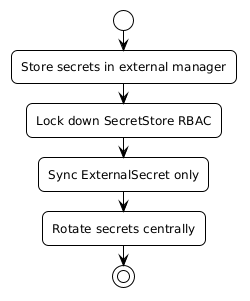
External secrets context External secrets context Guardrails flow Guardrails flow

Apply this: migrate the most sensitive secrets first

Don't try to migrate everything at once. Start with database credentials, API keys, and service account tokens — the things where a leak would be most damaging. Once those are working with ESO, the rest follows the same pattern. You'll also learn the rough edges of your specific secret manager integration on lower-stakes items first.


The secure pattern

  • Git holds ExternalSecret manifests only
  • ESO pulls from Vault/SSM/Secrets Manager
  • ArgoCD syncs manifests, ESO resolves secrets

The ExternalSecret is what lives in Git. It has no sensitive values — just a reference to the secret path in your secret manager and a description of which keys to extract. Anyone with repo access can see which secrets are in use without being able to read the values. That is your audit story.


Files worth opening

  • repo/gitops/secrets/secretstore.yaml
  • repo/gitops/secrets/externalsecret.yaml

The refresh interval gotcha

ESO's default refreshInterval is 1h. If you rotate a secret in your secret manager expecting it to propagate immediately, it won't — the running pod keeps the old value until the next refresh cycle. For secrets that rotate frequently or in response to incidents, set refreshInterval: 15m or shorter. For long-lived credentials, 1h is fine.


What changed in practice

Teams can ship GitOps changes without ever touching sensitive data. Security teams gain control without blocking delivery. ArgoCD diffs stay clean because the ExternalSecret manifest — not the generated Kubernetes Secret — is what ArgoCD compares. Secret rotation is completely invisible to ArgoCD; it happens in the secret manager and ESO picks it up on the next refresh.


Frequently asked questions

What secret managers does ESO support?

ESO supports AWS Secrets Manager, AWS SSM Parameter Store, Google Secret Manager, Azure Key Vault, HashiCorp Vault, 1Password, Kubernetes secrets, and a growing list of others. The SecretStore provider field controls which backend you use — switching backends requires only a SecretStore change, not a rewrite of your ExternalSecret manifests.

Does ArgoCD treat ExternalSecret manifests as out-of-sync when secrets rotate?

No — this is one of the key benefits. ArgoCD compares the ExternalSecret manifest in Git against the ExternalSecret resource in the cluster. If neither has changed, ArgoCD reports the app as synced even when ESO quietly updates the underlying Kubernetes Secret with a rotated value. No spurious diff noise.

Can I use ESO in a multi-cluster setup?

Yes. Use ClusterSecretStore (cluster-scoped) for stores accessed by multiple namespaces, or SecretStore (namespace-scoped) for tighter isolation. In a multi-cluster ArgoCD setup, deploy ESO to each cluster and point each cluster's ClusterSecretStore at the appropriate path in your secret manager for that environment.

How do I handle secrets that need to exist before ESO is installed?

Bootstrap secrets — the credentials ESO itself uses to authenticate to your secret manager — have a chicken-and-egg problem. Most teams handle this with a SealedSecret or direct kubectl create secret for the bootstrap credential only, then manage everything else via ESO. Document this exception explicitly so the next person understands why one secret bypasses the ESO pattern.

What happens if the secret manager is unreachable?

ESO will surface an error condition on the ExternalSecret resource and the Kubernetes Secret won't be updated. Pods already running continue using their existing secret values (mounted at pod start). New pods that haven't yet received the secret will fail to start. Monitor ExternalSecret status conditions and alert on SecretSyncError to catch connectivity issues before they become incidents.

Multi‑Cluster GitOps with ArgoCD: The Operational Blueprint

Banner image Banner image

Multi‑Cluster GitOps with ArgoCD: The Operational Blueprint

One cluster is manageable. Two is fine. Five is where things start getting interesting. Somewhere around ten, you're not managing Kubernetes anymore — you're managing the management of Kubernetes, and that's a different job entirely.

The pattern most teams fall into is depressingly predictable. You start with one ArgoCD instance, one cluster, everything works great. Then a new environment lands — staging needs to be production-like, a regional cluster gets spun up, a client needs isolation. Each new cluster gets a copy of the configuration from the last one, tweaked by hand. Promotions happen by copying YAML between directories and hoping nothing was missed. Six months in, you've got seven clusters and no real confidence they're running the same thing.

Config drift isn't a discipline problem. It's an architectural one. You need a model that makes consistency the default, not something you have to manually enforce.

GitOps as a Product: Building Self‑Service with ArgoCD

Banner image Banner image

GitOps as a Product: Building Self‑Service with ArgoCD

Every platform team reaches the same inflection point. The Kubernetes clusters are stable, GitOps is working, ArgoCD is syncing everything cleanly — and then a developer submits a ticket asking the platform team to onboard their new service. Then another. Then a queue forms.

You've built good infrastructure. But it's not a product yet. It's a service that requires the platform team to be in the loop for every new workload. That doesn't scale, and it creates exactly the kind of toil that drains platform engineers and slows down everyone else.

The fix isn't to work faster. It's to make onboarding something developers can do themselves — within guardrails the platform team controls.

How I Standardised Kubernetes Deployments with ArgoCD

Banner image Banner image

How I Standardised Kubernetes Deployments with ArgoCD


Why this exists

We had multiple teams shipping to multiple clusters, and every team invented their own deployment pattern. It worked - until it didn’t. Rollbacks were manual, promotions were inconsistent, and there was no single place to reason about “what is actually running.”

This post shows the approach we use to make deployments boring, repeatable, and traceable. It mixes a short narrative with a practical guide you can apply.


What we standardised on

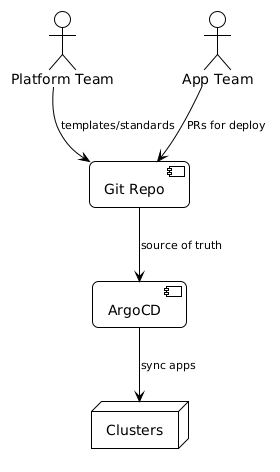
  • Single interface: everything deploys through ArgoCD Applications
  • Environment overlays: dev → staging → prod are explicit
  • Project + RBAC boundaries: no cross‑team bleed
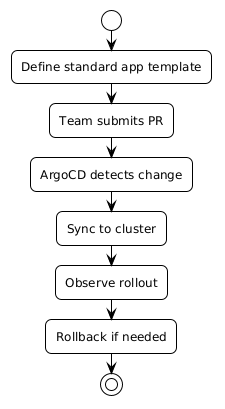
  • Promotion in Git: PRs and tags, not click‑ops
  • Consistent health + rollouts: same signals everywhere

Standardised context Standardised context Standardised flow Standardised flow


Architecture (repo + layout)

App-of-Apps is the structural foundation

The root App-of-Apps Application is the single highest-leverage change you can make. One ArgoCD Application manages the rest. New team apps get added to apps/workloads/ — ArgoCD detects the new entry and creates the child application automatically. No manual ArgoCD UI work needed.

We keep a platform apps repo with a root App‑of‑Apps and a consistent layout:

platform-apps/
  apps/
    root/                # app-of-apps
    workloads/           # team apps
  overlays/
    dev/
    staging/
    prod/

Root app example:

# repo/gitops/app-of-apps/root-app.yaml
apiVersion: argoproj.io/v1alpha1
kind: Application
metadata:
  name: platform-root
  namespace: argocd
spec:
  project: platform
  source:
    repoURL: https://github.com/polarpoint-io/platform-apps
    targetRevision: main
    path: apps
  destination:
    server: https://kubernetes.default.svc
    namespace: argocd
  syncPolicy:
    automated:
      prune: true
      selfHeal: true


1) ArgoCD Projects + RBAC (don’t skip)

Projects define where apps can deploy and who can touch them.

# repo/gitops/standardised/projects/platform-project.yaml
apiVersion: argoproj.io/v1alpha1
kind: AppProject
metadata:
  name: platform
  namespace: argocd
spec:
  sourceRepos:
    - https://github.com/polarpoint-io/platform-apps
  destinations:
    - namespace: platform-*
      server: https://kubernetes.default.svc
  roles:
    - name: team-readonly
      policies:
        - p, proj:platform:team-readonly, applications, get, platform/*, allow
    - name: team-admin
      policies:
        - p, proj:platform:team-admin, applications, *, platform/*, allow

Why it matters: without Projects, every app can deploy anywhere. That’s how drift becomes security incidents.


2) Environment overlays (dev/staging/prod)

Keep environment diffs explicit and small. Example values:

# repo/gitops/standardised/overlays/values-dev.yaml
replicaCount: 1
resources:
  limits:
    cpu: 200m
    memory: 256Mi
# repo/gitops/standardised/overlays/values-prod.yaml
replicaCount: 3
resources:
  limits:
    cpu: 1000m
    memory: 1Gi

Rule: if it can’t be expressed as an overlay, it doesn’t get deployed.


3) Promotion flow (Git, not clicks)

The click-ops promotion tell

If your promotion process involves someone running kubectl apply or clicking "sync" in the ArgoCD UI without a corresponding Git change, that promotion has no audit trail, no review, and no easy rollback. If you can't git log the promotion, it's click-ops. The ArgoCD app definitions in this post target branches and tags — promotions are commits.

We promote with branches/tags and ArgoCD Applications that point to them:

  • main → dev
  • release/* → staging
  • prod → production (protected)

Example dev/staging/prod apps:

# repo/gitops/standardised/promotion/argocd-app-dev.yaml
spec:
  source:
    targetRevision: main
    helm:
      valueFiles: [values-dev.yaml]

# repo/gitops/standardised/promotion/argocd-app-staging.yaml
spec:
  source:
    targetRevision: release/v1.2.3
    helm:
      valueFiles: [values-staging.yaml]
# repo/gitops/standardised/promotion/argocd-app-prod.yaml
spec:
  source:
    targetRevision: prod
    helm:
      valueFiles: [values-prod.yaml]

4) Health, rollouts, and sync order

We standardise sync waves and health checks so dependencies come up in order.

# repo/gitops/standardised/health/sync-waves.yaml
metadata:
  annotations:
    argocd.argoproj.io/sync-wave: "1"

Standard rules: - readiness/liveness probes on all deployments - consistent timeouts + retries - health overrides for CRDs if needed


Operational impact

  • Deployments are auditable Git changes
  • Rollbacks are a single commit revert
  • Drift is visible instead of hidden
  • Teams still ship fast - but on rails

Walkthrough files

Apply this: start with the App-of-Apps pattern

The single highest-leverage change you can make to an ad-hoc ArgoCD setup is introducing an App-of-Apps root. One ArgoCD Application manages the rest. New team apps get added to apps/workloads/ — no manual ArgoCD UI work. The root app detects the new directory entry and creates the child application automatically.

  • repo/gitops/app-of-apps/root-app.yaml
  • repo/gitops/standardised/projects/platform-project.yaml
  • repo/gitops/standardised/overlays/values-dev.yaml
  • repo/gitops/standardised/overlays/values-staging.yaml
  • repo/gitops/standardised/overlays/values-prod.yaml
  • repo/gitops/standardised/promotion/argocd-app-dev.yaml
  • repo/gitops/standardised/promotion/argocd-app-staging.yaml
  • repo/gitops/standardised/promotion/argocd-app-prod.yaml
  • repo/gitops/standardised/health/sync-waves.yaml

Frequently asked questions

How do you handle rollbacks in this setup?

Rollback is a Git revert. Update the targetRevision in the staging or prod ArgoCD Application to point to the previous good tag (release/v1.2.2 instead of release/v1.2.3), open a PR, merge. ArgoCD syncs to the reverted version. The entire rollback decision is in Git history.

What's the right sync wave number for dependencies vs workloads?

Common convention: infrastructure (CRDs, namespaces, secrets) at wave 0 or 1, platform services (cert-manager, ESO, ingress) at wave 2–5, workloads at wave 10+. Leave gaps between waves so you can insert new dependencies without renumbering everything. The exact numbers matter less than the relative ordering.

How do you enforce that teams use the standard overlay structure?

Kyverno policies or OPA gatekeeper rules that validate the presence of required Helm value files and reject Applications targeting non-standard paths. Combined with the Projects RBAC (teams can only deploy to their own namespaces), the structure is enforced at both the Git level (PR reviews) and the cluster level (policy engine).

Can you use Kustomize overlays instead of Helm values for environment differences?

Yes — Kustomize and Helm are both first-class in ArgoCD. The structure is the same: a base/ with the canonical manifest and overlays/dev/, overlays/staging/, overlays/prod/ directories with patches. The ArgoCD Application points to the overlay path for each environment. Choose whichever your team is more comfortable maintaining.

How do you track which version is actually running in production?

ArgoCD's UI and CLI show the current targetRevision and the git SHA of the last synced commit. For a more durable audit trail, add ArgoCD to your observability stack: the argocd_app_info metric includes revision labels. A Grafana dashboard showing current revision by app and environment gives you a fleet-wide deployment snapshot at a glance.

Demystifying Model Context Protocol (MCP): AI Gets Smarter About Context

Banner image Banner image

Ask an LLM to help you debug a Kubernetes incident. It does a decent job. Then, five minutes later, ask it a follow-up question — and watch it answer as if the previous conversation never happened.

That's not a bug in the model. That's the fundamental architectural problem with how most AI tools are wired up. Every prompt starts fresh. Decisions evaporate. Context has to be re-established from scratch every single time. At some point you stop thinking of the AI as a collaborator and start treating it like a very fast search engine that needs to be told the same things repeatedly.

Model Context Protocol (MCP) is the attempt to fix that. It's an open standard — originally proposed by Anthropic, now gaining adoption across the industry — that defines a common way for AI models and the tools around them to share, persist, and prioritise context. The goal is simple: make AI assistants behave less like stateless chatbots and more like reliable operators that actually remember what's going on.

Why you should use External Secrets Operator with ArgoCD

Banner image Banner image

Cloud‑native patterns: Why you should use External Secrets Operator with ArgoCD

There's a moment every GitOps team hits where someone asks the obvious question: "where do the secrets go?"

The rest of the configuration is in Git. It's version-controlled, reviewable, auditable. But you can't put secrets there. So they end up... somewhere else. Sometimes it's a manual kubectl create secret that nobody documents. Sometimes it's base64-encoded values tucked into Helm values files with a comment that says "TODO: fix this properly". Sometimes it's a mix of both, spread across three clusters, maintained by different people who've all developed their own workarounds.

External Secrets Operator (ESO) is the "fix this properly" solution. It connects ArgoCD's GitOps workflow to your secret manager of choice — AWS Secrets Manager, Google Secret Manager, HashiCorp Vault, Azure Key Vault — so secrets are pulled automatically at deploy time, never stored in Git, and rotated without touching your GitOps configuration.