There's a shift happening on GitHub that's easy to miss if you're filtering by star count alone.
The biggest numbers go to the obvious things — new model releases, ChatGPT wrappers, inference frameworks. But the interesting stuff is happening one layer up. People aren't just asking "which model should I use?" anymore. They're asking: how do I make an agent actually reliable? How do I give it the right skills, the right memory, the right coordination layer? And — increasingly — how do I make multiple agents talk to each other without it becoming a distributed systems nightmare?
These six repos are the honest answer to those questions right now. They span behavioural discipline, workflow methodology, persistence and memory, multi-agent orchestration, knowledge-aware agents, and the open protocol that lets agents from different vendors coordinate without anyone owning the bus. Between them, they've accumulated well over 400,000 GitHub stars in 2026.
The number that changes how you think about the agent stack
Skills, memory, and coordination — not the model itself — account for the biggest performance gaps between production agent systems in 2026. The harness matters more than the model.
Let me walk through each one, what it actually does, and why it matters if you're building or operating AI agents at any scale.
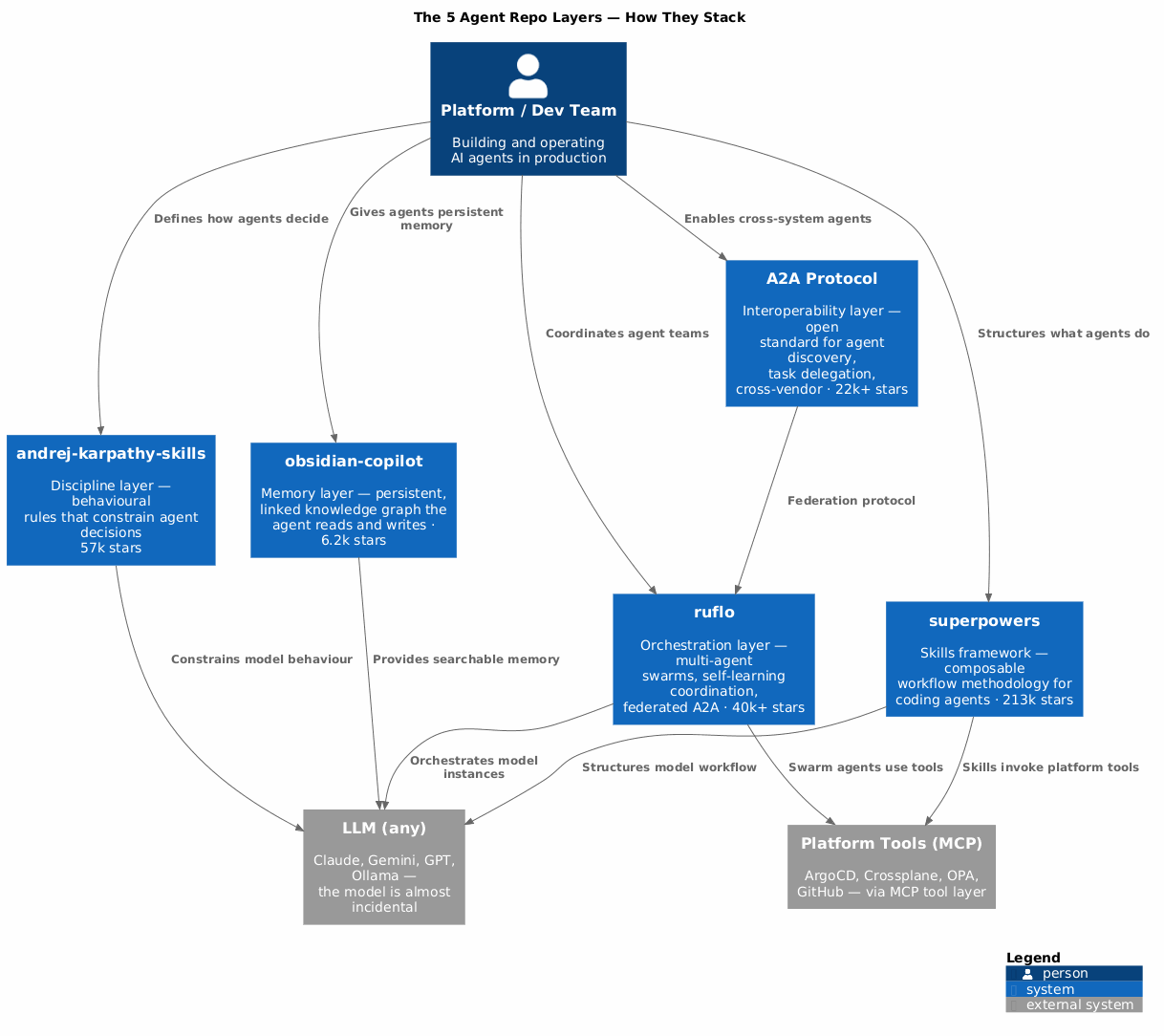
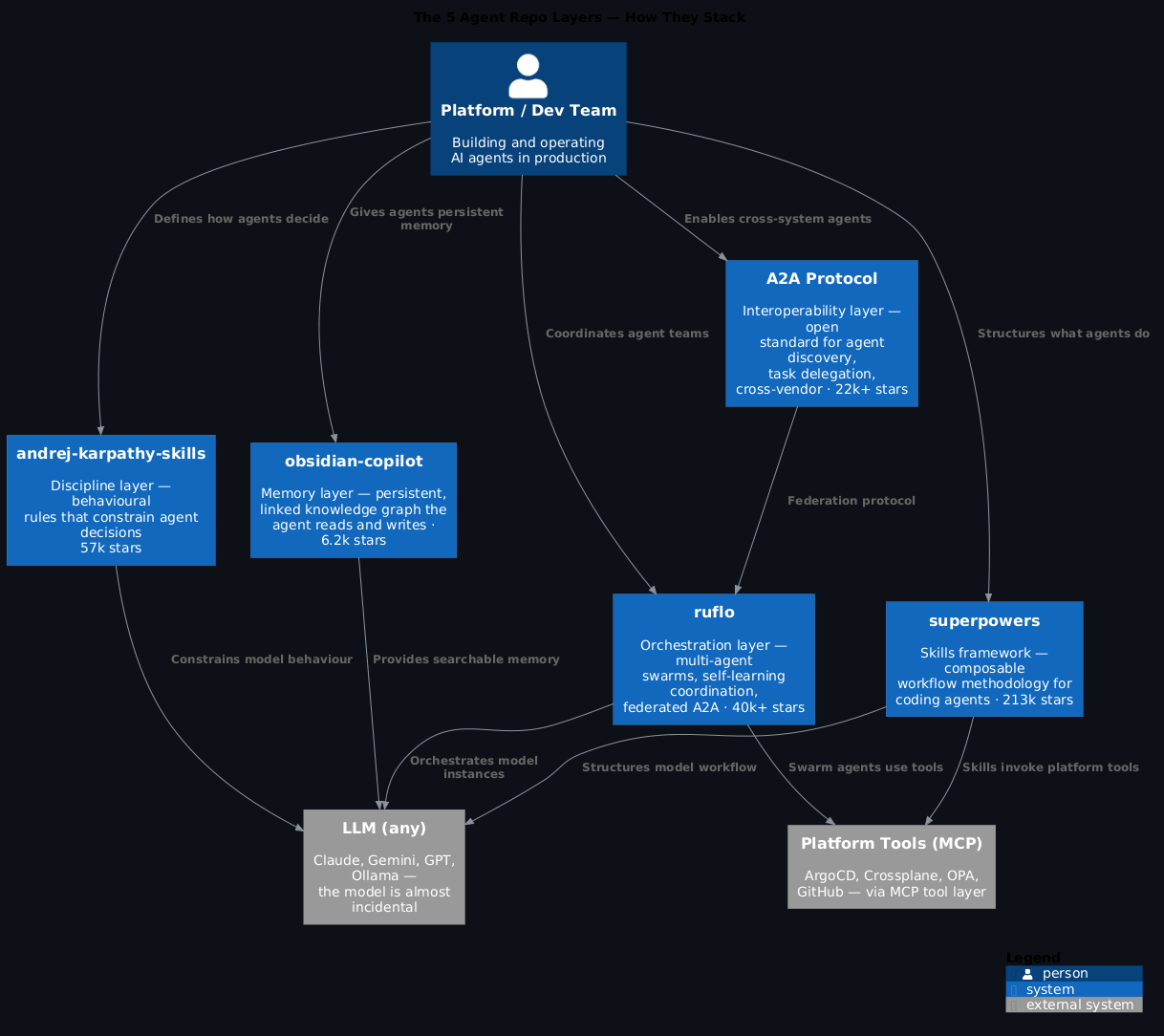
Before we get into the individual repos, it's worth seeing the whole picture. These aren't six unrelated tools — they represent distinct layers of the agent stack.
Karpathy's skills repo is the discipline layer: the behavioural rules that stop an agent from going off-script. Superpowers is the methodology layer: composable skills that give your coding agent a complete software development workflow. Everything Claude Code is the persistence layer: the memory, project context, and domain-specific agents that survive between sessions. Ruflo is the orchestration layer: coordinating multiple agents so they work as a team rather than independently. Obsidian Copilot is the knowledge layer: giving an agent access to structured, personal knowledge rather than just context window scraps. And A2A is the interoperability layer: the protocol that lets agents from different vendors and systems actually talk to each other.
Stack them in that order and you've got something close to a complete production agent architecture.
57k stars · multica-ai/andrej-karpathy-skills
There's a repo on GitHub with a single file in it.
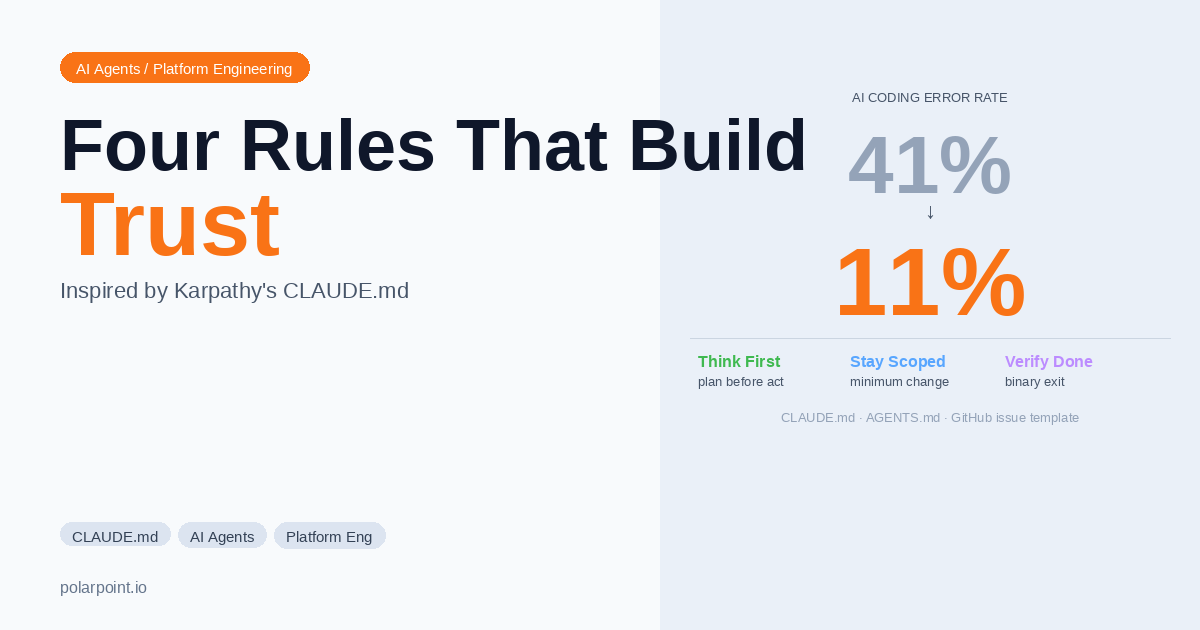
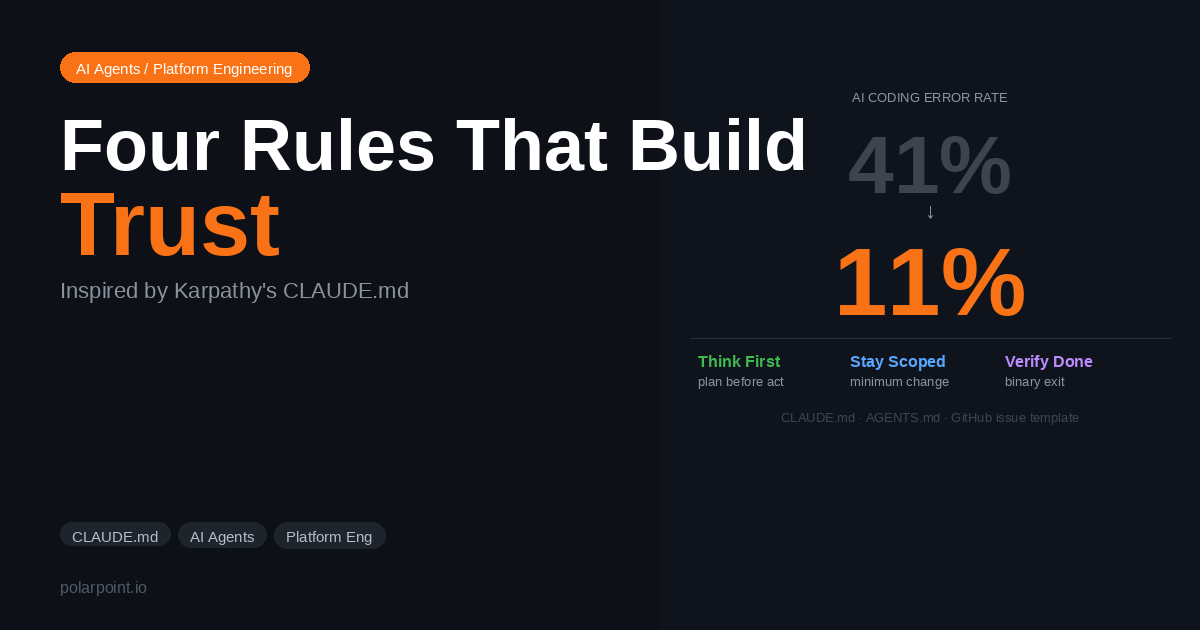
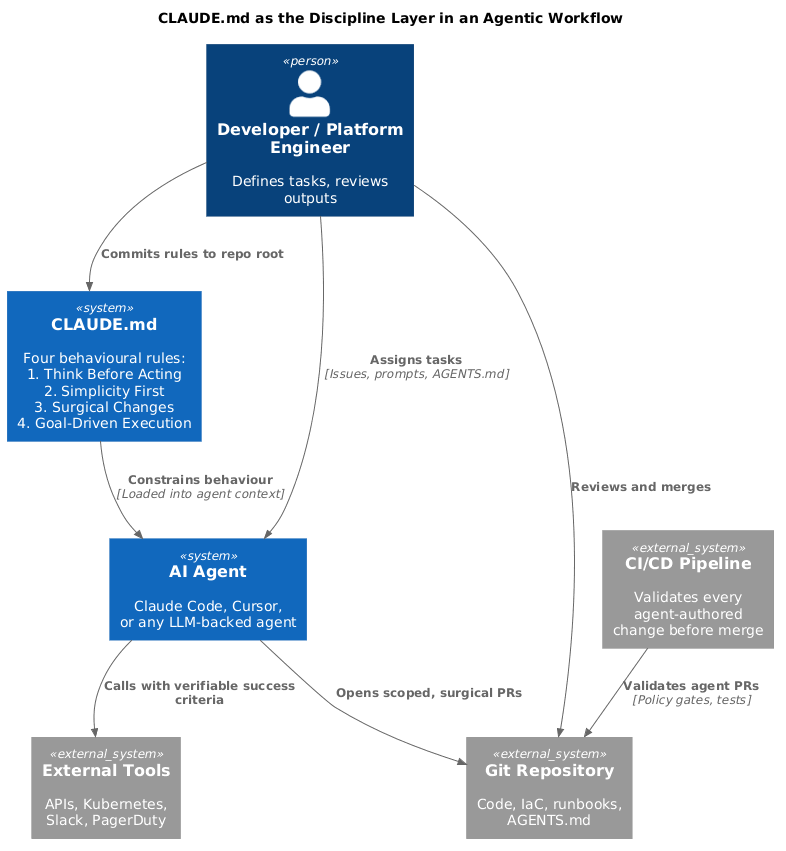
No framework. No library. Just a CLAUDE.md — 65 lines of behavioural rules for AI coding agents, written by Andrej Karpathy and refined by thousands of contributors. It held the #1 spot on GitHub Trending for 28 consecutive days. If you haven't read it, stop here and go read it. It takes four minutes.
The four rules are deceptively simple. Think before coding — don't assume, surface tradeoffs, ask if uncertain. Simplicity first — minimum code that solves the problem, nothing speculative. Surgical changes — touch only what you must, every changed line traces to the user's request. Goal-driven execution — transform tasks into verifiable goals with binary exit conditions so agents can loop independently without constant clarification.
These rules exist because language models, by default, do the opposite of all four. They expand scope. They add "helpful" features. They refactor adjacent code. They continue trying variations when they should stop and ask. CLAUDE.md is the specific counter-force.
What this means for platform agents
Every agent you deploy against production infrastructure needs a version of this. Not the generic file — a version extended for your stack: blast radius awareness, approval tiers, what to touch and what to leave alone. The ai-capabilities repo has a ready-to-extend platform engineering version at templates/CLAUDE.md.
The 65-line file that reduced AI coding mistakes from 41% to 11% isn't magic. It's just the specific constraints that correct for how models behave by default. That's the whole insight.
213k stars · obra/superpowers
Superpowers is what happens when you take the CLAUDE.md idea and build a full methodology around it.
Jesse Vincent built it as a composable skills framework for coding agents — but "skills framework" undersells what it actually is. Superpowers is a complete software development workflow encoded as skills that trigger automatically. The agent doesn't wait for you to invoke them. It checks for relevant skills before any task and applies them as mandatory workflows, not suggestions.
Here's the flow. When you give the agent a task, it doesn't jump into writing code. It runs the brainstorming skill first — asking questions, exploring alternatives, presenting a design in digestible chunks for your sign-off. Once you approve, writing-plans kicks in and breaks the work into bite-sized tasks, each with exact file paths, complete code, and verification steps. Then subagent-driven-development dispatches fresh subagents per task with a two-stage review (spec compliance, then code quality) after each one. Test-driven development is enforced throughout. The finishing-a-development-branch skill handles merge decisions and cleanup.
What makes it genuinely different: it works across every major coding agent. Claude Code, Codex, Gemini CLI, Cursor, Copilot — Superpowers installs as a plugin in each harness. The skills are harness-agnostic, which means your team can use whatever agent they prefer without forking your workflow conventions.
The subagent pattern
The subagent-driven-development skill is the one worth understanding in detail. Each task gets a fresh agent with no accumulated context from previous tasks — this is intentional. Accumulated context leads to cascading assumptions. Fresh agents stay on-spec. The two-stage review (does it match the plan? is the code quality acceptable?) happens before the next task starts. This is how Superpowers enables hours of autonomous work without deviation.
The skills library covers testing (red-green-refactor TDD enforced, not suggested), debugging (4-phase root cause process), collaboration (brainstorming, planning, parallel agents, code review in both directions), and meta skills like writing-skills for extending the framework. It's a methodology, not a tool.
40k+ stars · ruvnet/ruflo
Ruflo answers a question that Superpowers doesn't: what happens when you need multiple agents working in parallel, coordinating across tasks, sharing memory, and — in the latest versions — federating across machines?
Built by Reuven Cohen, Ruflo started as an orchestration layer on top of Claude Code but has grown into something more general. It deploys agents as coordinated swarms with a self-learning memory layer that routes tasks, learns from successful patterns, and coordinates agents in the background. The latest v3.6 release adds agent federation: two or more Ruflo instances on different machines can communicate without exposing data — which starts to look a lot like proper A2A before the A2A protocol spec existed.
The numbers are striking. 84.8% solve rate on SWE-bench. 75% API cost reduction compared to using Claude Code directly. More than 40,000 stars and 6,000 commits. It's not a toy.
The A2A connection
Ruflo's federation model and the A2A protocol (repo #5) are solving the same problem from different directions. Ruflo builds coordination into the orchestration layer. A2A standardises the protocol so agents from different systems can coordinate. If you're building multi-agent infrastructure, you'll want both: Ruflo for internal coordination, A2A for cross-system interoperability. They're complementary, not competing.
For platform teams, Ruflo is the answer to "we want agents handling multiple concurrent infrastructure tasks without them conflicting." Drift detection, resource provisioning, incident triage — these don't have to run sequentially. With Ruflo's swarm model, they can run in parallel with explicit coordination. The self-learning hooks mean the orchestration improves over time without manual intervention.
6.2k stars · logancyang/obsidian-copilot
This one has the smallest star count of the six. It's also the most underrated.
Obsidian Copilot is an AI agent that lives inside your Obsidian vault — the note-taking tool built on linked markdown files. But the interesting thing isn't the interface. It's what the vault becomes when you wire an agent into it: a structured, persistent, inspectable knowledge graph that the agent can read, write, and reason over.
Most agent memory is ephemeral — the context window fills up and older context falls off. What you end up with in practice is agents that know a lot right now and nothing next session. Obsidian Copilot flips this. The vault is the memory. The agent reads notes, writes notes, follows links between notes, and builds up a knowledge base that persists across every session and is completely transparent to you in plain markdown.
The agentic features have grown significantly in 2026: vault search, web search, YouTube summarisation, a Composer V2 with precise in-file editing tools, and long-term memory as an explicit tool the agent can use starting from v3.1.0. There's even a planned Obsidian CLI integration that will give the agent desktop-level vault operations.
Why the knowledge graph matters for agents
Context window management is one of the hardest problems in practical agent design. If the agent can only work with what fits in the window, you're constantly curating what to include and what to drop. If the agent has a searchable, linked knowledge graph it can query at will, the curation problem shrinks dramatically. The agent asks for what it needs rather than being given everything upfront. That's a fundamentally more scalable pattern.
For knowledge workers, researchers, and anyone who thinks in connected notes rather than linear documents, this is the agent that actually fits the way their work is organised. And for platform teams: if your runbooks, ADRs, and internal documentation live in a linked knowledge base, this pattern scales directly.
22k+ stars · a2aproject/A2A
The other five repos solve problems within a single agent system. A2A solves the problem between systems.
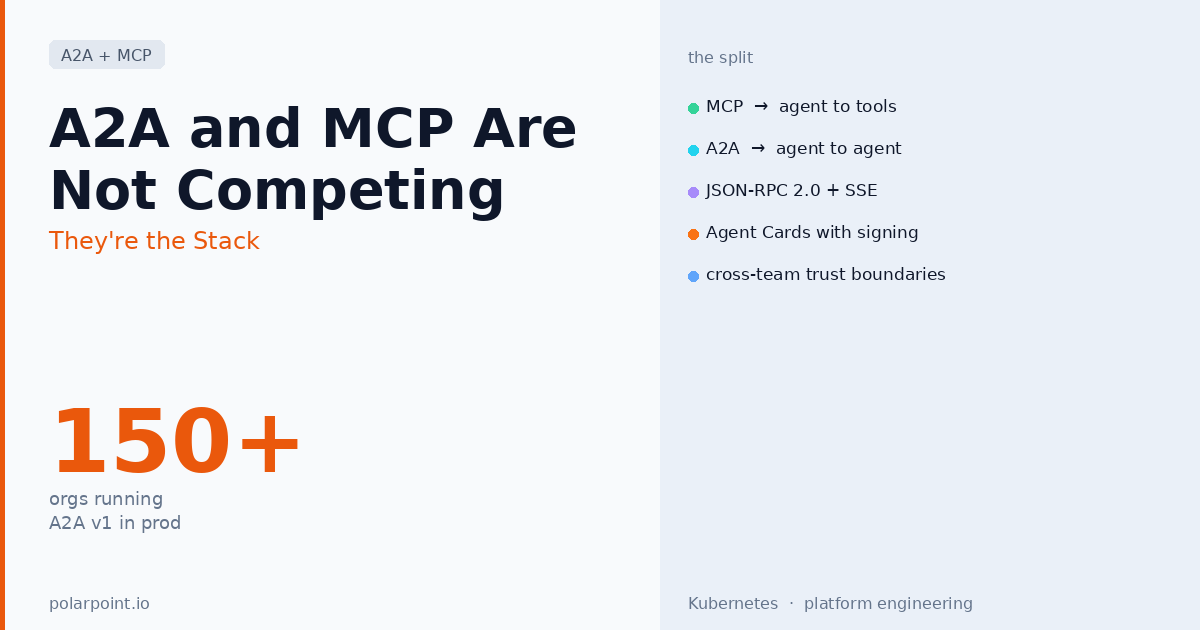
A2A — Agent-to-Agent — is an open protocol, originally contributed by Google and now hosted by the Linux Foundation, that lets AI agents built by different vendors discover each other, delegate tasks, and coordinate work without a shared codebase or a vendor-owned message bus. As of April 2026, it's in active production use at more than 150 organisations.
The protocol works through an Agent Card — a JSON manifest that an agent publishes describing its capabilities, input schemas, and authentication requirements. Any A2A-compatible agent can discover another agent's card, understand what it can do, and delegate tasks to it using a standardised lifecycle: task creation, execution, progress streaming, and completion or failure handling. The delegating agent doesn't need to know anything about the implementation on the other side.
Think about what this enables. Your ArgoCD-aware agent can delegate to a Crossplane provisioning agent without you building a custom integration between them. Your incident triage agent can delegate a policy check to an OPA agent from a completely different team. Vendor-built agents (GitHub Copilot, Claude, Gemini) can participate in the same workflow as your internal agents. No custom APIs, no bespoke message formats, no vendor lock-in.
A2A and MCP are different things
This comes up constantly. MCP (Model Context Protocol) connects an agent to tools — APIs, databases, functions it can call. A2A connects an agent to other agents — delegates tasks to systems that have their own reasoning, their own models, their own tool access. You'll likely use both: MCP to give your agents platform tooling access, A2A to let those agents coordinate with agents in other systems.
For platform teams, A2A is the protocol you adopt before you need it, not after. Once you have multiple agent systems — which happens faster than you'd expect — retrofitting coordination is painful. Designing your agent interfaces as A2A-compatible from the start means your internal agents can interoperate with vendor agents, partner systems, and future tools you haven't built yet.
~100K stars · affaan-m/everything-claude-code
Claude Code has one glaring problem: it forgets everything between sessions. Team conventions, project-specific patterns, architectural decisions you've made — gone when you close the terminal. Superpowers gives you the workflow discipline. But discipline doesn't help if the agent doesn't know what your codebase is, what your team standards are, or what you've already decided.
Everything Claude Code (ECC) is the fix. Created by Affaan Mustafa after winning an Anthropic hackathon in September 2025, it layers a structured memory system, 30 specialised agents, 136 skills, 60 slash commands, and automated hook workflows on top of the base Claude Code agent. The v1.9.0 release in March 2026 added a selective-install architecture (you pull only the agents and skills you actually need) and support for 12 language ecosystems.
The key mechanism is a persistent memory layer that stores team conventions, project context, security scan results, and previous session outputs in structured files. When you start a new Claude Code session, ECC pre-loads the relevant context automatically. The agent walks in knowing what the project is, what patterns to follow, and what decisions have already been made.
The 30 agents aren't generic. There's a security agent that runs automated scanning before every commit, a documentation agent that keeps internal docs in sync with code changes, performance optimisation agents for specific language ecosystems, and architecture review agents that check new code against your documented patterns. You install the ones that match your stack.
ECC + Superpowers is the combination most teams end up at
Superpowers gives the workflow structure (the how: brainstorm before building, fresh subagents per task, spec compliance review). ECC gives the persistent context (the what: your project's conventions, your team's decisions, your codebase's patterns). They're complementary, not competing. Most mature Claude Code setups run both.
Why it hit 100K stars: Because the memory problem is universal. Every team using Claude Code hits the same wall — the agent is great in session one and increasingly unreliable by session three because it keeps re-deriving decisions you've already made. ECC solves that at the framework level rather than making every engineer manually curate context at the start of every session.
The platform engineering angle: ECC ships a dedicated infrastructure agent that understands IaC patterns, Kubernetes manifests, and CI/CD workflows. Pair it with the Karpathy rules and your platform-specific CLAUDE.md extensions, and you've got a coding agent that stays on-pattern across the entire team — not just in the sessions where someone manually explains your conventions.
Look at what these six repos have in common.
All of them treat the agent's environment as more important than the model. Karpathy's rules constrain behaviour. Superpowers provides structure. Ruflo manages coordination. Obsidian Copilot provides persistent memory. A2A defines the interface. None of them are about which LLM you use. The model is almost incidental.
That's the real shift in 2026. Twelve months ago, most of the GitHub activity was about models and inference. Now it's about the layer that wraps the model — the skills, the memory, the coordination, the protocol. The harness is the product.
If you're building an internal developer platform and you're thinking about where AI fits into it, these six repos show you the architectural vocabulary. Discipline layer, skills framework, orchestration layer, memory layer, interoperability protocol, persistence layer. Each one solves a distinct problem. Together they describe what a production-grade AI agent stack actually looks like.
The architecture talk is useful, but let's get concrete. Here are five real workflows — one per role — that show how these repos translate into things people actually need to get done. None of these require you to be an engineer.
You're a product owner. You've got a rough idea, a few customer interviews, and a half-finished Miro board. You need a proper PRD before the sprint planning session tomorrow.
This is where Obsidian Copilot earns its place. Your vault already has your interview notes, your competitor research, your previous PRD templates. You ask the agent to draft a PRD for the new feature. It searches the vault for related context — past decisions, open questions from previous planning, what the engineering team flagged as constraints last quarter. It pulls that in automatically rather than you curating it by hand.
Then Superpowers' brainstorming skill kicks in — the agent asks clarifying questions before it writes a single sentence. What's the user problem? What are the constraints? What does success look like in 90 days? You answer, it validates your understanding back, you approve the shape of it. Then it writes. The output follows your vault's PRD template (because that template is already in there as a note), includes links back to the source interviews, and flags three open questions it couldn't answer from existing context.
The Obsidian vault as your second brain
The difference between a generic AI-generated PRD and one that's actually useful is context — your product history, your team's constraints, your customers' words. Obsidian Copilot pulls that in from your vault automatically. The richer your vault, the better the output. This is why the memory layer is the most underrated part of the stack.
You've got a ticket. It's well-specified — scope, acceptance criteria, which files are in and out of bounds. You fire up your coding agent with Superpowers installed.
The agent doesn't jump into writing code. brainstorming activates first — it restates the spec back to you, flags two ambiguities it noticed, and proposes a design in chunks short enough to actually read. You approve. using-git-worktrees creates an isolated branch so this work can't bleed into anything else running in parallel. writing-plans breaks the implementation into 2–5 minute tasks, each with exact file paths and verification steps. Then subagent-driven-development dispatches fresh subagents per task, reviews each one before moving to the next, and runs test-driven-development throughout.
Two hours later you have a PR with a clean diff, a description that echoes the spec, and every changed line traceable to a specific sentence in the ticket. finishing-a-development-branch handles the merge decision and cleans up the worktree.
Why this beats just asking the agent to implement the ticket
The difference is the structure. Without Superpowers, an agent will implement the ticket — and it'll probably overreach, make assumptions, and produce a diff nobody wants to review carefully. With Superpowers, the workflow enforces the planning step, the scope constraint, and the verification before you see any output. The agent did two hours of work, but the result reads like a careful engineer did it.
You need to run drift detection across three clusters, provision a new namespace for the data team, and rotate credentials — all while keeping those agents from stepping on each other.
This is the Ruflo use case. You configure a swarm: three agents with explicit task ownership, coordination hooks that prevent conflicting writes, and a shared memory layer that routes tasks based on learned patterns from previous runs. The drift agent checks cluster state against Git and opens targeted fix PRs. The provisioning agent creates the namespace and wires it up via Crossplane. The credential rotation agent runs against your secrets manager. All in parallel. All isolated. All feeding back into the same coordination layer.
When a task completes or fails, Ruflo's hooks route the result to the right place — a Slack notification, a PR, a follow-up task. You watch the summary rather than babysitting three terminal windows.
Add A2A to the mix
If your credential rotation agent is a vendor-built security tool rather than something you wrote, A2A is how you wire it in without building a custom integration. Publish an Agent Card for your Ruflo swarm. The vendor agent discovers it, delegates the rotation task via the standardised A2A lifecycle, and reports back. No custom API, no bespoke message format.
You're tracking a fast-moving research area — say, agent memory architectures, or the regulatory landscape for AI in healthcare. You need something that stays current, not a one-shot document that's stale in three weeks.
Obsidian Copilot + a web search tool gives you a living review. You set up a note structure in your vault: a hub note for the topic, linked notes per paper or source, a synthesis note that the agent updates as new material comes in. When you ask the agent to add a new paper, it reads the paper, checks your existing notes for related work, updates the synthesis note with the new finding, and flags any contradictions with what's already there.
The vault becomes a knowledge graph the agent actively maintains. You read and edit in Obsidian. The agent does the indexing and synthesis. After a month, you have a structured, cross-linked literature review that an agent can query to answer specific questions — rather than a folder of PDFs nobody can find anything in.
This pattern scales beyond research
Legal teams tracking case law. Finance teams following regulatory changes. Marketing teams watching competitor moves. Any domain where you're accumulating knowledge over time and need to reason over it later fits this pattern. The knowledge graph is the product; the agent is the librarian.
You've got a GitHub Copilot deployment for your dev team, an internal Claude-based triage agent for incidents, and a security scanning agent your vendor provides. Right now they don't talk to each other. When an incident involves a code change, someone manually bridges the three systems.
A2A is how you fix this. Each system publishes an Agent Card describing what it can do. Your incident triage agent discovers the GitHub Copilot agent's card, delegates the "find the commit that introduced this regression" task to it via standard A2A task lifecycle, waits for the result, then hands that to the security agent to check for CVEs. The whole chain runs on a standard protocol — no custom webhooks, no shared API keys, no bespoke integration code between each pair.
The agents are from three different vendors. They run on three different infrastructures. They coordinate as if they were one system.
Start with the Agent Card, not the integration
The instinct when you want two systems to talk is to build a custom integration. Resist it. If either system is A2A-compatible (or can be made A2A-compatible), publishing an Agent Card is a fraction of the work and gives you a reusable interface for every future integration. Design the interface once; every A2A-compatible agent gets it for free.
Do these all only work with Claude?
No. Karpathy's CLAUDE.md works with any coding agent that reads context files (most of them do). Superpowers explicitly supports Claude Code, Codex, Gemini CLI, Cursor, and Copilot. Ruflo started as Claude-focused but the orchestration patterns are increasingly general. Obsidian Copilot supports any OpenAI-compatible API backend, including Ollama for local models. A2A is explicitly vendor-agnostic — it was designed from the start to work across any agent system.
Is A2A ready for production?
Yes, with caveats. The protocol is stable and in use at 150+ organisations. The implementation quality varies by vendor. Check which A2A versions your chosen agent runtimes support before designing your coordination architecture around specific features. The spec is evolving — the Linux Foundation governance means it moves more deliberately than a single-vendor standard would.
How does Superpowers relate to CLAUDE.md?
CLAUDE.md is the behavioural layer — it defines how an agent should make decisions. Superpowers is the workflow layer — it defines what steps an agent follows to get work done. They're complementary. Superpowers actually ships its own CLAUDE.md and AGENTS.md as part of the framework. You'd typically use both together: CLAUDE.md for the "how do I decide" layer, Superpowers skills for the "what do I do next" layer.
Can I use Ruflo with agents other than Claude?
The core orchestration concepts translate, but Ruflo's current implementation is tightest with Claude Code and Codex. Federation via A2A is the cleaner path if you need cross-vendor agent coordination — that's what A2A was designed for.
Where does MCP fit in this picture?
MCP gives agents their tools — the ability to call APIs, query databases, run commands. These six repos build the layer above that: how agents behave, coordinate, remember, and interoperate. You'll want MCP for the tool access layer and these repos for everything that sits on top of it.
If you're building agent workflows from scratch, start with Karpathy's CLAUDE.md as your discipline foundation, then layer Superpowers on top for workflow structure. If you're moving to multi-agent systems, Ruflo gives you internal coordination today; add A2A compatibility as you build external interfaces. If memory and knowledge management is your constraint, Obsidian Copilot shows you the pattern even if you implement it differently.
The six repos together describe the problem space. The right starting point depends on which layer is your current bottleneck.
These frameworks aren't all equally compatible with every coding assistant. Here's where each one lands across the four most popular tools — so you know what you're getting before you commit to an integration.
| Repo |
Claude Code |
GitHub Copilot |
Cursor |
Windsurf |
| andrej-karpathy-skills |
✅ Native — CLAUDE.md is its home |
⚠️ Adapt content to Copilot custom instructions |
✅ Port to .cursorrules |
✅ Port to .windsurfrules |
| superpowers |
✅ Native Anthropic marketplace plugin |
✅ Copilot CLI harness (v5.0+) |
✅ .cursor-plugin/ harness |
⚠️ No official harness yet — use .windsurfrules manually |
| everything-claude-code |
✅ Native (built specifically for Claude Code) |
❌ Claude Code–specific hooks and memory system |
✅ Supported (skills and slash commands port across) |
⚠️ Partial — skills work, hook workflows don't |
| ruflo |
✅ Native (built for Claude Code first) |
❌ Copilot lacks the agent orchestration model Ruflo needs¹ |
✅ Supported |
✅ Supported |
| obsidian-copilot |
➖ Obsidian plugin — IDE-agnostic |
➖ Obsidian plugin — IDE-agnostic |
➖ Obsidian plugin — IDE-agnostic |
➖ Obsidian plugin — IDE-agnostic |
| A2A |
⚠️ Participate as protocol client via custom wiring |
✅ GitHub/Microsoft are A2A contributors; Copilot agent supports it |
⚠️ Participate as protocol client |
⚠️ Participate as protocol client |
Key: ✅ Official integration or native support · ⚠️ Works with manual adaptation · ❌ Not compatible · ➖ Not applicable (tool operates independently of your IDE)
A few notes worth highlighting:
Superpowers is the standout for multi-tool teams — it's the only framework here with explicit multi-harness support baked in. The same skills folder works across Claude Code, Cursor, Codex, and Copilot CLI with no content duplication. If half your team uses Cursor and half use Claude Code, Superpowers is the only framework on this list that doesn't force you to maintain separate skill sets.
ECC is the most Claude Code–specific repo of the six. The hook system that drives its memory and automated scanning is tightly coupled to Claude Code's plugin architecture. You get the most out of it with Claude Code; the skills and slash commands translate to Cursor reasonably well, but you lose the persistence and hook automation.
¹ Ruflo for Copilot users: The structural gap is real — Ruflo's swarm orchestration requires persistent background coordination that Copilot's current architecture doesn't expose. If you're on Copilot and need multi-agent orchestration, the closest alternatives are GitHub Copilot Workspace (Microsoft's own built-in multi-step agent, limited but native) or OpenHands (formerly OpenDevin — model-agnostic, runs against any OpenAI-compatible backend so it can coordinate the same underlying GPT-4o models Copilot uses). Ruflo itself also now supports multi-model via its web UI (OpenAI, Gemini, Qwen), so running Ruflo with GPT-4o directly — outside of Copilot's IDE integration — is a workable path for teams that need the orchestration capability.
The Obsidian Copilot row isn't a weakness — it's a feature. The knowledge graph pattern is IDE-independent because it lives entirely outside your IDE. Your vault is your memory layer regardless of what coding tool you're using that day.
All of these repos are worth starring and tracking. The specific files to read first:
For the platform engineering versions of CLAUDE.md and AGENTS.md — extended with blast radius awareness, approval tiers, and audit trail requirements — see the ai-capabilities repo. And for the day-to-day setup that puts these repos to work — the context budget, the plugins to skip, the token discipline — see Claude Code for Platform Engineers.